# Hướng dẫn xóa một công việc

## 1. Thao tác trên Web

### 1.1. Hướng dẫn xóa một công việc

**Bước 1:** Từ menu **WORK** -> chọn **Danh sách công việc (Task)**

<figure><img src="https://1934075284-files.gitbook.io/~/files/v0/b/gitbook-x-prod.appspot.com/o/spaces%2FSgjp5pKuJrPSuYtLZvBs%2Fuploads%2FB8R1Na6nOVuWBJGXVIS2%2Fimage.png?alt=media&#x26;token=dd127896-addd-4c19-a3af-a7e058aa88c6" alt=""><figcaption><p>Giao diện chức năng danh sách công việc <strong>(Task)</strong></p></figcaption></figure>

**Bước 2:** Từ giao diện công việc chọn công việc cần xóa

<figure><img src="https://1934075284-files.gitbook.io/~/files/v0/b/gitbook-x-prod.appspot.com/o/spaces%2FSgjp5pKuJrPSuYtLZvBs%2Fuploads%2FhQCDt1MmE8zHBhssq7Ds%2Fimage.png?alt=media&#x26;token=e65f27a1-3706-4928-83f3-ca9aa826642e" alt=""><figcaption><p>Giao diện danh sách công việc trên Web</p></figcaption></figure>

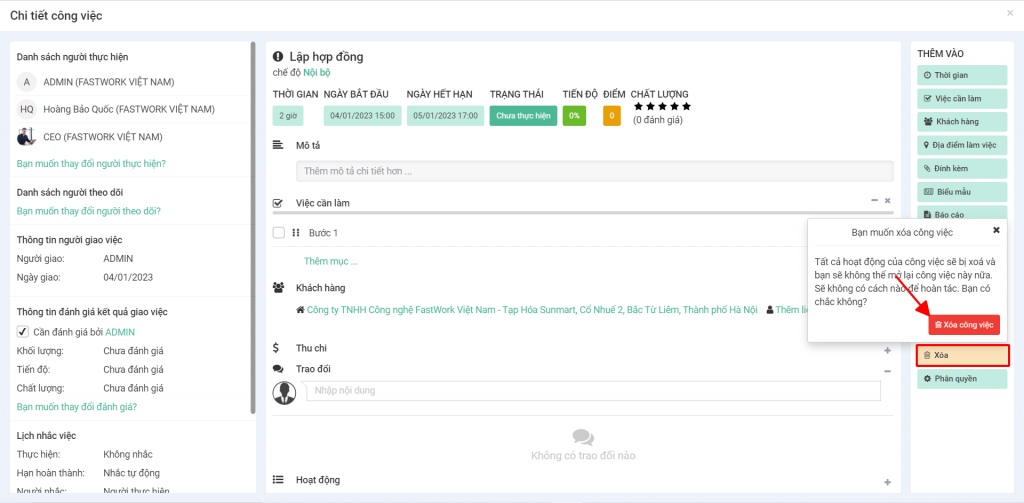
**Bước 3:** Chọn **"Xóa"** và xác nhận xóa công việc

<figure><img src="https://1934075284-files.gitbook.io/~/files/v0/b/gitbook-x-prod.appspot.com/o/spaces%2FSgjp5pKuJrPSuYtLZvBs%2Fuploads%2F2Ym4k6Hct6PrcxK5FtMQ%2Fimage.png?alt=media&#x26;token=1b3b6bc2-f7e2-4c25-8d34-d093c1466960" alt=""><figcaption><p>Giao diện chi tiết công việc trên Web</p></figcaption></figure>

### 1.2. Hướng dẫn xóa nhiều công việc

[Tại đây](https://help.fastwork.vn/fastwork-help-center/huong-dan-s-dung-chi-tiet/fastwork-work/fastwork-workplace/huong-dan-thao-tac-nhanh-tren-nhieu-cong-viec#id-5.-huong-dan-xoa-nhieu-cong-viec)

## 2. Thao tác trên Mobile

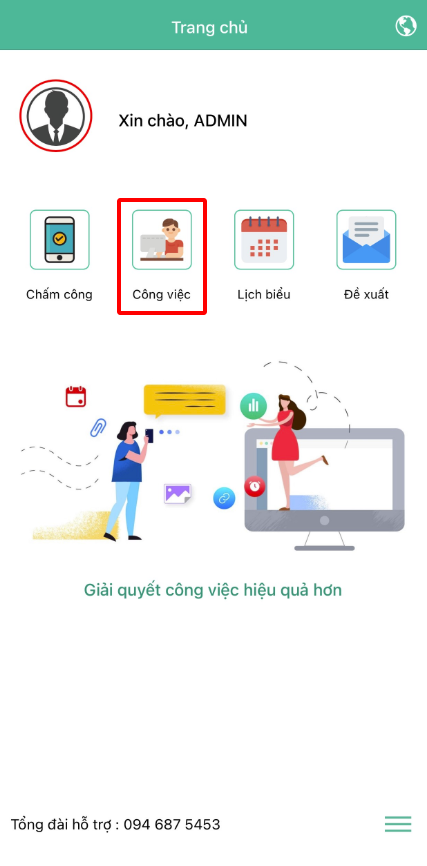
**Bước 1:** Tại giao diện chính chọn **Công việc**

<figure><img src="https://1934075284-files.gitbook.io/~/files/v0/b/gitbook-x-prod.appspot.com/o/spaces%2FSgjp5pKuJrPSuYtLZvBs%2Fuploads%2FUrp1EWMHpdFHvFpl9KPy%2Fimage.png?alt=media&#x26;token=ebd1f17c-4b5f-4294-8953-d41dcfb84980" alt="" width="214"><figcaption><p>Giao diện chính trên Mobile</p></figcaption></figure>

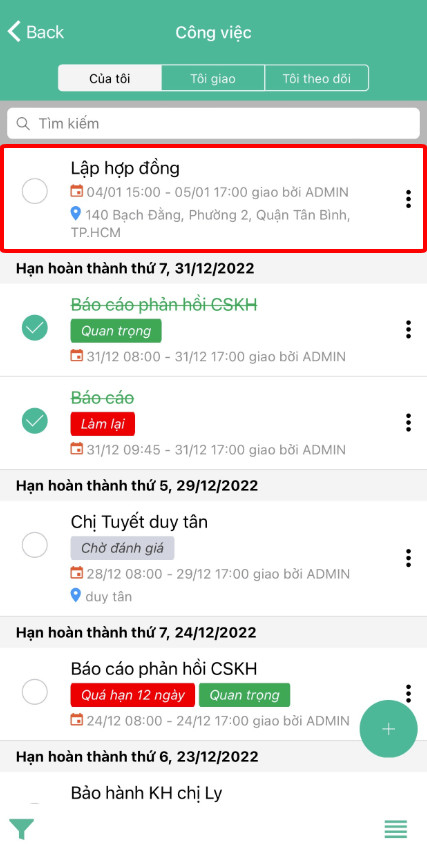
**Bước 2:** Chọn công việc cần xóa

<figure><img src="https://1934075284-files.gitbook.io/~/files/v0/b/gitbook-x-prod.appspot.com/o/spaces%2FSgjp5pKuJrPSuYtLZvBs%2Fuploads%2Fvk4oNwGooz1n4uIs00p2%2Fimage.png?alt=media&#x26;token=d2fb96d4-a22f-4c3f-b705-ccc91137a109" alt="" width="214"><figcaption><p>Giao diện danh sách công việc trên Mobile</p></figcaption></figure>

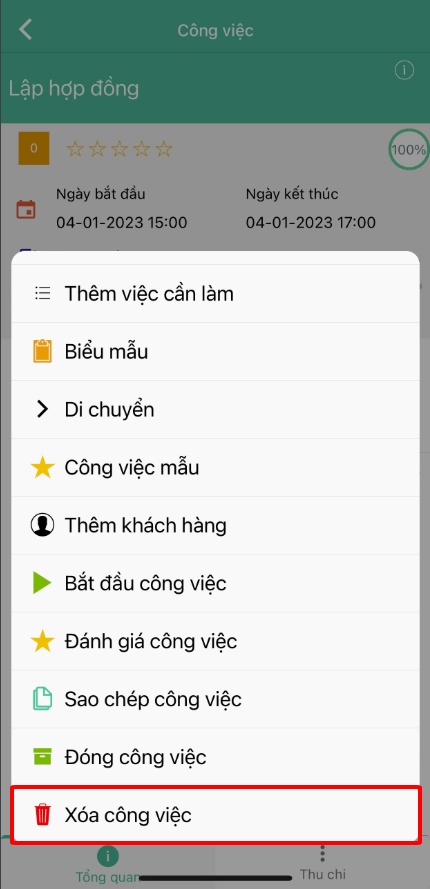
**Bước 3:** Chọn **dấu (+)** ở góc dưới màn hình -> chọn **Xóa công việc**

<figure><img src="https://1934075284-files.gitbook.io/~/files/v0/b/gitbook-x-prod.appspot.com/o/spaces%2FSgjp5pKuJrPSuYtLZvBs%2Fuploads%2FdN52RLTqdMjubOFsJnGk%2Fimage.png?alt=media&#x26;token=4b50f5d0-809f-40d6-9c52-649f48074bc6" alt="" width="215"><figcaption><p>Giao diện chi tiết công việc trên Mobile</p></figcaption></figure>

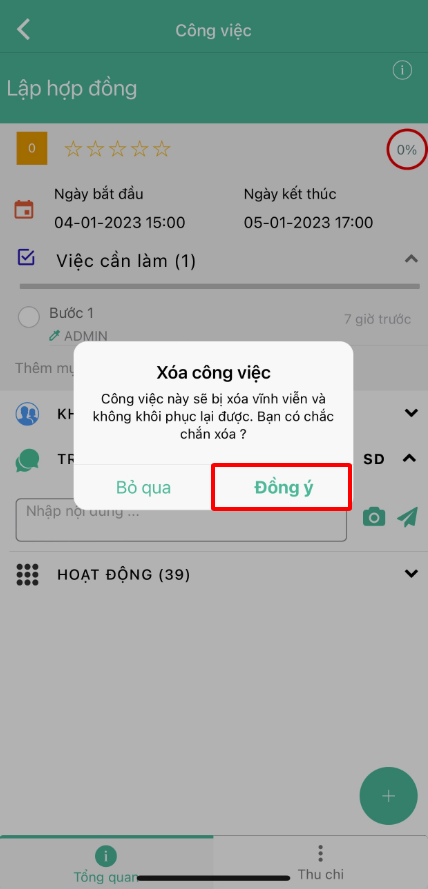
**Bước 4:** Xác nhận xóa công việc -> chọn **Đồng ý** để xóa công việc

<figure><img src="https://1934075284-files.gitbook.io/~/files/v0/b/gitbook-x-prod.appspot.com/o/spaces%2FSgjp5pKuJrPSuYtLZvBs%2Fuploads%2FpfJOqu8LHqUiA1fyZ8PC%2Fimage.png?alt=media&#x26;token=a76ff1fc-088f-4ec2-b233-fecc8f4f69a3" alt="" width="214"><figcaption><p>Giao diện xác nhận xóa công việc</p></figcaption></figure>