# Hướng dẫn thêm các việc cần làm (Checklist) trong công việc

## 1. Thao tác trên Web

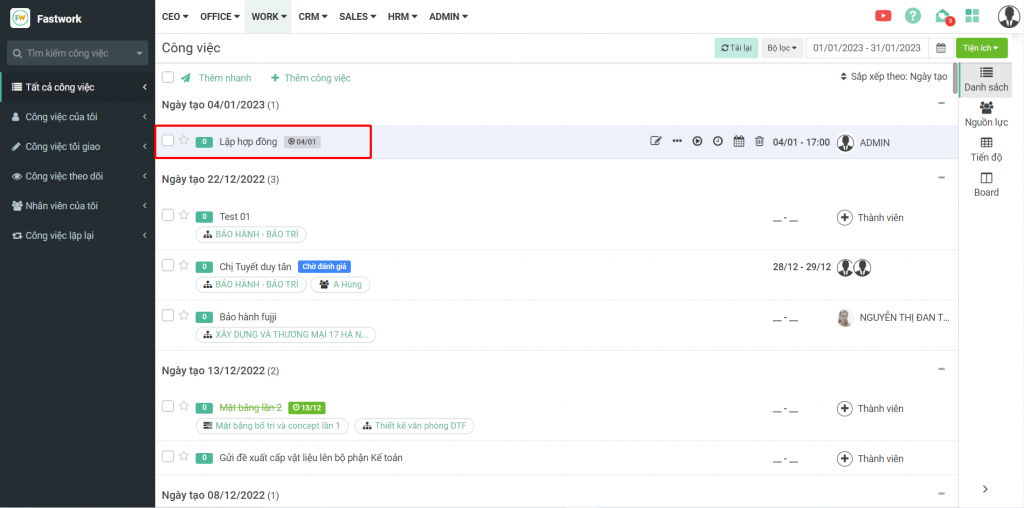
**Bước 1:** Từ menu **WORK** -> chọn **Danh sách công việc (Task)**

<figure><img src="/files/N53a5BWMzyHWkLFk33yQ" alt=""><figcaption><p>Giao diện chức năng danh sách công việc <strong>(Task)</strong></p></figcaption></figure>

**Bước 2:** Từ giao diện công việc chọn công việc cần thêm checklist

<figure><img src="/files/voP1K4XErY6cYfOaI0RN" alt=""><figcaption><p>Giao diện danh sách công việc trên Web</p></figcaption></figure>

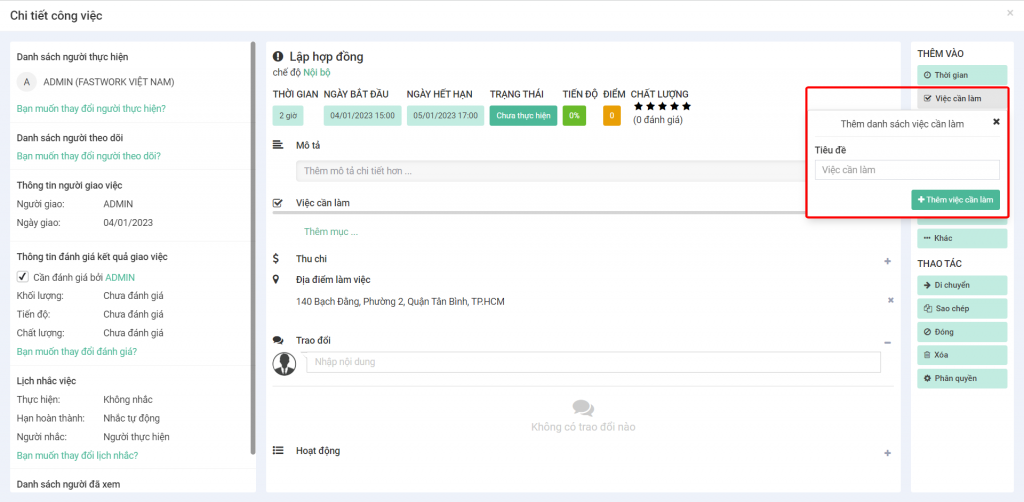
&#x20;**Bước 3:** Chọn việc cần làm, nhập tiêu đề cho công việc -> Chọn **Thêm việc cần làm**

<figure><img src="/files/EJjBbueSM0aTdXqUYVN5" alt=""><figcaption><p>Giao diện chi tiết công việc trên Web</p></figcaption></figure>

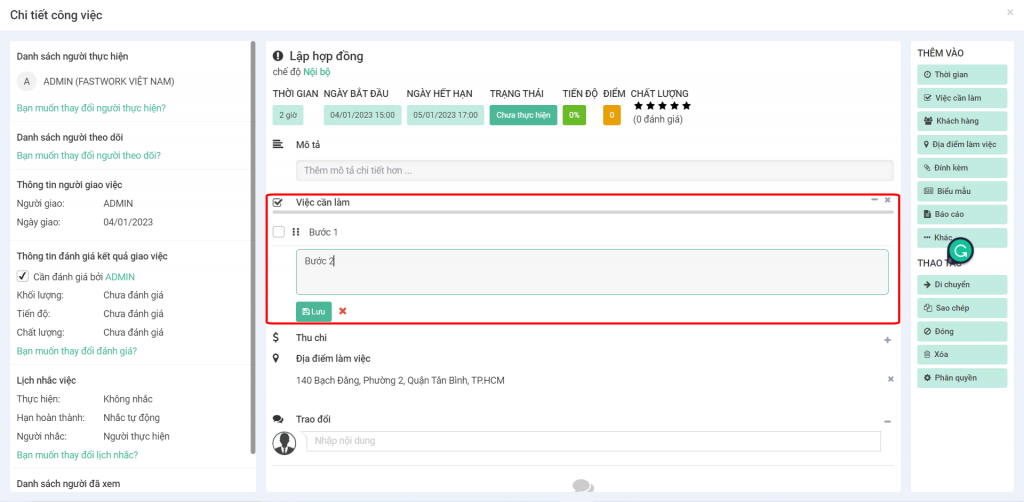
**Bước 4:** Nhập các việc cần checklist vào -> chọn **Lưu** để hoàn tất

<figure><img src="/files/6RclzMJrQ3nQ7LAx2Yju" alt=""><figcaption><p>Giao diện thêm việc cần làm</p></figcaption></figure>

## 2. Thao tác trên Mobile

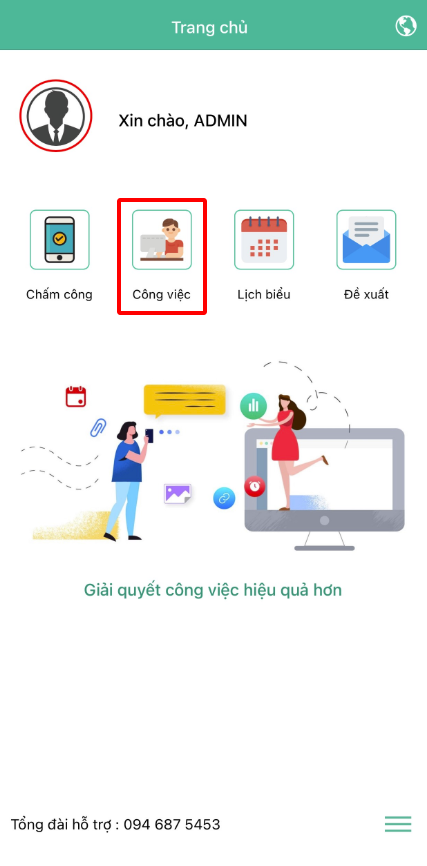
**Bước 1:** Tại giao diện chính chọn **Công việc**

<figure><img src="/files/2FXjG5pfRZOj85mc70hF" alt="" width="214"><figcaption><p>Giao diện chính trên Mobile</p></figcaption></figure>

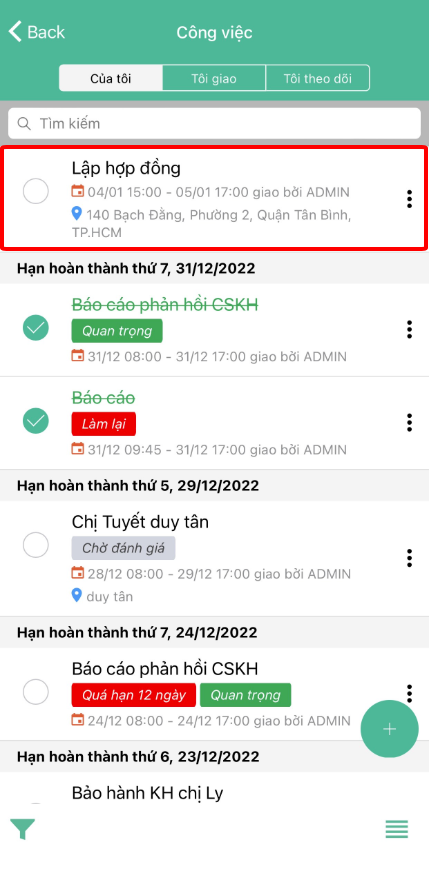
**Bước 2:** Chọn công việc cần thêm việc cần làm

<figure><img src="/files/wtTKyoAne3EQis8kiXOI" alt="" width="215"><figcaption><p>Giao diện danh sách công việc trên Mobile</p></figcaption></figure>

**Bước 3:** Nhấp vào **dấu  (+)** dưới góc phải màn hình -> chọn **Thêm việc cần làm**

<figure><img src="/files/crjfxo4Fm6AZ4irdOP0b" alt="" width="215"><figcaption><p>Giao diện chi tiết công việc trên Mobile</p></figcaption></figure>

**Bước 4:** Chọn **“Thêm mục”** phía dưới việc cần làm để thêm các **checklist** -> Chọn dấu **tích (v) ở góc trên bên phải** cạnh chữ Thêm mục để lưu lại

<figure><img src="/files/64NC2j5FVOsOSEUzpx8V" alt="" width="214"><figcaption><p>Giao diện thêm công việc cần làm trên Mobile</p></figcaption></figure>


---

# Agent Instructions: Querying This Documentation

If you need additional information that is not directly available in this page, you can query the documentation dynamically by asking a question.

Perform an HTTP GET request on the current page URL with the `ask` query parameter:

```
GET https://help.fastwork.vn/fastwork-help-center/huong-dan-s-dung-chi-tiet/fastwork-work/fastwork-workplace/thao-tac-nguoi-dung/huong-dan-them-cac-viec-can-lam-checklist-trong-cong-viec.md?ask=<question>
```

The question should be specific, self-contained, and written in natural language.
The response will contain a direct answer to the question and relevant excerpts and sources from the documentation.

Use this mechanism when the answer is not explicitly present in the current page, you need clarification or additional context, or you want to retrieve related documentation sections.