> For the complete documentation index, see [llms.txt](https://help.fastwork.vn/fastwork-help-center/llms.txt). Markdown versions of documentation pages are available by appending `.md` to page URLs; this page is available as [Markdown](https://help.fastwork.vn/fastwork-help-center/huong-dan-s-dung-chi-tiet/fastwork-work/fastwork-workflow/thiet-lap-quy-trinh/huong-dan-them-moi-mot-khung-thoi-gian-lam-viec-tinh-han-hoan-thanh.md).
# Hướng dẫn thêm mới một khung thời gian làm việc tính hạn hoàn thành
Để thực hiện cấu hình khung thời gian làm việc để áp dụng cho một quy trình công việc Workflow thực hiện như sau:
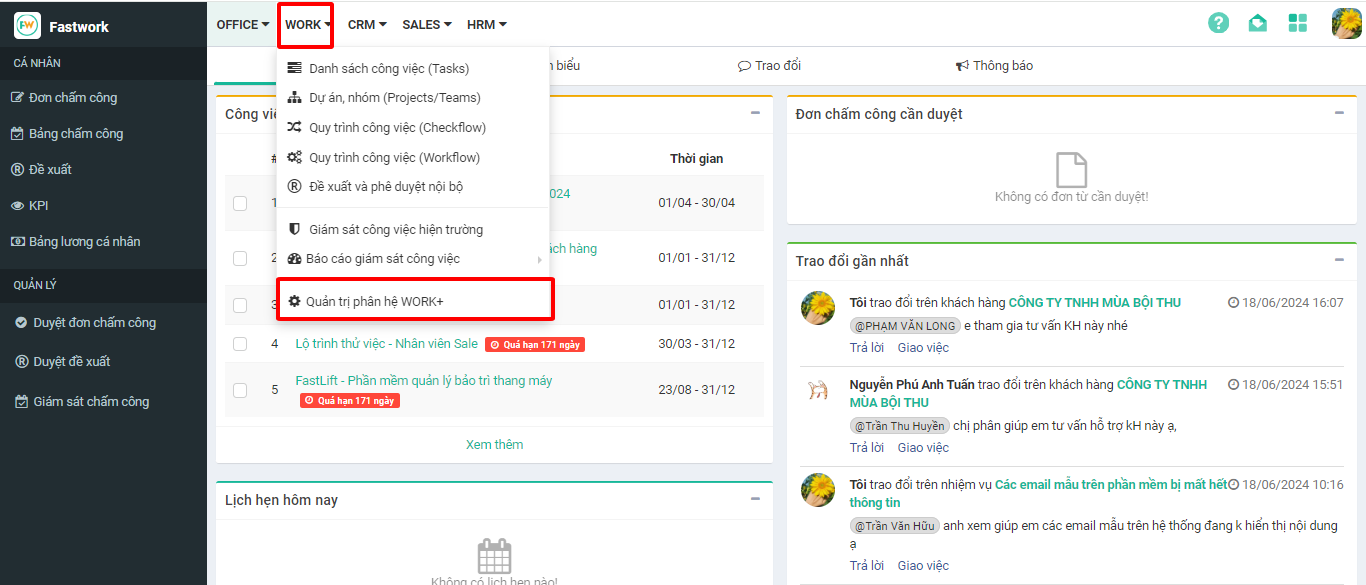
**Bước 1:** Chọn **WORK** -> chọn **Quản trị phân hệ WORK+**
**Bước 2:** Chọn **Cấu hình** -> chọn **Phân quyền quy trình** -> chọn **Hạn hoàn thành**
**Bước 3:** Để thêm mới 1 cấu hình hạn hoàn thành -> chọn **Thêm cấu hình**
**Bước 4:** Nhập tên cấu hình, lựa chọn các ngày làm việc và khung thời gian tương ứng các ngày làm việc
**Bước 5:** Nhập xong thời gian -> chọn **Thêm ngày làm việc** để thực hiện cấu hình ngày làm việc và thời gian tương ứng
**Bước 6:** Chọn **Lưu** **cấu hình** để thực hiện lưu lại hạn hoàn thành này