> For the complete documentation index, see [llms.txt](https://help.fastwork.vn/fastwork-help-center/llms.txt). Markdown versions of documentation pages are available by appending `.md` to page URLs; this page is available as [Markdown](https://help.fastwork.vn/fastwork-help-center/huong-dan-s-dung-chi-tiet/fastwork-work/fastwork-workflow/nhan-vien-van-hanh/huong-dan-thuc-hien-trao-doi-thong-tin-trong-mot-nhiem-vu.md).
# Hướng dẫn thực hiện trao đổi thông tin trong một nhiệm vụ
## 1. Thao tác trên Web
**Bước 1: Chọn WORK** -> chọn **Quy trình công việc (Workflow)**
**Bước 2:** Chọn **Nhiệm vụ** cần thực hiện trao đổi
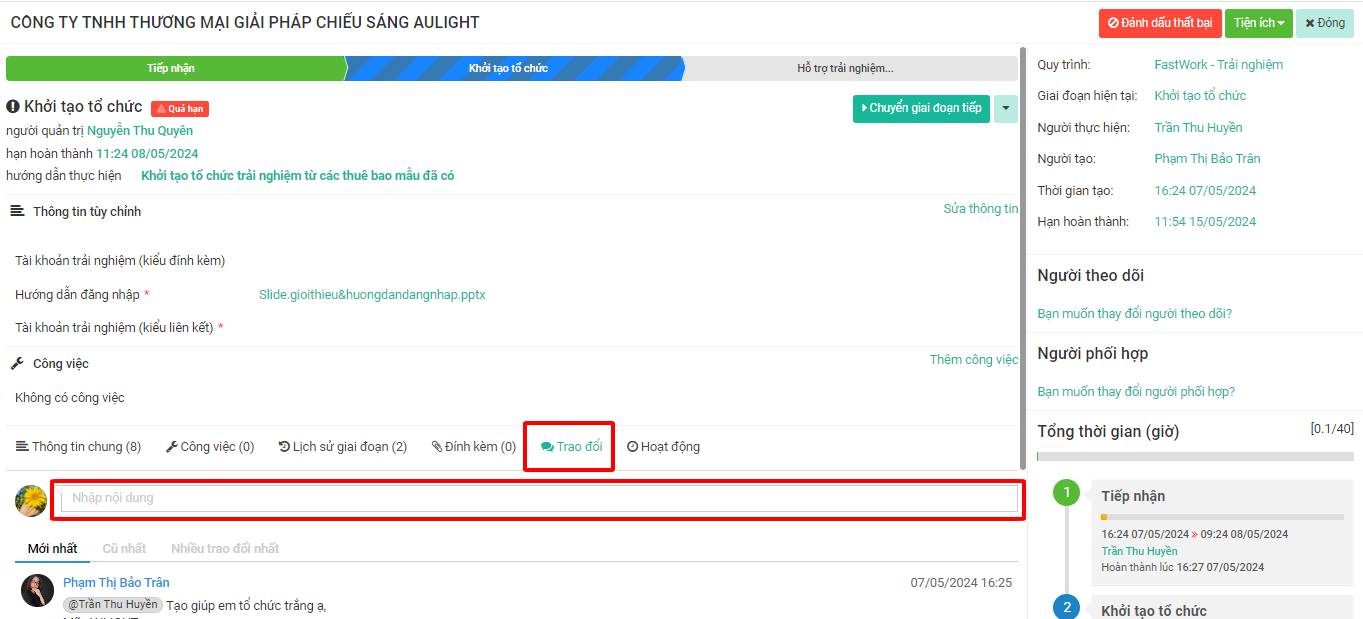
**Bước 3:** Click vào mục **Trao đổi**
**Bước 4:** Nhập thông tin trao đổi -> chọn **Gửi** để thực hiện nội dung trao đổi
{% hint style="info" %}
* Nếu muốn gửi thông báo cụ thể tới một người nào đó cần thực hiện **@gán tên người cần trao đổi** -> Phần mềm sẽ gửi thông báo tới người được gán tên
* Trong trao đổi bạn cũng có thể thực hiện đính kèm file hoặc hình ảnh -> Chọn **Đính kèm** để lựa chọn file
{% endhint %}
## 2. Thao tác trên Mobile
**Bước 1:** Từ giao diện chính -> chọn **3 gạch ngang**
**Bước 2:** Chọn tính năng **Workflow**
**Bước 3:** Xem danh sách các **Nhiệm vụ** ->click sang tab **Nhiệm vụ**
**Bước 4:** Chọn nhiệm vụ cần thực hiện gửi trao đổi
**Bước 5:** Chọn mục **Trao đổi**
**Bước 6:** Nhập thông tin trao đổi và chọn biểu tượng **Gửi đi**
Anh/ chị cũng có thể đính kèm hình ảnh trong trao đổi ở trên mobile