# Hướng dẫn tạm dừng một nhiệm vụ đang thực hiện

Khi một nhiệm vụ đang thực hiện nhưng vì một lý do nào đó sẽ tạm dừng một thời gian, khi nào đủ điều kiện sẽ tiếp tục. Để chuyển nhiệm vụ sang trạng thái tạm dừng thực hiện như sau:

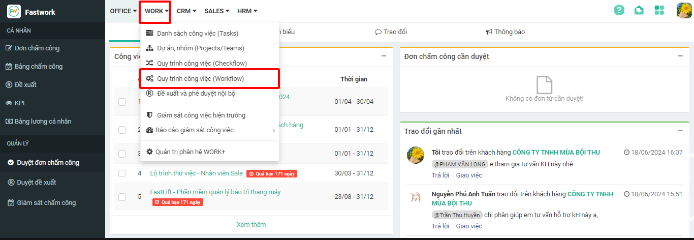
**Bước 1:** Chọn **WORK** -> chọn **Quy trình công việc (Workflow)**

<figure><img src="/files/GeQsLuS0jDeqjJVl8C3a" alt=""><figcaption></figcaption></figure>

**Bước 2:** Ở danh sách nhiệm vụ -> chọn **Nhiệm vụ cần chuyển sang trạng thái Tạm dừng**

<figure><img src="/files/zU8RtZFTkSyKPMJLnhiL" alt=""><figcaption></figcaption></figure>

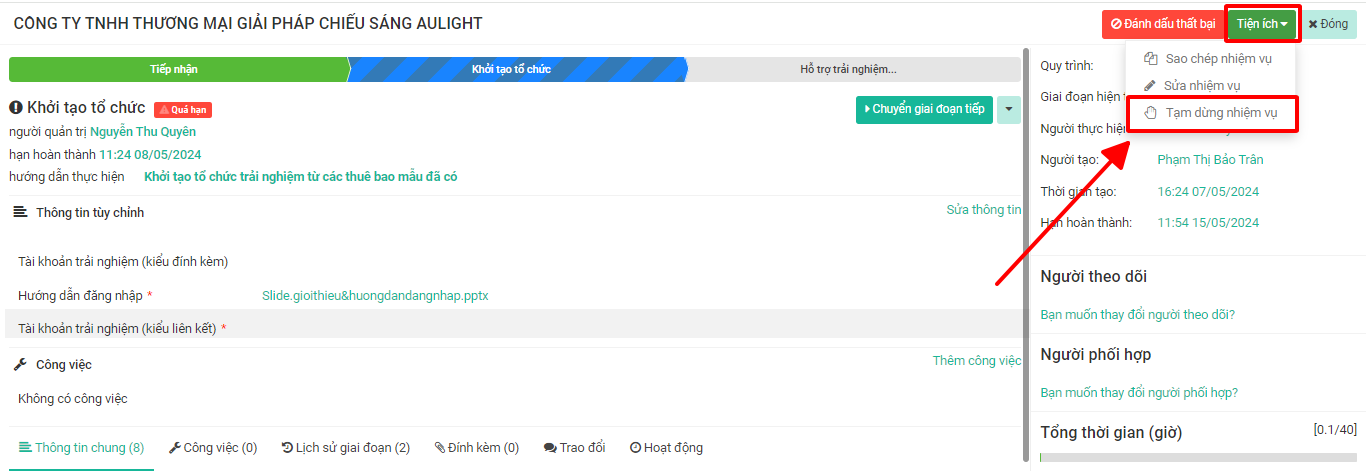
**Bước 3:** Chọn **Tiện ích** -> chọn **Tạm dừng nhiệm vụ**

<figure><img src="/files/3U3Qs0lEYMZbZSskDdyk" alt=""><figcaption></figcaption></figure>

**Bước 4:** Chọn **Đồng ý** để xác nhận tạm dừng nhiệm vụ

<figure><img src="https://fc-use1-00-pics-bkt-00.s3.amazonaws.com/79620180ce66e27c66759c0d02a48a90ecc67a56e568b1d445f1e7ebd35a3fbc/f_faq-image/u_3e38da1de48fe4f2078620490fbd5d467f75d2fd226e5659079160450f082d15/img_1626487033907.png" alt=""><figcaption></figcaption></figure>

{% hint style="info" %}
Nhiệm vụ khi chuyển sang trạng thái **Tạm dừng** sẽ chuyển sang <mark style="color:orange;">**màu cam**</mark> để người dùng dễ nhận biết. Khi tiếp tục thực hiện trạng thái sẽ được tự động chuyển về Đang xử lý
{% endhint %}
<figure><img src="https://help.fastwork.vn/wp-content/uploads/2023/01/image-396-1024x502.png" alt=""><figcaption></figcaption></figure>


---

# Agent Instructions: Querying This Documentation

If you need additional information that is not directly available in this page, you can query the documentation dynamically by asking a question.

Perform an HTTP GET request on the current page URL with the `ask` query parameter:

```
GET https://help.fastwork.vn/fastwork-help-center/huong-dan-s-dung-chi-tiet/fastwork-work/fastwork-workflow/nhan-vien-van-hanh/huong-dan-tam-dung-mot-nhiem-vu-dang-thuc-hien.md?ask=<question>
```

The question should be specific, self-contained, and written in natural language.
The response will contain a direct answer to the question and relevant excerpts and sources from the documentation.

Use this mechanism when the answer is not explicitly present in the current page, you need clarification or additional context, or you want to retrieve related documentation sections.