> For the complete documentation index, see [llms.txt](https://help.fastwork.vn/fastwork-help-center/llms.txt). Markdown versions of documentation pages are available by appending `.md` to page URLs; this page is available as [Markdown](https://help.fastwork.vn/fastwork-help-center/huong-dan-s-dung-chi-tiet/fastwork-work/fastwork-request/thao-tac-quan-tri/huong-dan-thiet-lap-ma-de-xuat-trong-danh-sach.md).
# Hướng dẫn thiết lập mã đề xuất trong danh sách
Nếu công ty có nhu cầu quản lý các đề xuất của công ty theo mã thì sẽ thực hiện thao tác như sau để mở trường thông tin mã đề xuất
**Bước 1:** Chọn **WORK** -> chọn **Quản trị phân hệ Work+**
**Bước 2**: Chọn **Đề xuất** -> Tick vào ô **Hiển thị mã đề xuất trên danh sách** - **Lưu** lại để hoàn tất
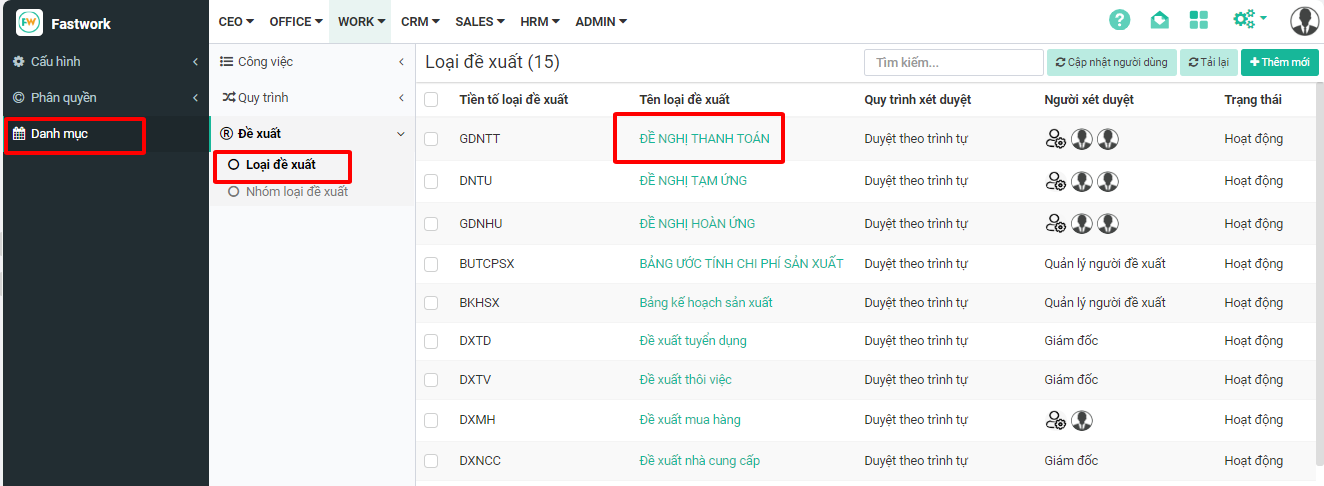
**Bước 3:** Chọn tiếp **Danh mục** -> chọn **Đề xuất** -> chọn **Loại đề xuất** -> Chọn đề xuất cần hiển thị mã
**Bước 4:** Nhập tiền tố loại đề xuất tùy chọn cho đề xuất này - Lưu lại để hoàn tất