> For the complete documentation index, see [llms.txt](https://help.fastwork.vn/fastwork-help-center/llms.txt). Markdown versions of documentation pages are available by appending `.md` to page URLs; this page is available as [Markdown](https://help.fastwork.vn/fastwork-help-center/huong-dan-s-dung-chi-tiet/fastwork-work/fastwork-request/thao-tac-quan-tri/huong-dan-cau-hinh-de-xuat-voi-quan-ly-truc-tiep-cua-users.md).
# Hướng dẫn cấu hình đề xuất với Quản lý trực tiếp của users
{% hint style="info" %}
Có 2 cách đề thiết lập Quản lý trực tiếp của 1 users:
* **Cách 1**: Quản lý trực tiếp theo cây đơn vị **ADMIN,** nghĩa là Quyền của user cao hơn sẽ được hiểu là Quản lý trực tiếp của user Quyền nhỏ hơn mình.
**Ví dụ:** Quản lý trực tiếp của quyền Nhân viên -> quyền Trưởng nhóm
Quản lý trực tiếp của quyền Trưởng nhóm -> quyền Trưởng phòng.
* **Cách 2:** Quản lý trực tiếp tự chủ động chọn cho từng user trong thiết lập tài khoản chi tiết của user đó.
{% endhint %}
## 1. Quản **lý trực tiếp theo cây đơn vị ADMIN**
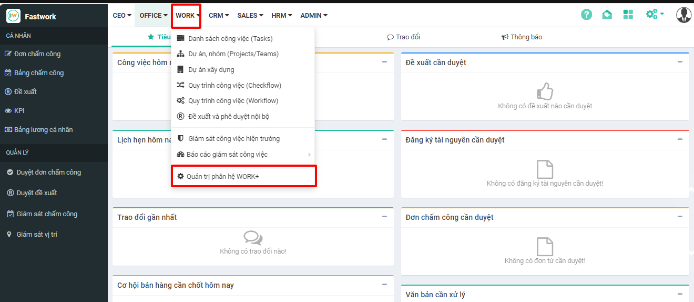
**Bước 1:** Chọn **WORK** -> chọn **Quản trị phân hệ WORK+**
**Bước 2:** Chọn **Cấu hình** ⟶ chọn **Đề xuất** ⟶ Bấm chọn nếu muốn:
* Trưởng nhóm là người quản lý trực tiếp
* Hiện mã đề xuất trên danh sách
* Chỉ gửi thông báo cho những người bước sau (Duyệt theo trình tự)
* Yêu cầu xác thực khi duyệt đề xuất
* Nhấn **Lưu** để hoàn tất
## 2. **Quản lý trực tiếp tự chủ động chọn cho từng user trong thiết lập tài khoản chi tiết của user đó**
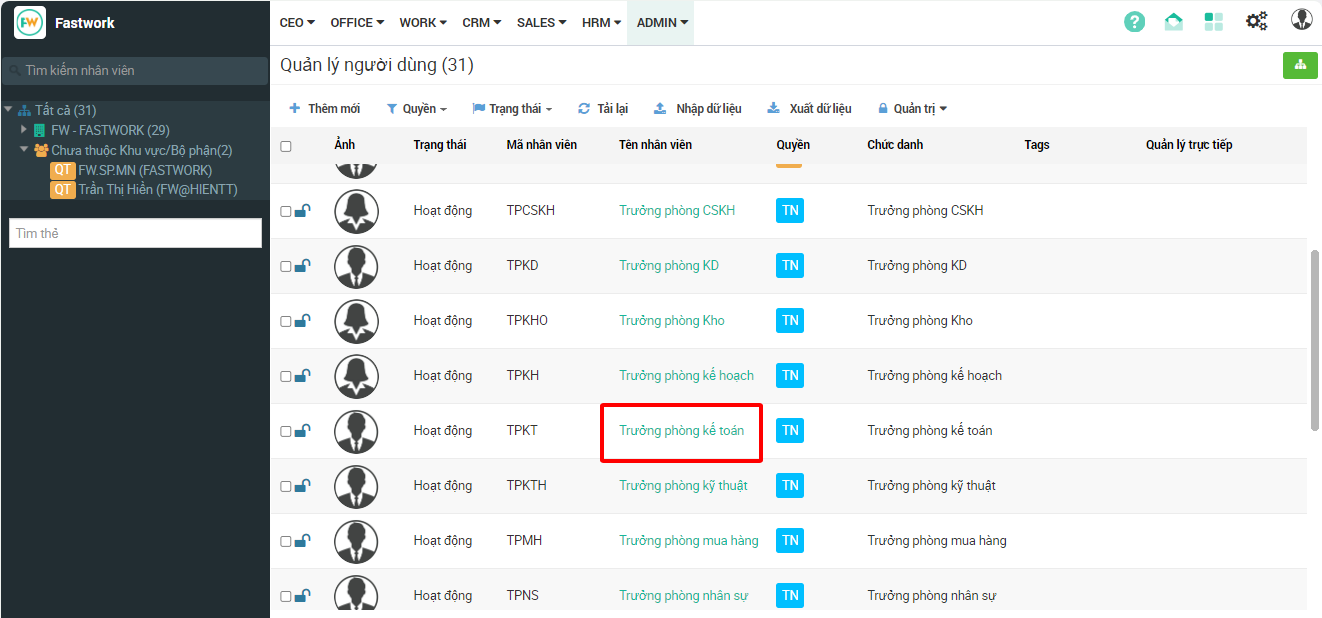
**Bước 1:** Chọn **ADMIN** ⟶ chọn **Quản lý người dùng**
**Bước 2:** Chọn chi tiết 1 user cần điều chỉnh quản lý trực tiếp
**Bước 3:** Nhấn **Sửa** - **Cập nhậ**t ⟶ chọn **Quản lý trực tiếp** ⟶ chọn **Lưu** lại để hoàn tất