> For the complete documentation index, see [llms.txt](https://help.fastwork.vn/fastwork-help-center/llms.txt). Markdown versions of documentation pages are available by appending `.md` to page URLs; this page is available as [Markdown](https://help.fastwork.vn/fastwork-help-center/huong-dan-s-dung-chi-tiet/fastwork-work/fastwork-request/thao-tac-nguoi-dung/huong-dan-trao-doi-nhanh-tren-de-xuat.md).
# Hướng dẫn trao đổi nhanh trên đề xuất
**Bước 1:** Từ menu **WORK ->** chọn **Đề xuất và phê duyệt nội bộ.**
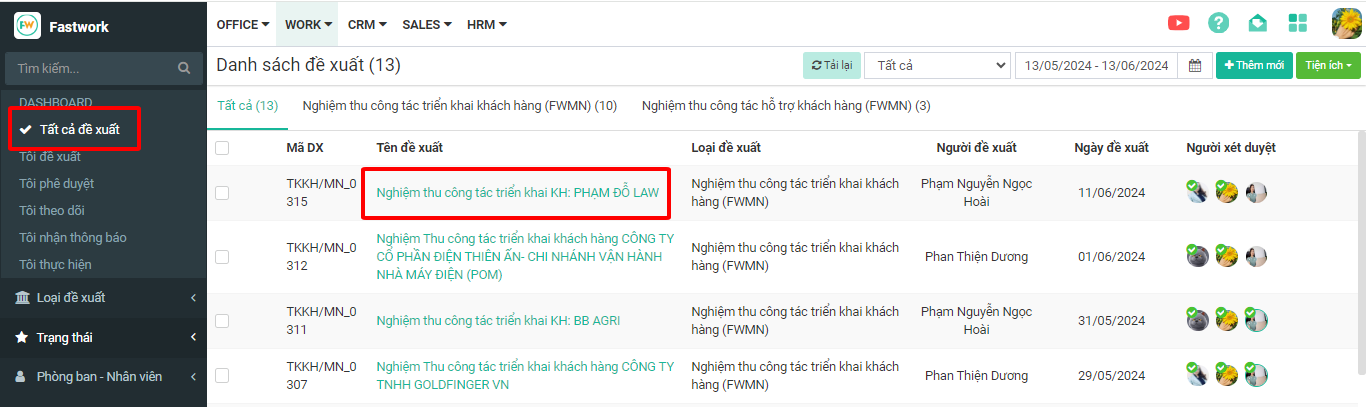
**Bước 2:** Từ giao diện hiển thị -> chọn **Tất cả đề xuất ->** chọn **Đề xuất cần trao đổi**
**Bước 3:** Trong chi tiết đề xuất -> ở mục **Trao đổi** chọn **dấu (+)** để mở ra cửa sổ nhập trao đổi
**Bước 4:** Nhập nội dung trao đổi sau đó chọn Gửi để thực hiện lưu trao đổi trên đề xuất này
{% hint style="info" %}
* Với giao diện trên mobile anh/chị cũng thực hiện tương tự.
* Ngoài ra ở giao diện web, anh/chị có thể truy cập nhanh vào các đề xuất ở giao diện Bàn làm việc cá nhân

{% endhint %}