> For the complete documentation index, see [llms.txt](https://help.fastwork.vn/fastwork-help-center/llms.txt). Markdown versions of documentation pages are available by appending `.md` to page URLs; this page is available as [Markdown](https://help.fastwork.vn/fastwork-help-center/huong-dan-s-dung-chi-tiet/fastwork-work/fastwork-request/thao-tac-nguoi-dung/huong-dan-in-mot-de-xuat-tren-phan-mem.md).
# Hướng dẫn in một đề xuất trên phần mềm
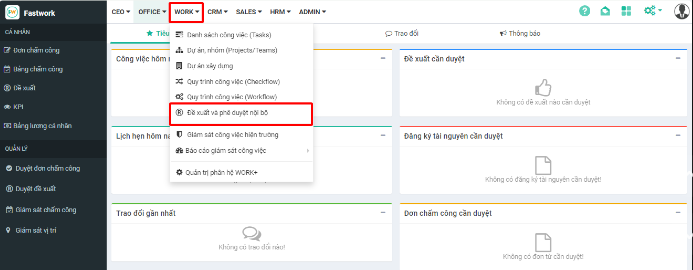
**Bước 1:** Từ menu **WORK** -> chọn **Đề xuất và phê duyệt nội bộ.**
**Bước 2:** Ở giao diện **Tất cả đề xuất** -> chọn một **đề xuất cần in.**
**Bước 3:** Chọn **In đề xuất**
**Bước 4:** Thay đổi các thông tin và nhấn **In** để hoàn tất in đề xuất
* **Máy in đích:** chọn máy in để in đề xuất
* **Trang:** tất cả/ tùy chỉnh muốn in
* **Bố cục:** Khổ dọc/ khổ ngang
* **Màu:** in trắng đen hoặc in màu
{% hint style="info" %}
Với các tổ chức không cấu hình mẫu in đề xuất, khi chọn In phần mềm sẽ kết nối tới máy in để hiển thị ra giao diện in từ phần mềm
Các tổ chức thực hiện thiết lập các mẫu in riêng theo quy định của doanh nghiệp, khi chọn In đề xuất sẽ hiển thị ra bảng thông báo để tiến hành lưu file về máy tính trước khi thực hiện in. Cách thiết lập mẫu in cho một đề xuất tham khảo hướng dẫn [tại đây](https://help.fastwork.vn/fastwork-help-center/huong-dan-s-dung-chi-tiet/fastwork-work+/fastwork-request/thao-tac-nguoi-dung/cach-cau-hinh-mau-in-cho-mot-loai-de-xuat)
{% endhint %}