> For the complete documentation index, see [llms.txt](https://help.fastwork.vn/fastwork-help-center/llms.txt). Markdown versions of documentation pages are available by appending `.md` to page URLs; this page is available as [Markdown](https://help.fastwork.vn/fastwork-help-center/huong-dan-s-dung-chi-tiet/fastwork-work/fastwork-request/thao-tac-nguoi-dung/huong-dan-hoan-thanh-mot-de-xuat-danh-cho-nguoi-thuc-hien.md).
# Hướng dẫn hoàn thành một đề xuất (Dành cho người thực hiện)
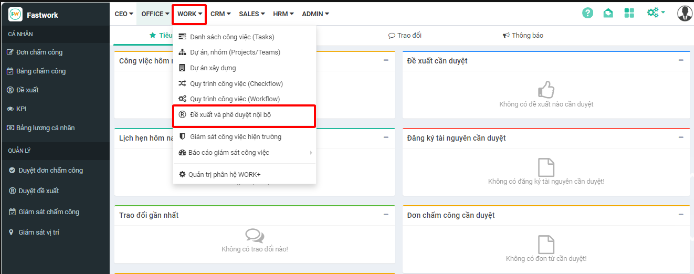
**Bước 1:** Từ menu **WORK** -> chọn **Đề xuất và phê duyệt nội bộ**
**Bước 2:** Từ giao diện chọn **Tôi thực hiện ->** chọn đề xuất để thực hiện
**Bước 3:** Nhấn vào chữ **Hoàn thành** để hoàn thành đề xuất
{% hint style="info" %}
* Những tài khoản được phân quyền mới được phép hoàn thành đề xuất. Nếu trường hợp nhân viên được gán là người thực hiện nhưng lại không thấy nút Hoàn thành thì anh/chị cần kiểm tra lại **Thiết lập phân quyền chức năng** trong Loại đề xuất đó
* Ngoài ra, anh/chị có thể truy cập vào đề xuất cần hoàn thành từ trung tâm thông báo đến

{% endhint %}