> For the complete documentation index, see [llms.txt](https://help.fastwork.vn/fastwork-help-center/llms.txt). Markdown versions of documentation pages are available by appending `.md` to page URLs; this page is available as [Markdown](https://help.fastwork.vn/fastwork-help-center/huong-dan-s-dung-chi-tiet/fastwork-work/fastwork-request/thao-tac-nguoi-dung/huong-dan-cach-xoa-mot-de-xuat-tren-phan-mem.md).
# Hướng dẫn cách xóa một đề xuất trên phần mềm
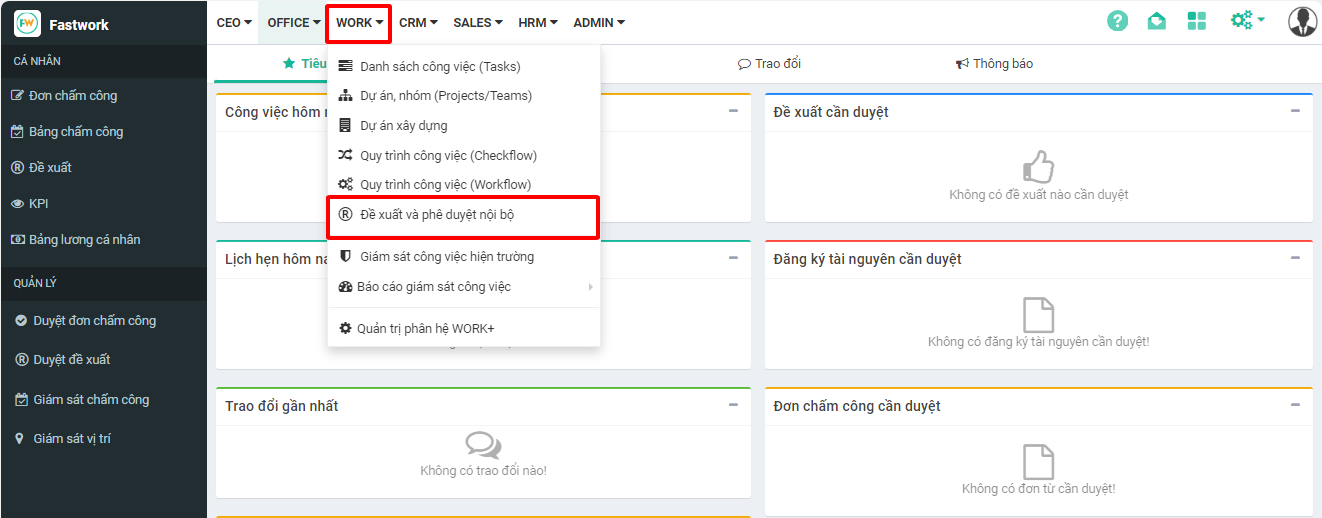
**Bước 1:** Từ menu **WORK** -> chọn **Đề xuất và phê duyệt nội bộ.**
**Bước 2:** Từ giao diện hiển thị chọn Tất cả đề xuất -> chọn **đề xuất cần xóa** -> chọn **Xóa**
Giao diện danh sách đề xuất
**Bước 3:** Xác nhận **Đồng ý** để xóa đề xuất
Giao diện xác nhận xóa đề xuất
{% hint style="info" %}
* Chỉ có thể xóa được các đề xuất chưa được phê duyệt hoặc các đề xuất nháp
* Tài khoản được phân quyền mới có thể xóa được đề xuất trên hệ thống
{% endhint %}