> For the complete documentation index, see [llms.txt](https://help.fastwork.vn/fastwork-help-center/llms.txt). Markdown versions of documentation pages are available by appending `.md` to page URLs; this page is available as [Markdown](https://help.fastwork.vn/fastwork-help-center/huong-dan-s-dung-chi-tiet/fastwork-work/fastwork-project/thao-tac-quan-tri/phan-quyen-cho-mot-nhom-nguoi-dung-truy-cap-vao-cac-chuc-nang-trong-quan-ly-du-an.md).

# Phân quyền cho một nhóm người dùng truy cập vào các chức năng trong Quản lý dự án

**Bước 1:** Dùng tài khoản của người quản trị hoặc tài khoản có thể Phân quyền&#x20;

* Chọn **WORK** -> Chọn **Quản trị phân hệ WORK+**

<figure><img src="https://1934075284-files.gitbook.io/~/files/v0/b/gitbook-x-prod.appspot.com/o/spaces%2FSgjp5pKuJrPSuYtLZvBs%2Fuploads%2Fbi2ibhMTZe0cPM8pQAFX%2Fimage.png?alt=media&amp;token=8b47658f-015d-4011-b84a-31012c50ae25" alt=""><figcaption></figcaption></figure>

**Bước 2:** Chọn mục **Phân quyền** --> Chọn **Nhóm quyền**&#x20;

<figure><img src="https://1934075284-files.gitbook.io/~/files/v0/b/gitbook-x-prod.appspot.com/o/spaces%2FSgjp5pKuJrPSuYtLZvBs%2Fuploads%2FIqk7FAAEaLedcglRDE6E%2Fimage.png?alt=media&amp;token=634a6cb6-e292-429e-8b55-83ed19d53c4c" alt=""><figcaption></figcaption></figure>

* Bấm vào Nhóm quyền **Nhân viên** ở bảng bên phải -> chọn tab **Người dùng** -> chọn nút **Thêm**

<figure><img src="https://1934075284-files.gitbook.io/~/files/v0/b/gitbook-x-prod.appspot.com/o/spaces%2FSgjp5pKuJrPSuYtLZvBs%2Fuploads%2FCNe05bRFpBS9izIJmcj5%2Fimage.png?alt=media&amp;token=925287d9-01d3-4727-9fd5-edb324383a93" alt=""><figcaption></figcaption></figure>

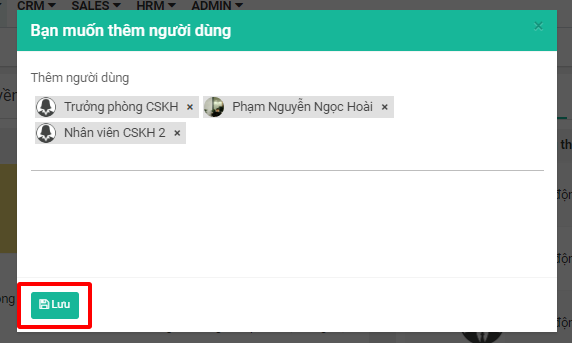
**Bước 3:** Bảng “Bạn muốn thêm người dùng" hiện ra -> chọn những người muốn thêm vào dự án -> Sau đó bấm nút **Lưu**

<figure><img src="https://1934075284-files.gitbook.io/~/files/v0/b/gitbook-x-prod.appspot.com/o/spaces%2FSgjp5pKuJrPSuYtLZvBs%2Fuploads%2Fi7FkI3hTdbKIhxN7Rn8Z%2Fimage.png?alt=media&amp;token=3e5f16e4-fd97-4c25-ae3b-e68a36e2cdae" alt=""><figcaption></figcaption></figure>