> For the complete documentation index, see [llms.txt](https://help.fastwork.vn/fastwork-help-center/llms.txt). Markdown versions of documentation pages are available by appending `.md` to page URLs; this page is available as [Markdown](https://help.fastwork.vn/fastwork-help-center/huong-dan-s-dung-chi-tiet/fastwork-work/fastwork-project/thao-tac-quan-tri/huong-dan-cau-hinh-phan-quyen-du-an.md).

# Hướng dẫn cấu hình phân quyền dự án

{% hint style="info" %}
Có 2 cách để phân quyền dự án:

* Phân quyền chung cho tất cả các dự án
* Phân quyền riêng cho từng dự án
  {% endhint %}

## 1. Phân quyền chung cho tất cả các dự án&#x20;

{% hint style="info" %}
Đối với tài khoản được cấp quyền “Quản trị công việc"
{% endhint %}

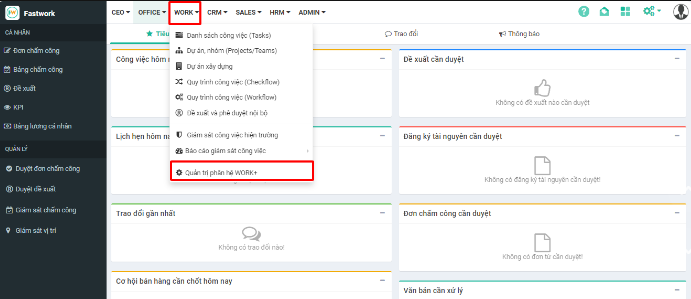
**Bước 1:** Từ menu **WORK** -> chọn **Quản trị phân hệ WORK+**

<figure><img src="/files/XgIbKXwU5LsrUFacgZMt" alt=""><figcaption></figcaption></figure>

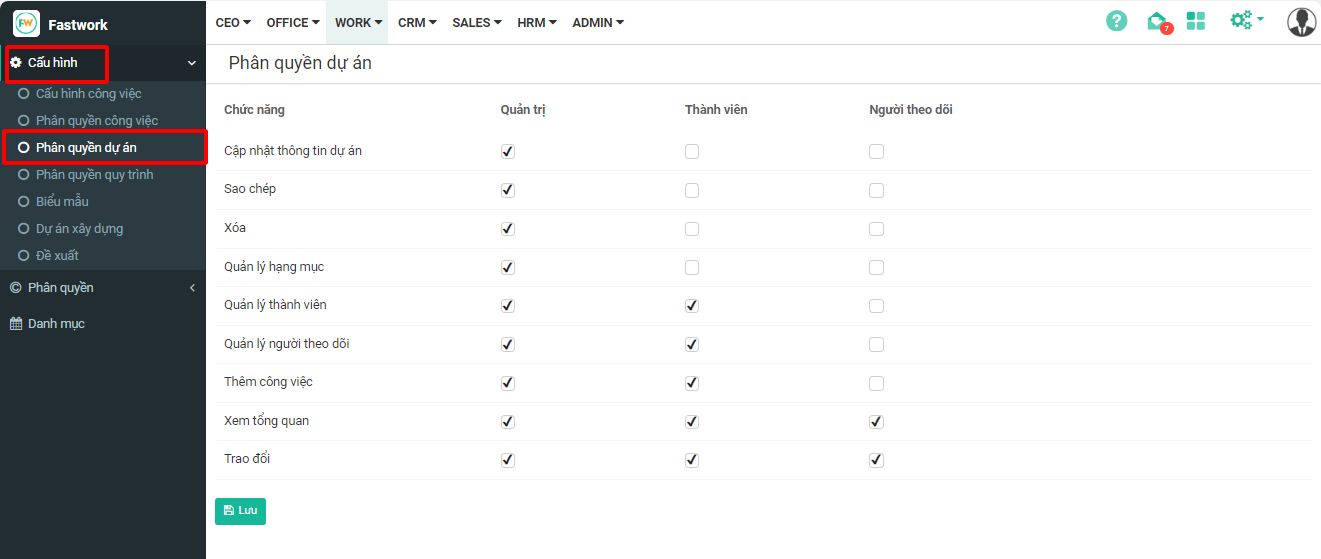
**Bước 2:** Trong mục **Cấu hình** → chọn **Phân quyền dự án**

<figure><img src="/files/5rBC4jm6rI5AoZaAHdsY" alt=""><figcaption></figcaption></figure>

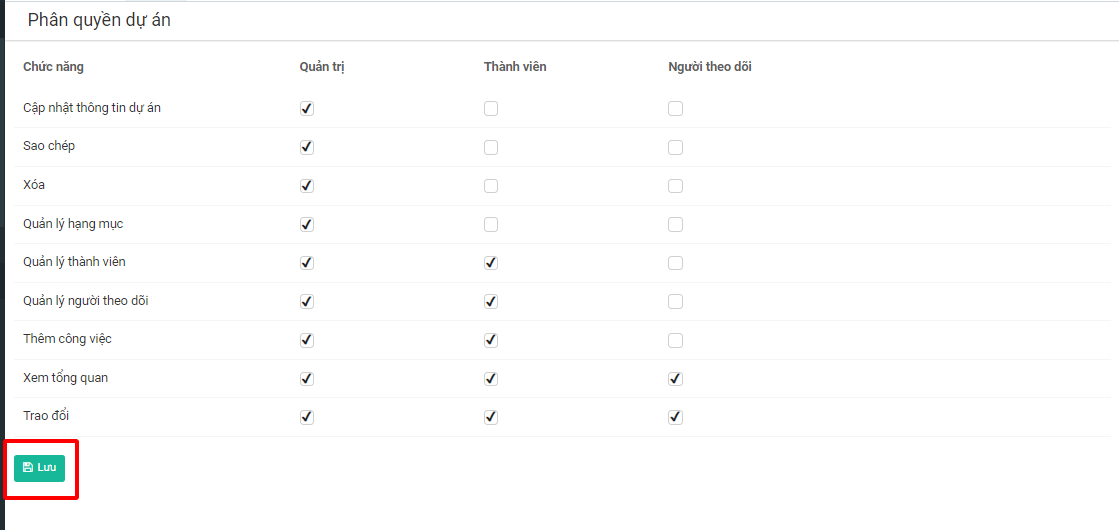
**Bước 3:** Tick chọn các chức năng tương ứng với từng nhóm quyền → **Lưu**

<figure><img src="/files/tM805TX8sT0f6gra6LoU" alt=""><figcaption></figcaption></figure>

{% hint style="info" %}
Trong đó:&#x20;

* ***Quản trị:*** là người tạo ra/chủ dự án
* ***Thành viên:*** là những người cùng tham gia trong dự án
* ***Người theo dõi:*** Không trực tiếp tham gia dự án, chỉ giám sát.

Khi phân quyền trong này, thì tất cả các dự án tạo ra sau này đều áp dụng các quyền này cho các thành viên.
{% endhint %}

## 2. Phân quyền riêng cho từng dự án

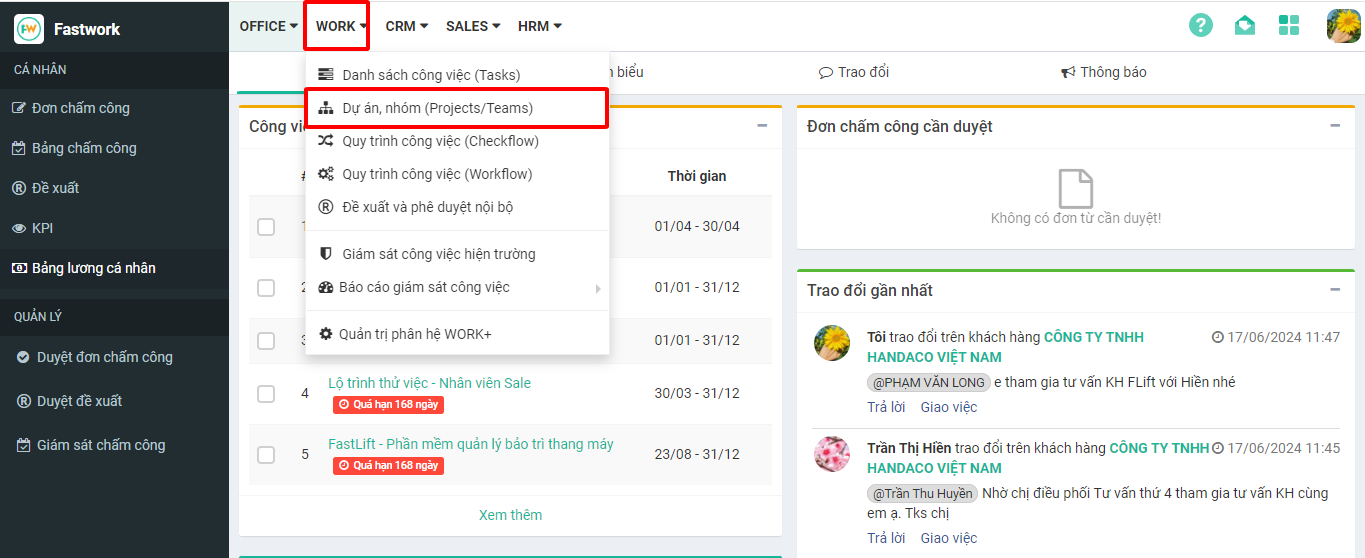
**Bước 1:** Chọn **WORK** -> chọn **Dự án, nhóm (Project/Teams)**

<figure><img src="/files/C1H865ZH5SsELdEISHt8" alt=""><figcaption></figcaption></figure>

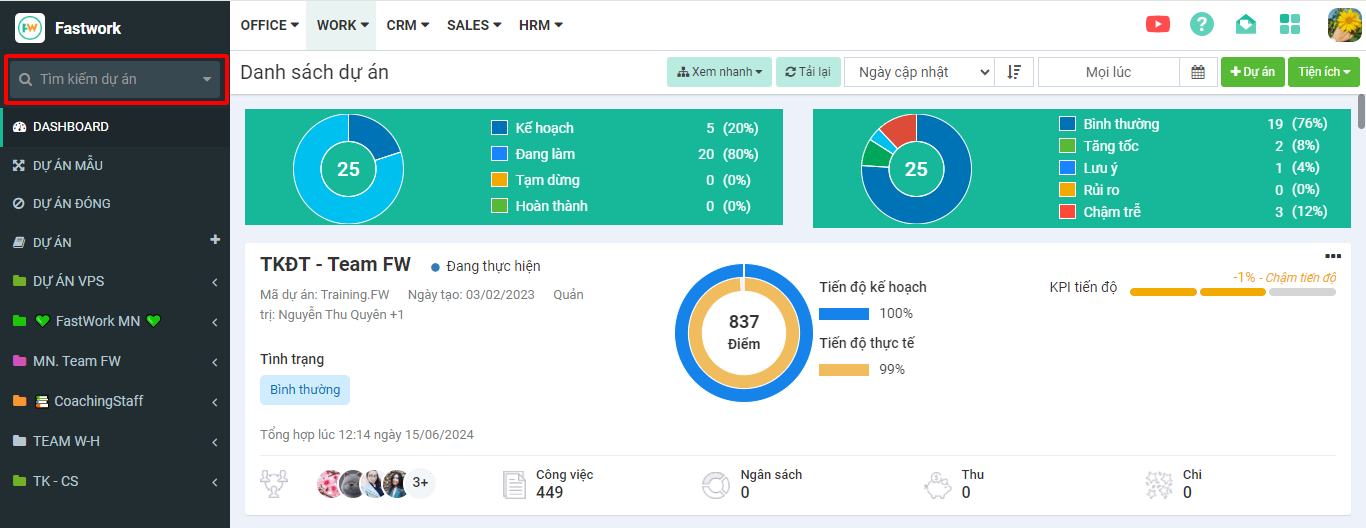
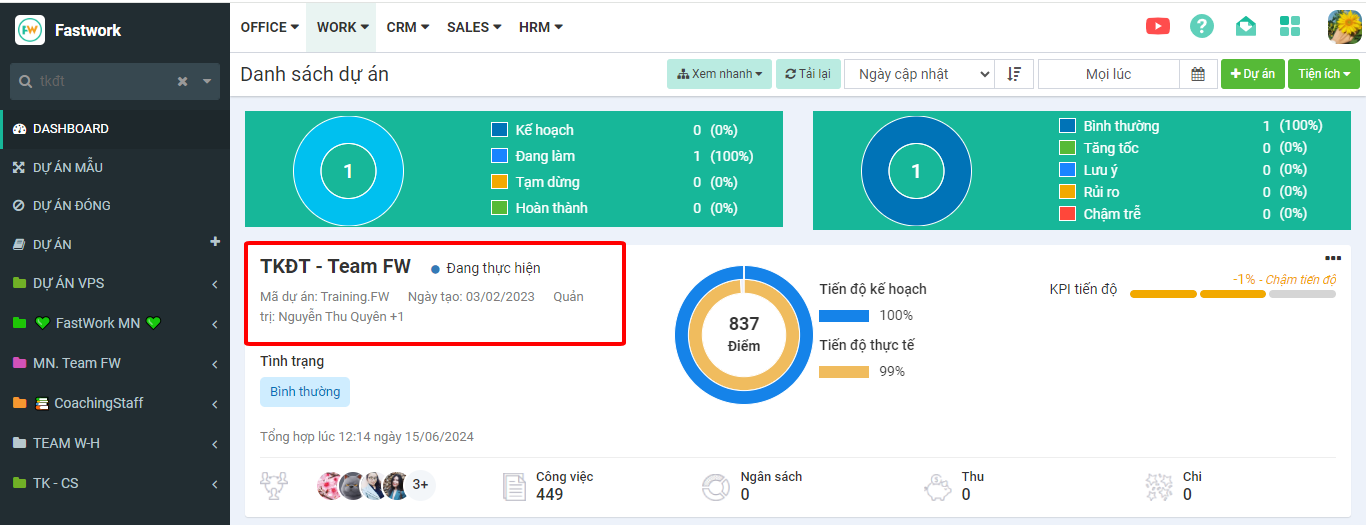
**Bước 2:** Tìm tên dự án muốn phân quyền trong ô **Tìm kiếm** → Bấm vào tên dự án

<figure><img src="/files/DjqNe5uIhfWLCzxq0gSB" alt=""><figcaption></figcaption></figure>

**Bước 3:** Chọn **Thiết lập** để vào chi tiết dự án

<figure><img src="/files/v0tZgXJBZkxGMnMGVUdM" alt=""><figcaption></figcaption></figure>

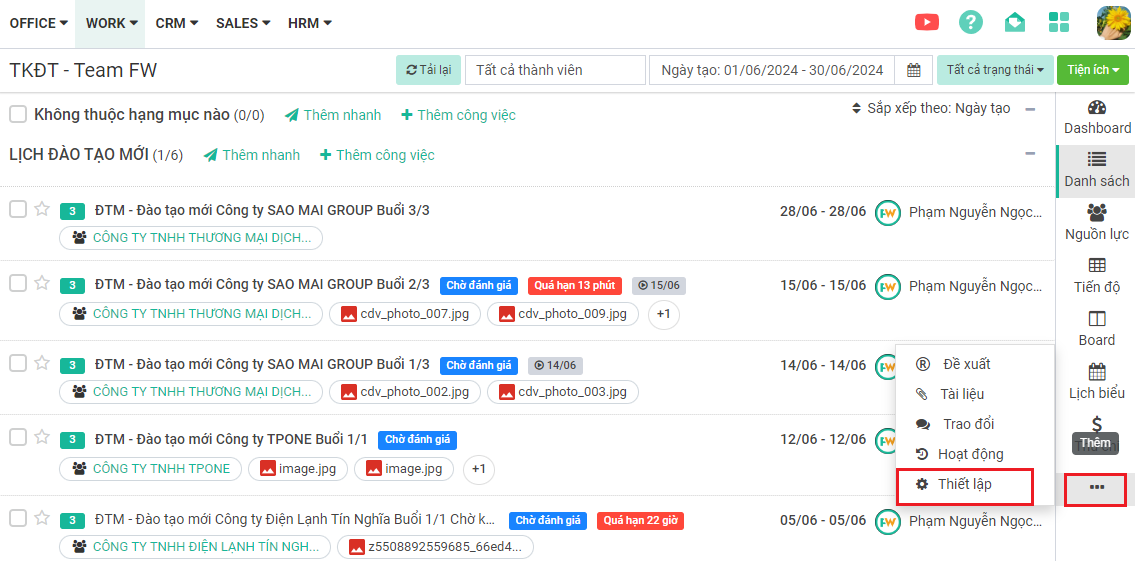
**Bước 4:** Click vào dấu 3 chấm ở thanh menu bên phải -> chọn **Thiết lập**

<figure><img src="/files/ALMZb6MIkDgwo9aGual1" alt=""><figcaption></figcaption></figure>

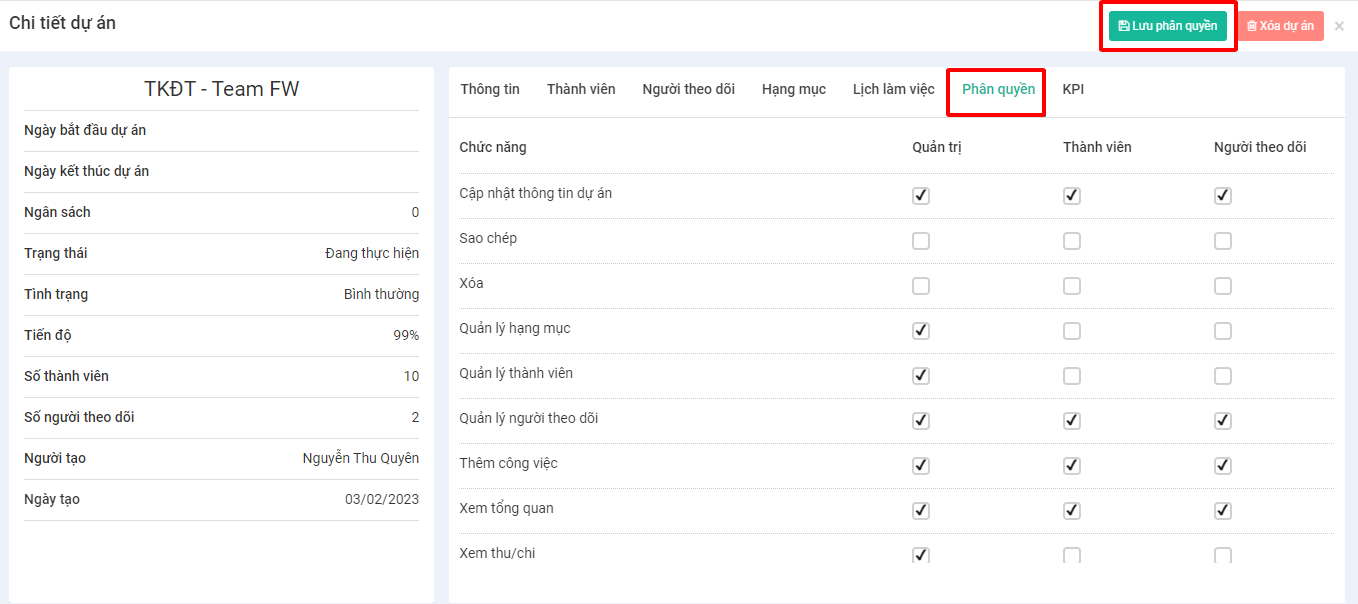
**Bước 5:**&#x20;

* Bấm vào mục **Phân Quyền**
* Tick chọn/bỏ theo các nhóm quyền
* Sau khi phân quyền xong, chọn **Lưu phân quyền**
<figure><img src="/files/HuCAGxu60ezWxgIJESvI" alt=""><figcaption></figcaption></figure>


---

# Agent Instructions
This documentation is published with GitBook. GitBook is the documentation platform designed so that both humans and AI agents can read, navigate, and reason over technical content effectively. Learn more at gitbook.com.

## Querying This Documentation
If you need additional information that is not directly available in this page, you can query the documentation dynamically by asking a question.

Perform an HTTP GET request on the current page URL with the `ask` query parameter:

```
GET https://help.fastwork.vn/fastwork-help-center/huong-dan-s-dung-chi-tiet/fastwork-work/fastwork-project/thao-tac-quan-tri/huong-dan-cau-hinh-phan-quyen-du-an.md?ask=<question>
```

The question should be specific, self-contained, and written in natural language.
The response will contain a direct answer to the question and relevant excerpts and sources from the documentation.

Use this mechanism when the answer is not explicitly present in the current page, you need clarification or additional context, or you want to retrieve related documentation sections.