> For the complete documentation index, see [llms.txt](https://help.fastwork.vn/fastwork-help-center/llms.txt). Markdown versions of documentation pages are available by appending `.md` to page URLs; this page is available as [Markdown](https://help.fastwork.vn/fastwork-help-center/huong-dan-s-dung-chi-tiet/fastwork-work/fastwork-project/thao-tac-nguoi-dung/huong-dan-them-thanh-vien-cung-bo-phan-ngoai-bo-phan-tham-gia-du-an.md).
# Hướng dẫn thêm thành viên cùng bộ phận/ngoài bộ phận tham gia dự án
**ước 1:** Từ menu **WORK** -> chọn **Dự án/Nhóm (Projects/Teams)** ->Chọn dự án muốn thêm thành viên
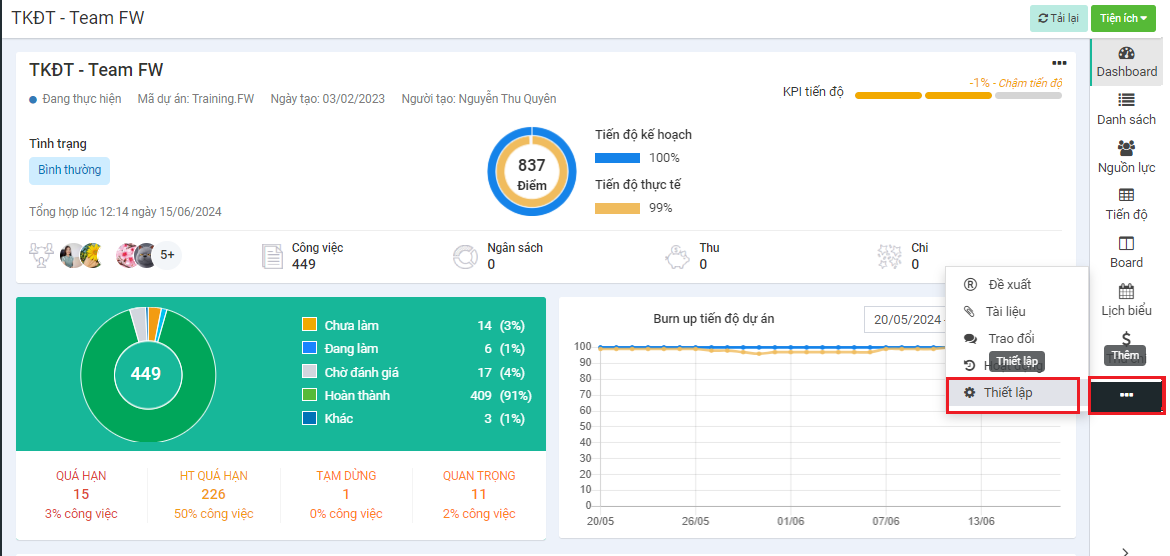
**Bước 2**: Chọn 3 gạch ngang ở thanh menu bên phải -> chọn **Thiết lập**
**Bước 3:** Click menu thành viên
* Nếu anh/ chị thêm thành viên thuộc cùng 1 bộ phận -> click chọn thành viên tham gia dự án và nhấn thêm:
* Nếu anh/ chị thêm thành viên ngoài bộ phận -> Tìm kiếm tên thành viên muốn add vào dự án -> chọn thành viên tham gia và nhấn thêm.
{% hint style="info" %}
Các thành viên ngoài bộ phận muốn thêm được vào dự án thì đã được phân quyền truy cập module này.
{% endhint %}