# Hướng dẫn phân quyền/thêm/xóa/xuất phiếu thu, phiếu chi trực tiếp trong một dự án

## 1. Hướng dẫn phân quyền được phép xem các khoản thu chi trong một dự án

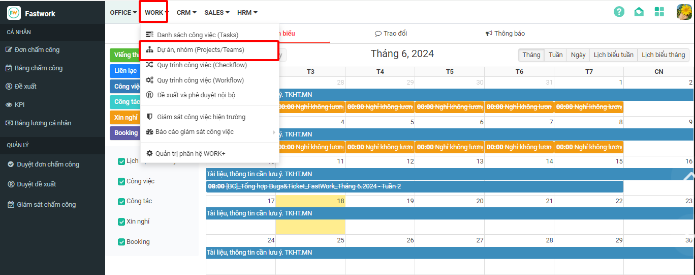
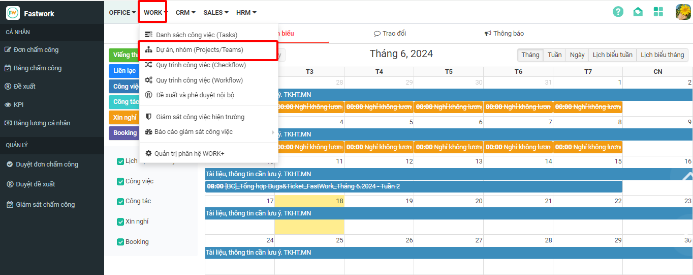
**Bước 1:** Chọn **WORK** -> chọn **Dự án/nhóm (Project/Team)**

<figure><img src="https://1934075284-files.gitbook.io/~/files/v0/b/gitbook-x-prod.appspot.com/o/spaces%2FSgjp5pKuJrPSuYtLZvBs%2Fuploads%2FVt2MXe3XXMD2v6i5cA90%2Fimage.png?alt=media&#x26;token=12b8729c-47dd-4c44-be8b-ad2e04e1c249" alt=""><figcaption></figcaption></figure>

**Bước 2:** Bấm vào dự án cụ -> chọn 3 gạch ngang -> chọn **Thiết lập**

<figure><img src="https://1934075284-files.gitbook.io/~/files/v0/b/gitbook-x-prod.appspot.com/o/spaces%2FSgjp5pKuJrPSuYtLZvBs%2Fuploads%2F9S2SjjnFs6W0bdPxbchP%2Fimage.png?alt=media&#x26;token=019f29fb-6e3c-4131-ab70-6f144c060650" alt=""><figcaption></figcaption></figure>

**Bước 3:** Chọn **phân quyền**, tích thêm hoặc bỏ ở ô Xem thu/chi -> bấm **Lưu phân quyền** để hoàn tất

<figure><img src="https://1934075284-files.gitbook.io/~/files/v0/b/gitbook-x-prod.appspot.com/o/spaces%2FSgjp5pKuJrPSuYtLZvBs%2Fuploads%2FbfOZT1IJZL7l622vcnVR%2Fimage.png?alt=media&#x26;token=c72a727c-1892-4dc7-869d-6dc5c20d8331" alt=""><figcaption></figcaption></figure>

## 2. Hướng dẫn thêm mới phiếu thu, phiếu chi

**Bước 1:** Chọn **WORK** -> chọn **Dự án/nhóm (Project/Team)**

<figure><img src="https://1934075284-files.gitbook.io/~/files/v0/b/gitbook-x-prod.appspot.com/o/spaces%2FSgjp5pKuJrPSuYtLZvBs%2Fuploads%2FmcwsDilc1ZYfKu8RkGt9%2Fimage.png?alt=media&#x26;token=7adeacdb-95c8-4354-9f99-ebb19cbba7e6" alt=""><figcaption></figcaption></figure>

**Bước 2:** Bấm vào dự án cụ thể cần thêm phiếu thu/ chi -> Chọn **$ Thu chi**

<figure><img src="https://1934075284-files.gitbook.io/~/files/v0/b/gitbook-x-prod.appspot.com/o/spaces%2FSgjp5pKuJrPSuYtLZvBs%2Fuploads%2FBFD5IGZN5ZIyLavXPoGI%2Fimage.png?alt=media&#x26;token=7382b0e4-f2f0-4fd6-a2ac-983c14524be5" alt=""><figcaption></figcaption></figure>

**Bước 3:** Chọn **Lập phiếu thu** hoặc **Lập phiếu chi**

<figure><img src="https://1934075284-files.gitbook.io/~/files/v0/b/gitbook-x-prod.appspot.com/o/spaces%2FSgjp5pKuJrPSuYtLZvBs%2Fuploads%2FH9bHfzBhNAJbOuRBPKPV%2Fimage.png?alt=media&#x26;token=fad6aaa2-0fb0-48d8-9b06-9e020cb8844c" alt=""><figcaption></figcaption></figure>

**Bước 4:** Nhập các thông tin ở lập phiếu thu, lập phiếu chi

* ***Lưu và đóng:*** lưu lại thông tin phiếu và đóng giao diện lập phiếu
* ***Lưu và thêm tiếp:*** lưu lại thông tin phiếu và lập thêm phiếu mới

<figure><img src="https://1934075284-files.gitbook.io/~/files/v0/b/gitbook-x-prod.appspot.com/o/spaces%2FSgjp5pKuJrPSuYtLZvBs%2Fuploads%2FyU4Bn9HBMuMIsswAS9hN%2Fimage.png?alt=media&#x26;token=d545b295-690d-4a67-8c6a-b4c1a82de940" alt=""><figcaption></figcaption></figure>

## 3. Hướng dẫn xóa phiếu thu, phiếu chi

**Bước 1:** Chọn **WORK** -> chọn **Dự án/nhóm (Project/Team)**

<figure><img src="https://1934075284-files.gitbook.io/~/files/v0/b/gitbook-x-prod.appspot.com/o/spaces%2FSgjp5pKuJrPSuYtLZvBs%2Fuploads%2FVXT8qdpJ8l87AaoeVBGo%2Fimage.png?alt=media&#x26;token=9eec80b2-d280-4a29-8bce-614be1b49022" alt=""><figcaption></figcaption></figure>

**Bước 2:** Bấm vào dự án cụ thể cần xóa nhiều phiếu thu/ chi -> Chọn **$ Thu chi**

<figure><img src="https://1934075284-files.gitbook.io/~/files/v0/b/gitbook-x-prod.appspot.com/o/spaces%2FSgjp5pKuJrPSuYtLZvBs%2Fuploads%2FqaL8ueY3DizNdaw2KINh%2Fimage.png?alt=media&#x26;token=6b27e834-a295-45a4-9803-541a85c7f6fb" alt=""><figcaption></figcaption></figure>

**Bước 3:** Tích chọn vào ô các phiếu thu/chi cần xóa -> Nhấn **xóa** để hoàn tất

<figure><img src="https://1934075284-files.gitbook.io/~/files/v0/b/gitbook-x-prod.appspot.com/o/spaces%2FSgjp5pKuJrPSuYtLZvBs%2Fuploads%2F1wnfHIHnMeVjmu6KO7Nz%2Fimage.png?alt=media&#x26;token=2a602a59-be11-4fcc-93b0-2536fdec90c7" alt=""><figcaption></figcaption></figure>

## 4. Hướng dẫn xuất danh sách phiếu thu, phiếu chi về file excel

**Bước 1**: Chọn **WORK** -> chọn **Dự án/nhóm (Project/Team)**

<figure><img src="https://1934075284-files.gitbook.io/~/files/v0/b/gitbook-x-prod.appspot.com/o/spaces%2FSgjp5pKuJrPSuYtLZvBs%2Fuploads%2FpRG5nsBQ5E0v3APhG8eG%2Fimage.png?alt=media&#x26;token=d87961bb-0ff9-4c1c-9376-badc304edfb4" alt=""><figcaption></figcaption></figure>

**Bước 2:** Bấm vào dự án cụ thể cần xuất danh sách phiếu thu/ chi -> Chọn **$ Thu chi**

<figure><img src="https://1934075284-files.gitbook.io/~/files/v0/b/gitbook-x-prod.appspot.com/o/spaces%2FSgjp5pKuJrPSuYtLZvBs%2Fuploads%2F4dJQabRkoVPmeITgJbKO%2Fimage.png?alt=media&#x26;token=743d5c90-8121-42be-951f-40a7988ecf90" alt=""><figcaption></figcaption></figure>

**Bước 3:** Chọn **Tiện ích** -> chọn **Xuất danh sách phiếu thu/chi**

<figure><img src="https://1934075284-files.gitbook.io/~/files/v0/b/gitbook-x-prod.appspot.com/o/spaces%2FSgjp5pKuJrPSuYtLZvBs%2Fuploads%2FUwSsiJmqze5VEZVtKUSs%2Fimage.png?alt=media&#x26;token=543b6043-2703-4bdf-bbe7-816dfc9fa0ba" alt=""><figcaption></figcaption></figure>

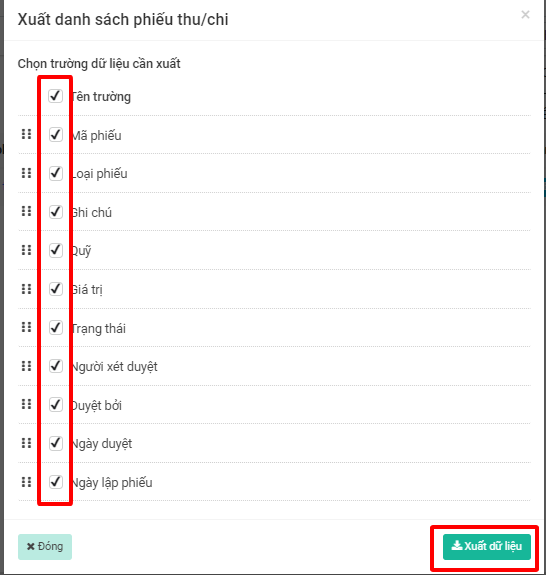
**Bước 4:** Chọn các trường còn xuất -> chọn **Xuất dữ liệu**

<figure><img src="https://1934075284-files.gitbook.io/~/files/v0/b/gitbook-x-prod.appspot.com/o/spaces%2FSgjp5pKuJrPSuYtLZvBs%2Fuploads%2FKMjdN0Lo8z28PZNALU3F%2Fimage.png?alt=media&#x26;token=33a63b7a-6114-48be-8dfa-edfb2b9503a8" alt=""><figcaption></figcaption></figure>