> For the complete documentation index, see [llms.txt](https://help.fastwork.vn/fastwork-help-center/llms.txt). Markdown versions of documentation pages are available by appending `.md` to page URLs; this page is available as [Markdown](https://help.fastwork.vn/fastwork-help-center/huong-dan-s-dung-chi-tiet/fastwork-work/fastwork-project/thao-tac-nguoi-dung/huong-dan-cau-hinh-thoi-gian-lam-viec-trong-mot-du-an-de-tinh-toan-thoi-gian-thuc-hien-cong-viec.md).
# Hướng dẫn cấu hình thời gian làm việc trong một dự án để tính toán thời gian thực hiện công việc
**Bước 1:** Chọn **WORK** -> chọn **Dự án/nhóm (Project/Team)**
**Bước 2:** Bấm vào dự án cụ thể -> chọn 3 gạch ngang ở thanh menu bên phải -> chọn **Thiết lập** để vào cấu hình thời gian làm việc
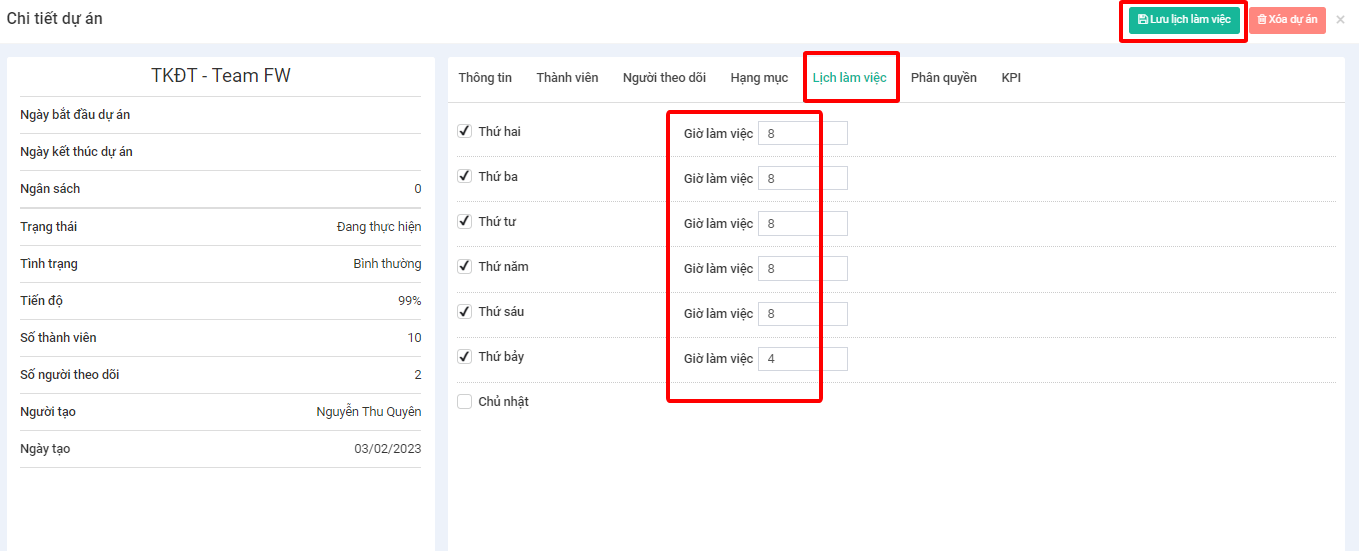
**Bước 3:** Chọn **Lịch làm việc**, điều chỉnh các khung giờ thời gian lịch làm việc từng ngày trong tuần rồi chọn Lưu lịch làm việc để cập nhật