> For the complete documentation index, see [llms.txt](https://help.fastwork.vn/fastwork-help-center/llms.txt). Markdown versions of documentation pages are available by appending `.md` to page URLs; this page is available as [Markdown](https://help.fastwork.vn/fastwork-help-center/huong-dan-s-dung-chi-tiet/fastwork-work/fastwork-checkflow/thao-tac-nguoi-dung/huong-dan-them-moi-buoc-thuc-hien-trong-quy-trinh-cong-viec-tren-web.md).
# Hướng dẫn thêm mới bước thực hiện trong quy trình công việc trên web
**Bước 1:** Trong nhóm quy trình -> chọn 1 quy trình muốn thêm bước thực hiện
**Bước 2:** Có 2 cách để thêm bước thực hiện
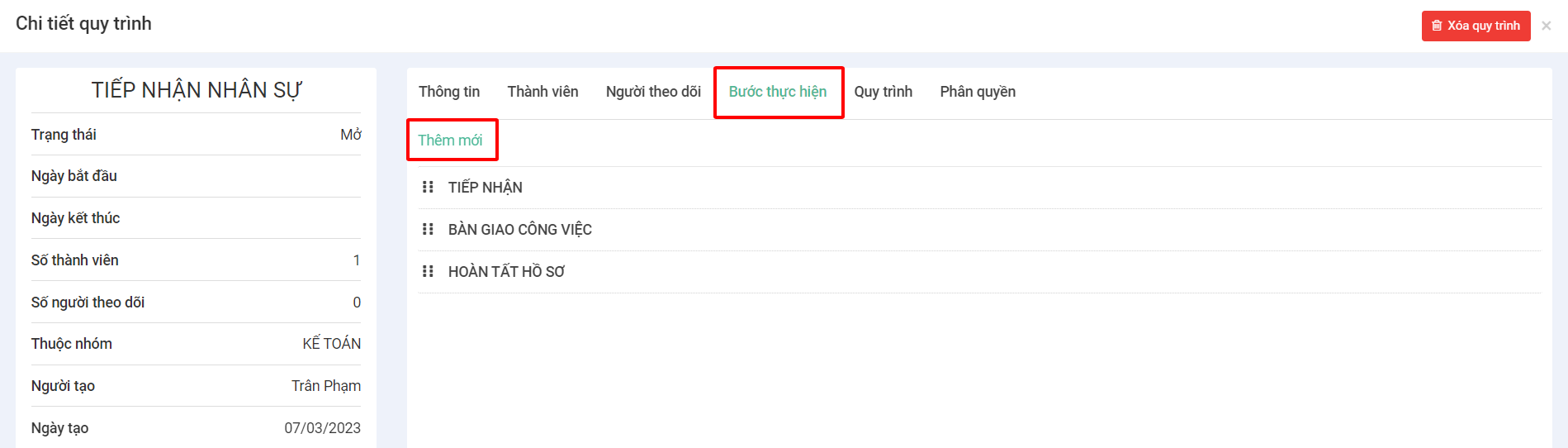
* **Cách 1:** Từ phần tiện ích -> chọn **Bước thực hiện**
* **Cách 2:** Ở cột bên phải -> chọn phần **Thiết lập** -> chọn tab **Bước thực hiện** -> Bấm nút **Thêm mới**
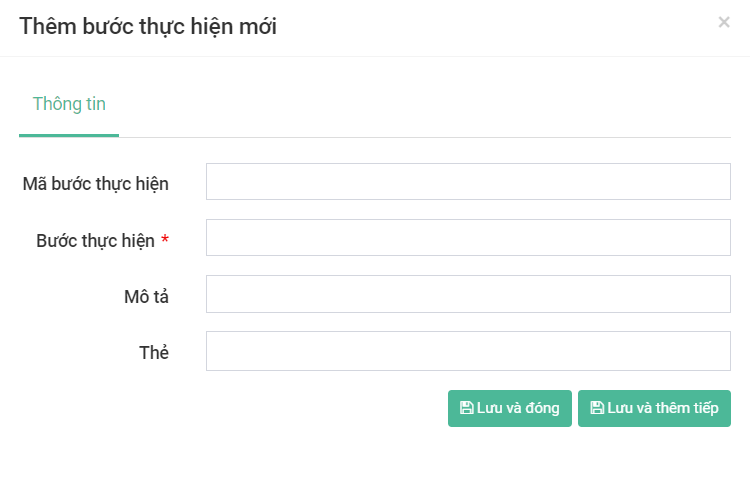
**Bước 3:** Điền đầy đủ các thông tin theo các trường trong bảng.
* Những trường có dấu **\*** là bắt buộc phải điền
* ***Lưu và đóng:*** Nếu không muốn tạo thêm bước thực hiện khác
* ***Lưu và thêm tiếp:*** Nếu muốn tiếp tục thêm bước thực hiện khác.
**Bước 4:** Hiện thông báo **“Thêm bước thực hiện mới thành công”** là hoàn thành