> For the complete documentation index, see [llms.txt](https://help.fastwork.vn/fastwork-help-center/llms.txt). Markdown versions of documentation pages are available by appending `.md` to page URLs; this page is available as [Markdown](https://help.fastwork.vn/fastwork-help-center/huong-dan-s-dung-chi-tiet/fastwork-office/fastwork-meeting/thao-tac-quan-tri/cach-phan-quyen-cho-mot-nguoi-dung-truy-cap-duoc-cac-chuc-nang-tren-module-quan-ly-lich-hop.md).
# Cách phân quyền cho một người dùng truy cập được các chức năng trên module quản lý lịch họp
**Bước 1:** Từ giao diện chính chọn **OFFICE** ⟶ “**Quản trị phân hệ OFFICE+**
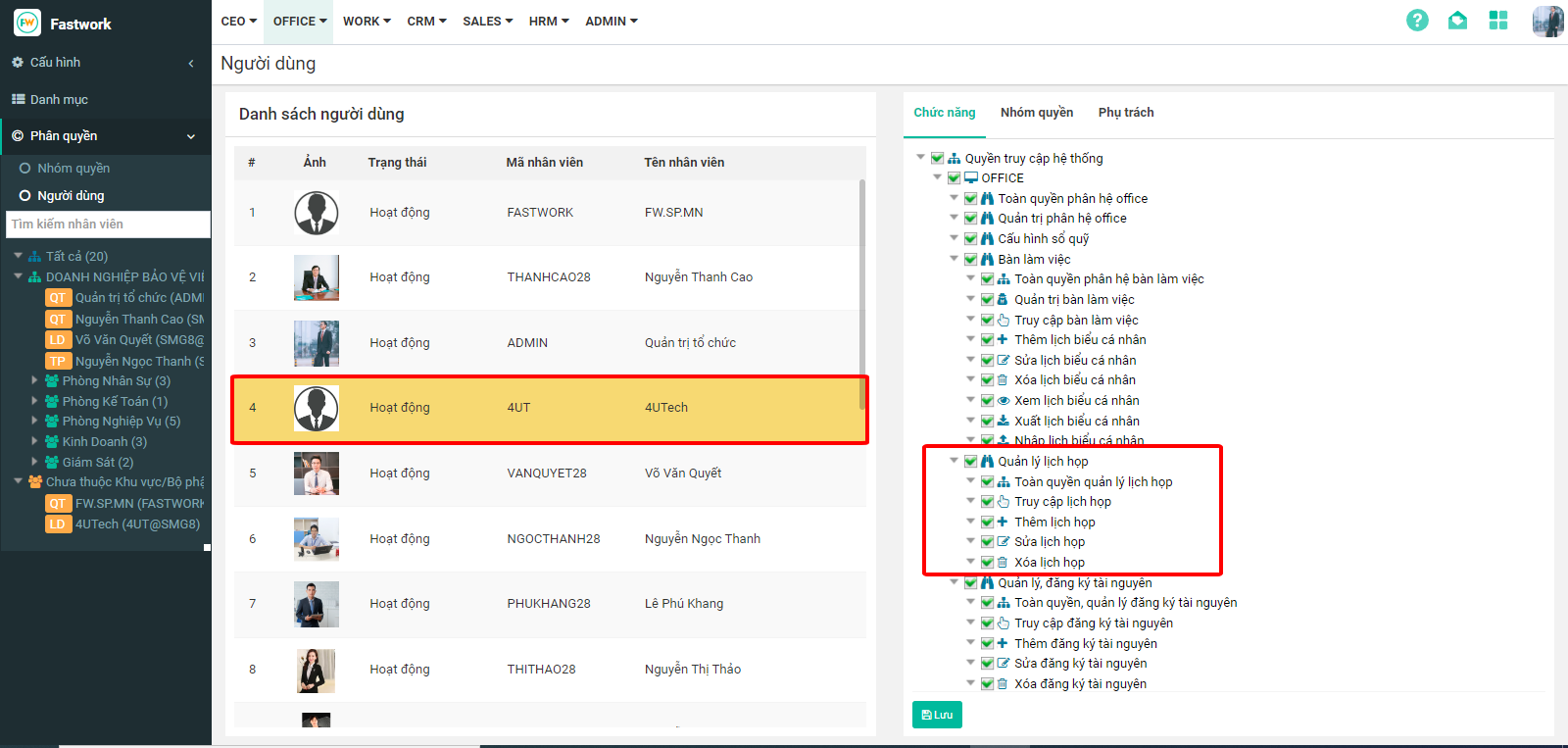
**Bước 2:**Chọn **“Phân quyền” → “Người dùng”**, chọn **tên người dùng** được cấp quyền Đăng ký sử dụng tài nguyên → chọn **“Chức năng”.**
**Bước 3:** Tích chọn vào dòng **“Quản lý lịch họp”**, kiểm tra lại 1 lượt các chức năng mà người dùng này được phép rồi ấn **“Lưu”**