# Cách thêm mới danh mục các loại thu và loại chi

## 1. Cách thêm mới loại thu

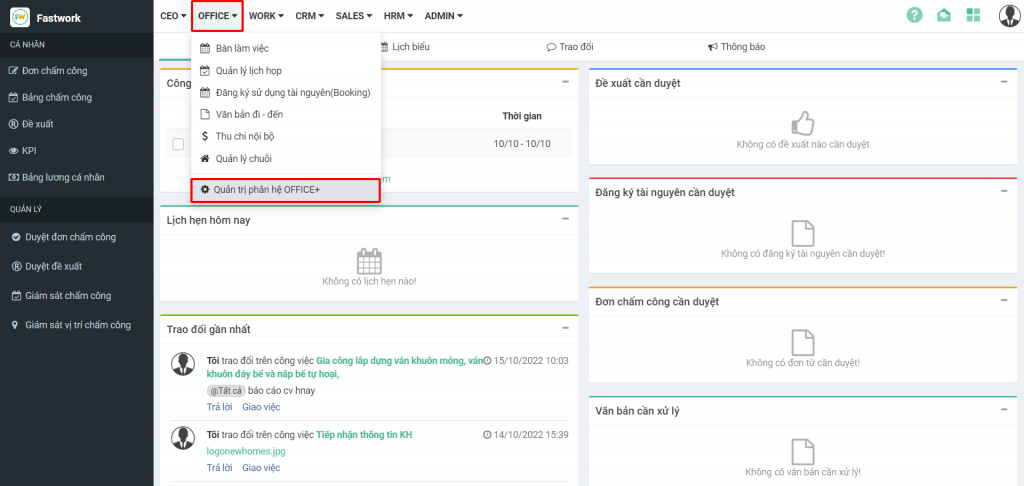
**Bước 1:** Từ Menu **OFFICE,**&#x63;họn **Quản trị phân hệ OFFICE+**

<figure><img src="https://1934075284-files.gitbook.io/~/files/v0/b/gitbook-x-prod.appspot.com/o/spaces%2FSgjp5pKuJrPSuYtLZvBs%2Fuploads%2FqtgLcND7gkiyepRvZtCA%2Fimage.png?alt=media&#x26;token=e5f013ff-a32a-48e4-b13b-cf6b41dc6bfe" alt=""><figcaption></figcaption></figure>

**Bước 2:** Chọn **Danh mục ->** chọn **Thu chi nội bộ** -> **Loại thu**-> **Thêm mới**

<figure><img src="https://1934075284-files.gitbook.io/~/files/v0/b/gitbook-x-prod.appspot.com/o/spaces%2FSgjp5pKuJrPSuYtLZvBs%2Fuploads%2FCJfGhTq4CXw6vef2unpm%2Fimage.png?alt=media&#x26;token=d0c8d2a9-acf4-4b4b-ba92-4fc7253d3778" alt=""><figcaption></figcaption></figure>

**Bước 3:** Nhập thông tin của Loại thu và **Lưu** lại

<figure><img src="https://1934075284-files.gitbook.io/~/files/v0/b/gitbook-x-prod.appspot.com/o/spaces%2FSgjp5pKuJrPSuYtLZvBs%2Fuploads%2FiO4jKwDgAV10588pg2F0%2Fimage.png?alt=media&#x26;token=f07a8816-3385-4205-a764-4aebfa58c506" alt=""><figcaption></figcaption></figure>

**Ngoài ra, phần mềm cũng hộ trợ người dùng thêm mới các Nhà cung cấp từ file excel**

**Bước 1:** Từ **Danh sách loại thu** => Chọn **tiện ích** => **Nhập dữ liệu**

<figure><img src="https://1934075284-files.gitbook.io/~/files/v0/b/gitbook-x-prod.appspot.com/o/spaces%2FSgjp5pKuJrPSuYtLZvBs%2Fuploads%2FbHIO2fnIUytSzeVl2b3V%2Fimage.png?alt=media&#x26;token=1694f7e1-2842-4a80-95ba-cc3f109c38b2" alt=""><figcaption></figcaption></figure>

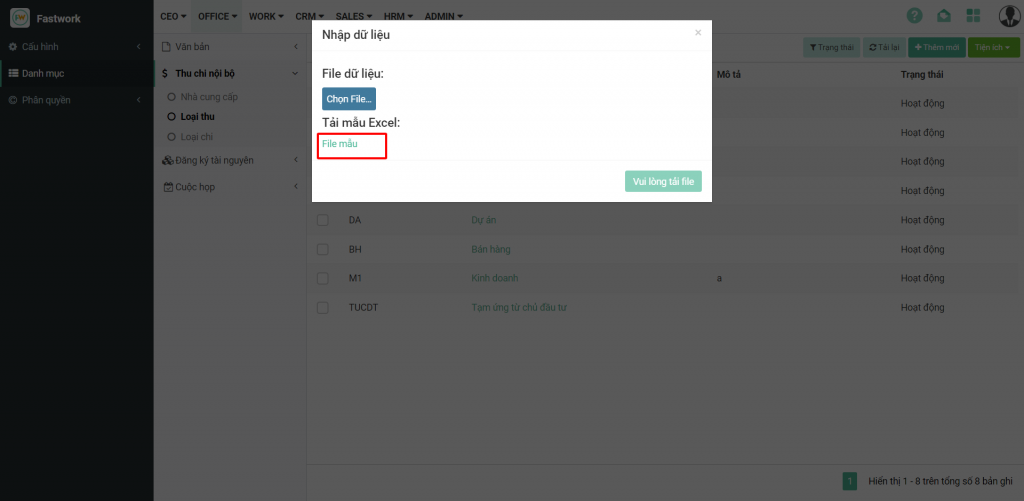
**Bước 2:** Tải **file mẫu** từ phần mềm để nhập các trường dữ liệu theo đúng quy định

<figure><img src="https://1934075284-files.gitbook.io/~/files/v0/b/gitbook-x-prod.appspot.com/o/spaces%2FSgjp5pKuJrPSuYtLZvBs%2Fuploads%2FQfrH7fdI1RszdulgFjcj%2Fimage.png?alt=media&#x26;token=3ffa2a21-afea-4c11-9f9f-97e3a1d0589e" alt=""><figcaption></figcaption></figure>

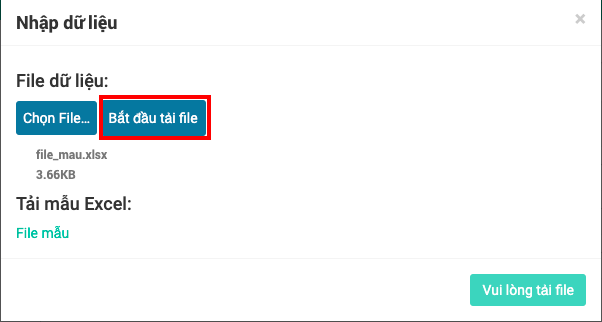
**Bước 3:** Nhập file dữ liệu theo file mẫu đã chuẩn hóa

Thao tác **Chọn file =>> Bắt đầu tải file =>> Nhập dữ liệu**

<figure><img src="https://1934075284-files.gitbook.io/~/files/v0/b/gitbook-x-prod.appspot.com/o/spaces%2FSgjp5pKuJrPSuYtLZvBs%2Fuploads%2FAKbVWqXXQKsMfNXaPi1O%2Fimage.png?alt=media&#x26;token=c5ad4cf3-c275-4176-bcf0-85a1818b40b7" alt=""><figcaption></figcaption></figure>

## 2. Cách thêm mới danh mục các loại chi

**Bước 1:** Từ Menu **OFFICE,** chọn **Quản trị phân hệ OFFICE+**

<figure><img src="https://1934075284-files.gitbook.io/~/files/v0/b/gitbook-x-prod.appspot.com/o/spaces%2FSgjp5pKuJrPSuYtLZvBs%2Fuploads%2FJUvaUh2L77R3CjyTdecJ%2Fimage.png?alt=media&#x26;token=d4947ddc-e898-4398-9edf-86054841ec3b" alt=""><figcaption></figcaption></figure>

**Bước 2 :** Chọn **Danh mục ->** chọn **Thu chi nội bộ** -> **Loại chi**-> **Thêm mới**

<figure><img src="https://1934075284-files.gitbook.io/~/files/v0/b/gitbook-x-prod.appspot.com/o/spaces%2FSgjp5pKuJrPSuYtLZvBs%2Fuploads%2FDq45QI6ATnDc9vwbZDjF%2Fimage.png?alt=media&#x26;token=9837be65-2164-43dd-a0d9-94c897a52aed" alt=""><figcaption></figcaption></figure>

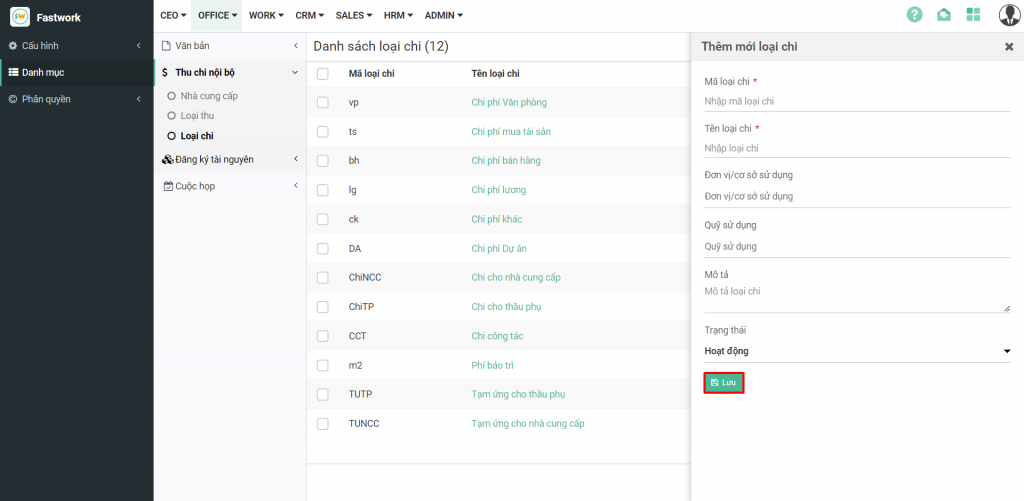
**Bước 3:** Nhập thông tin của Loại chi và **Lưu** lại

<figure><img src="https://1934075284-files.gitbook.io/~/files/v0/b/gitbook-x-prod.appspot.com/o/spaces%2FSgjp5pKuJrPSuYtLZvBs%2Fuploads%2FjgJWeSiQi11iuaBVhyjp%2Fimage.png?alt=media&#x26;token=625f71b7-7f5a-4849-97fd-c0966de55f5f" alt=""><figcaption></figcaption></figure>

**Ngoài ra, phần mềm cũng hộ trợ người dùng thêm mới các Nhà cung cấp từ file excel**

**Bước 1:** Từ **Danh sách loại chi** => **Chọn tiện ích** => **Nhập dữ liệu**

<figure><img src="https://1934075284-files.gitbook.io/~/files/v0/b/gitbook-x-prod.appspot.com/o/spaces%2FSgjp5pKuJrPSuYtLZvBs%2Fuploads%2FbGZPKcWY4736KQwQuRf6%2Fimage.png?alt=media&#x26;token=64d8a83f-ad4a-4688-8080-da5a9c86c459" alt=""><figcaption></figcaption></figure>

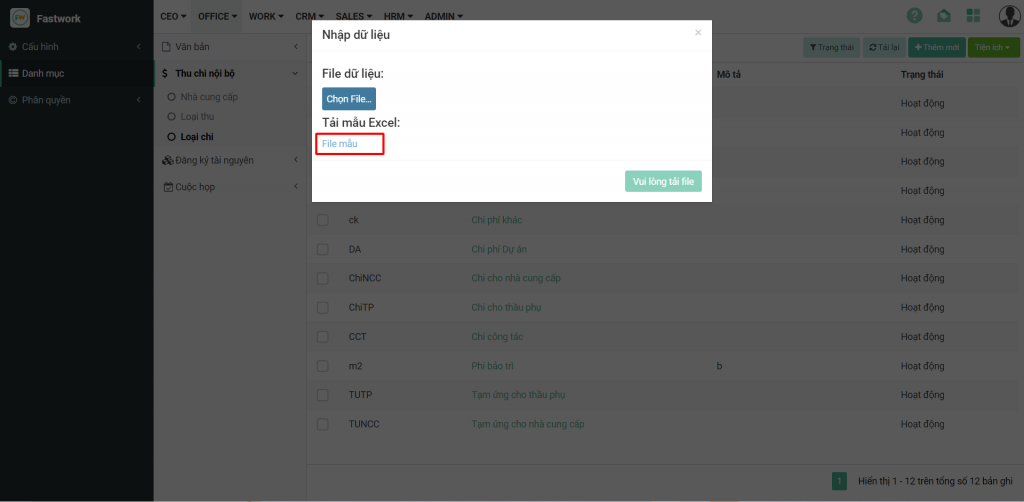
**Bước 2:** Tải **file mẫu** từ phần mềm để nhập các trường dữ liệu theo đúng quy định

<figure><img src="https://1934075284-files.gitbook.io/~/files/v0/b/gitbook-x-prod.appspot.com/o/spaces%2FSgjp5pKuJrPSuYtLZvBs%2Fuploads%2FSRJnRapCnGLKyuLI4uxF%2Fimage.png?alt=media&#x26;token=e14bb491-f1f6-4c32-81d1-1ef4538c46ee" alt=""><figcaption></figcaption></figure>

Thao tác **Chọn file =>> Bắt đầu tải file =>> Nhập dữ liệu**

<figure><img src="https://1934075284-files.gitbook.io/~/files/v0/b/gitbook-x-prod.appspot.com/o/spaces%2FSgjp5pKuJrPSuYtLZvBs%2Fuploads%2FaxDRhnAvbrJGy7lzCnju%2Fimage.png?alt=media&#x26;token=a30e24a1-eed3-4073-ac7b-296a51989be8" alt=""><figcaption></figcaption></figure>