> For the complete documentation index, see [llms.txt](https://help.fastwork.vn/fastwork-help-center/llms.txt). Markdown versions of documentation pages are available by appending `.md` to page URLs; this page is available as [Markdown](https://help.fastwork.vn/fastwork-help-center/huong-dan-s-dung-chi-tiet/fastwork-office/fastwork-expense/thao-tac-nguoi-dung/fastwork-co-ho-tro-xuat-cac-phieu-thu-chi-de-quan-ly-va-luu-tru-bang-file-excel.-thao-tac-cu-the-nhu.md).
# FastWork có hỗ trợ Xuất các phiếu thu chi để quản lý và lưu trữ bằng file excel. Thao tác cụ thể như
**Bước 1:** Từ giao diện **Danh sách phiếu Thu/chi** chọn loại **Quỹ** cần xuất dữ liệu ra file excel >> Chọn tiện ích >> Xuất dữ liệu
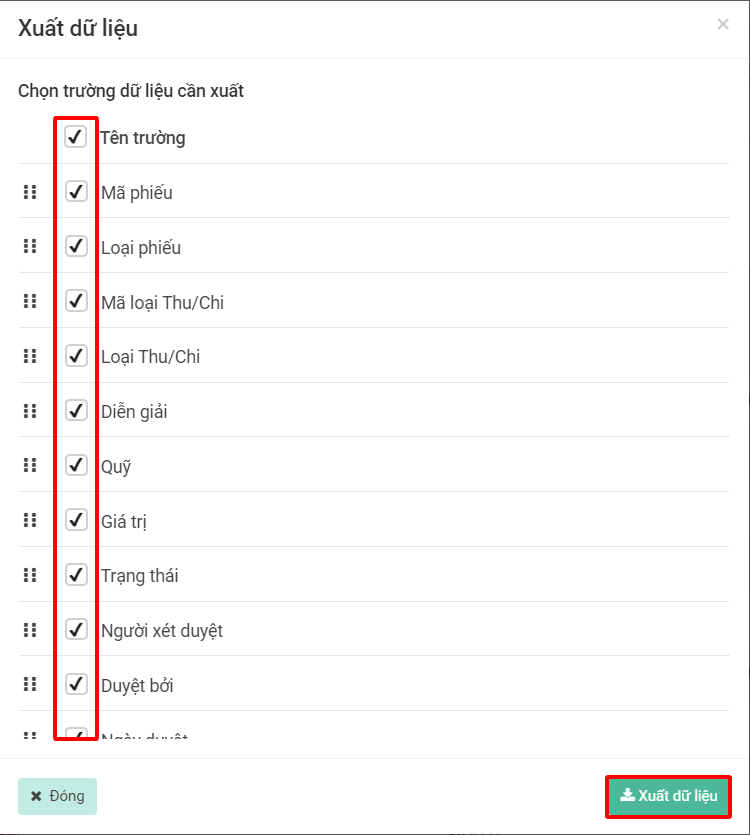
**Bước 2:** Chọn các **Trường dữ liệu** cần xuất thông tin =>> Chọn **Xuất dữ liệu**
Sau khi có thông báo như hình dưới là được.