> For the complete documentation index, see [llms.txt](https://help.fastwork.vn/fastwork-help-center/llms.txt). Markdown versions of documentation pages are available by appending `.md` to page URLs; this page is available as [Markdown](https://help.fastwork.vn/fastwork-help-center/huong-dan-s-dung-chi-tiet/fastwork-office/fastwork-expense/thao-tac-nguoi-dung/cach-tim-kiem-thong-tin-mot-phieu-thu-phieu-chi-tren-he-thong.md).
# Cách tìm kiếm thông tin một phiếu thu, phiếu chi trên hệ thống
**Bước 1:** Từ Menu **OFFICE** chọn **Thu chi nội bộ**
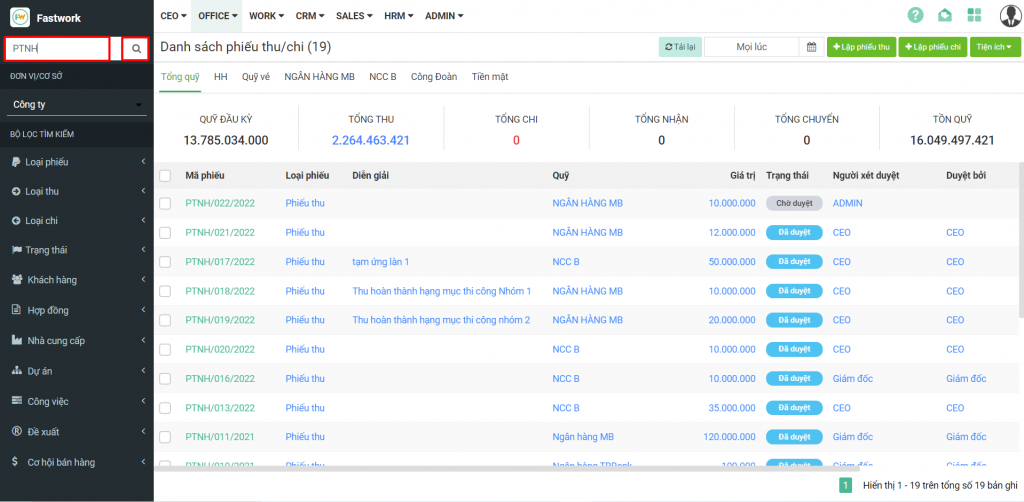
**Bước 2:** Điền thông tin tìm kiếm vào **ô tim kiếm** =>> Bấm vào **hình kính lúp** hoặc ấn phím **Enter** để phần mềm bắt đầu tìm cho mình
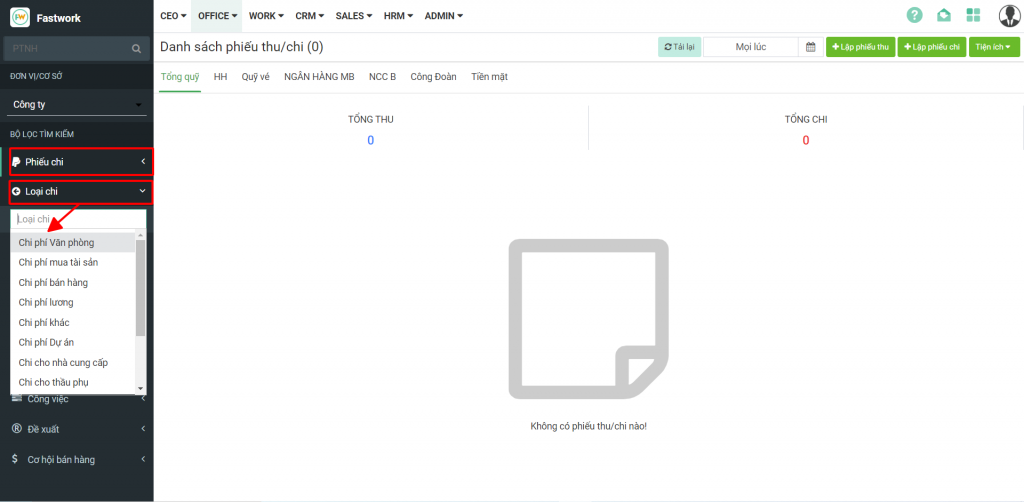
Bạn cũng có thể kết hợp các bộ lọc bên dưới để lọc các phiếu theo mong muốn
* Loại Phiếu: Phiếu thu/chi
* Loại thu/chi: theo danh mục các loại phiếu thu/chi mà mình đã cấu hình
* Trạng thái: Chờ duyệt/Đã duyệt
* Khách hàng/Hợp đồng/Dự án/Cơ hội bán hàng: Theo các module trong Work và CRM
* Nhà cung cấp: theo danh mục đã cấu hình