# Cách thêm mới nhiều văn bản đi – đến bằng excel

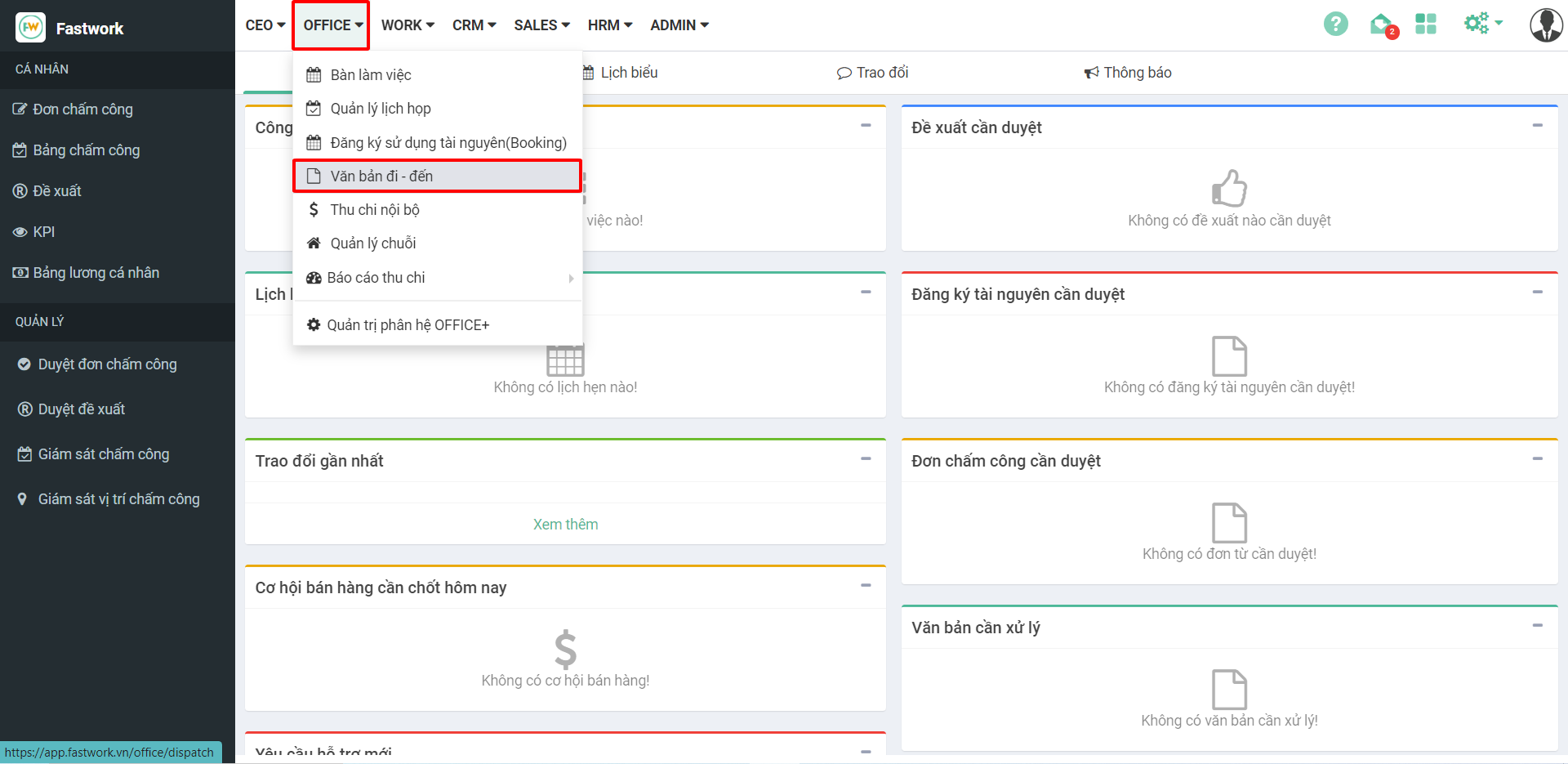
**Bước 1:** Từ menu **OFFICE** ⇒ Chọn **Văn bản đi – đến**

<figure><img src="https://1934075284-files.gitbook.io/~/files/v0/b/gitbook-x-prod.appspot.com/o/spaces%2FSgjp5pKuJrPSuYtLZvBs%2Fuploads%2FD17fKkMkCyhCh7h4MGGZ%2Fimage.png?alt=media&#x26;token=f43c0481-dd31-47d8-ae06-3fecb6d3b273" alt=""><figcaption></figcaption></figure>

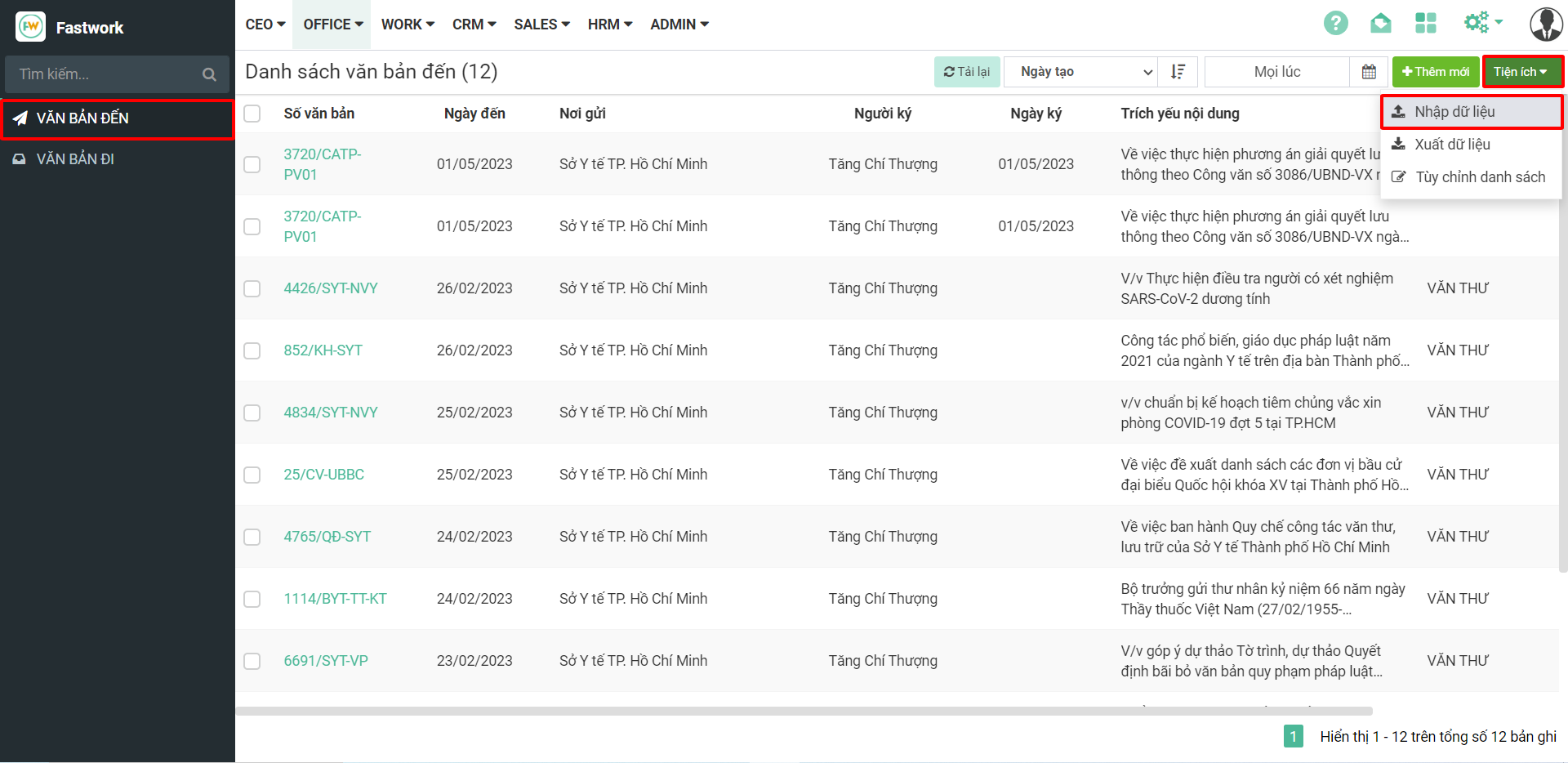
**Bước 2:** Tại giao diện **Văn bản đến** ⇒ chọn **Tiện ích** ⇒ chọn **Nhập dữ liệu**

<figure><img src="https://1934075284-files.gitbook.io/~/files/v0/b/gitbook-x-prod.appspot.com/o/spaces%2FSgjp5pKuJrPSuYtLZvBs%2Fuploads%2FQQw6GhhjA3Ouv7ls3tUS%2Fimage.png?alt=media&#x26;token=a3d40bd2-d522-49d5-9f2e-d84ccde8e3b9" alt=""><figcaption></figcaption></figure>

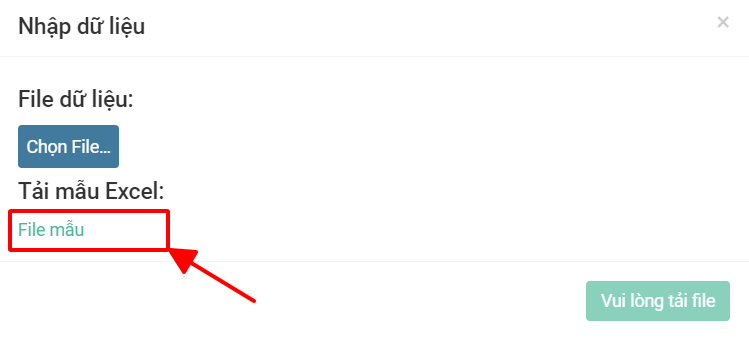
Khung Pop-up hiển thị ra, chọn **File mẫu** để tải về.

<figure><img src="https://1934075284-files.gitbook.io/~/files/v0/b/gitbook-x-prod.appspot.com/o/spaces%2FSgjp5pKuJrPSuYtLZvBs%2Fuploads%2FIYbEGN3lXJMA0g2AdbIn%2Fimage.png?alt=media&#x26;token=c60a7184-746c-4591-9db1-0cb9dc3fe2bc" alt=""><figcaption></figcaption></figure>

**Bước 3:** Điền đầy đủ các trường thông tin theo như file mẫu trên excel

<figure><img src="https://1934075284-files.gitbook.io/~/files/v0/b/gitbook-x-prod.appspot.com/o/spaces%2FSgjp5pKuJrPSuYtLZvBs%2Fuploads%2Fr9zB829unxHfmQLTbMXV%2Fimage.png?alt=media&#x26;token=3890b635-6f30-457d-a674-9479c1eec418" alt=""><figcaption></figcaption></figure>

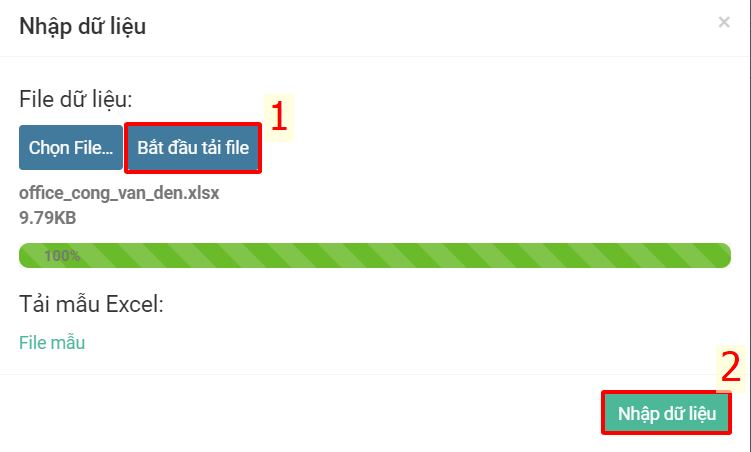
**Bước 4:** Sau khi điền đầy đủ thông tin quay lại giao diện của Fastwork bấm **Chọn file** (Chọn file vừa điền thông tin)

<figure><img src="https://1934075284-files.gitbook.io/~/files/v0/b/gitbook-x-prod.appspot.com/o/spaces%2FSgjp5pKuJrPSuYtLZvBs%2Fuploads%2F4SVWgNARJMYUtUmGghIJ%2Fimage.png?alt=media&#x26;token=40a13c93-f5aa-4287-88bb-cf166c9eda0d" alt=""><figcaption></figcaption></figure>

Chọn **Bắt đầu tải file** ⇒ đợi load dữ liệu 100% ⇒ chọn **Nhập dữ liệu**

<figure><img src="https://1934075284-files.gitbook.io/~/files/v0/b/gitbook-x-prod.appspot.com/o/spaces%2FSgjp5pKuJrPSuYtLZvBs%2Fuploads%2FJl6RHtLb0LMwKMtsfGWK%2Fimage.png?alt=media&#x26;token=87ccf6be-cd1e-4234-921e-f1c5240c8f90" alt=""><figcaption></figcaption></figure>

Sau khi upload và có thông báo như hình dưới là đã upload xong

<figure><img src="https://1934075284-files.gitbook.io/~/files/v0/b/gitbook-x-prod.appspot.com/o/spaces%2FSgjp5pKuJrPSuYtLZvBs%2Fuploads%2F5jBJyNZ7TlS3umzRTWjK%2Fimage.png?alt=media&#x26;token=c2038306-7249-40dd-9331-054998f70690" alt=""><figcaption></figcaption></figure>

{% hint style="info" %}
**\* Lưu ý:** Ta thực hiện thao tác tương tự cho văn bản đi
{% endhint %}