> For the complete documentation index, see [llms.txt](https://help.fastwork.vn/fastwork-help-center/llms.txt). Markdown versions of documentation pages are available by appending `.md` to page URLs; this page is available as [Markdown](https://help.fastwork.vn/fastwork-help-center/huong-dan-s-dung-chi-tiet/fastwork-hrm/fastwork-timesheet/thao-tac-quan-tri/thiet-lap-cau-hinh/kiem-tra-tinh-tuong-thich-giua-may-cham-cong-va-phan-mem-fastwork.md).
# Kiểm tra tính tương thích giữa Máy chấm công và phần mềm Fastwork
Hướng dẫn cách kiểm tra xem một máy chấm công có tích hợp đồng với phần mềm Fastwork hay không?
## Điều kiện tích hợp:
Máy chấm công vân tay phải kết nối được cloud (Có nhiều máy có thiết lập ethernet nhưng không có thiết lập cloud - Nhập thông tin cổng Port. Ethenet trên máy chấm công là để kết nối trong mạng LAN của công ty)
## Kiểm tra tính tương thích:
Đối với các MCC hiện hành, để kết nối với Fastwork, cần kiểm tra liên kết, bao gồm:
* Ethernet (kết nối mạng LAN)
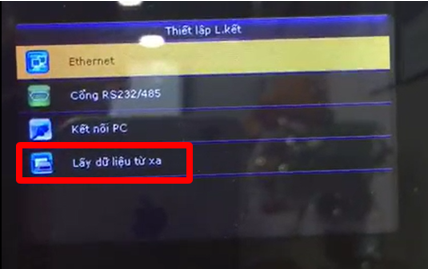
* Thiết lập kết nối đám mây (Cloud sever Setting) (hoặc Lấy dữ liệu từ xa)
**Bước 1: Thiết lập liên kết Ethernet**
Tại menu máy chấm công -> vào phần **Thiết lập liên kết** (Comm)
**Bước 2: Chọn mục Ethernet**
**Bước 3:** Kiểm tra máy cho phép nhập địa chỉ IP, thiết lập DHCP
**Bước 4: Kiểm tra Thiết lập liên kết đám mây (Cloud Sever Setting) (hoặc Lấy dữ liệu từ xa)**
Tại mục **Thiết lập liên kết** → chọn mục **Cài đặt máy chủ đám mây**
Hoặc lấy dữ liệu từ xa
Kiểm tra máy cho nhập địa chỉ IP (Địa chỉ máy chủ) và Cổng máy chủ
Hoặc:
Nếu đủ các điều kiện trên thì có thể liên kết máy chấm công với Fastwork
{% hint style="info" %}
Một số dòng MCC kết nối được với phần mềm Fastwork:
* Granding GT200: Máy chấm công vân tay [(link tham khảo) ](https://chamcongvantay.vn/products/may-cham-cong-van-tay-granding-gt200)
* Ronald Jack 3000TID-C: máy chấm công vân tay [(link tham khảo)](https://hacom.vn/may-cham-cong-ronald-jack-3000tid-c)
* Ronald Jack 4000TID-C: máy chấm công vân tay [(link tham khảo)](http://mitapro.net/may-cham-cong-ronald-jack/may-cham-cong-van-tay-ronald-jack-4000tid-c/)
* Ronald Jack F18: Máy chấm công vân tay kết hợp tính năng mở cửa [(link tham khảo)](http://mitapro.net/may-cham-cong-kiem-soat-cua/may-cham-cong-van-tay-va-kiem-soat-ra-vao-ronald-jack-f18-pro/)
* ZK-Teco Uface 602: Máy chấm công bằng khuôn mặt [(link tham khảo)](https://tctech.vn/he-thong-kiem-soat-ra-vao-zkteco-uface-602)
{% endhint %}