> For the complete documentation index, see [llms.txt](https://help.fastwork.vn/fastwork-help-center/llms.txt). Markdown versions of documentation pages are available by appending `.md` to page URLs; this page is available as [Markdown](https://help.fastwork.vn/fastwork-help-center/huong-dan-s-dung-chi-tiet/fastwork-hrm/fastwork-timesheet/thao-tac-nguoi-dung/don-tu-cham-cong/huong-dan-xoa-don-tu.md).
# Hướng dẫn xóa đơn từ
Để xóa đơn từ chưa duyệt FastWork hỗ trợ thực hiện thao tác trên nền tảng Web và Mobile:
## 1. Thao tác trên Web
**Bước 1:** Chọn **HRM** -> chọn **Đơn từ chấm công**
**Bước 2:** Tại mục Danh sách đơn từ -> chọn đơn từ cần xóa
Anh/chị chỉ có thể xóa các đơn chưa được ai phê duyệt. Đơn đã có hoạt động phê duyệt muốn xóa được cần phải thực hiện Hủy duyệt trả lại về cho người gửi.
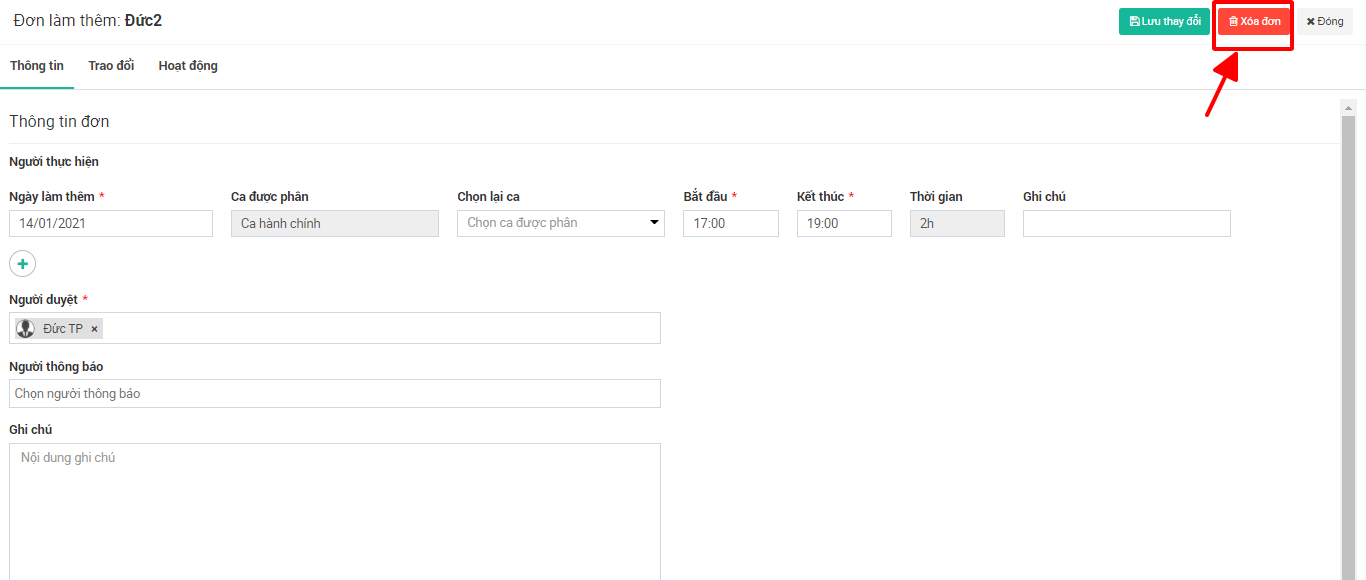
**Bước 3:** Chọn xóa đơn
## 2. Thao tác trên Mobile
* **Bước 1:** Từ giao diện chính chọn **dấu 3 gạch**
* **Bước 2:** Chọn **Đơn từ**
* **Bước 3:** Chọn **Chờ duyệt ⇒** chọn đơn cần xoá
* **Bước 4:** Bấm **Xoá** -> chọn **Có**