# Hướng dẫn theo dõi và quản lý đơn từ

**Bước 1:** Chọn **HRM** -> chọn **Đơn từ chấm công**

<figure><img src="https://1934075284-files.gitbook.io/~/files/v0/b/gitbook-x-prod.appspot.com/o/spaces%2FSgjp5pKuJrPSuYtLZvBs%2Fuploads%2Fl50D3Aawsz9CRuFXVJbP%2Fimage.png?alt=media&#x26;token=dbf25944-b8d6-4cf0-b749-65ac201295a0" alt=""><figcaption></figcaption></figure>

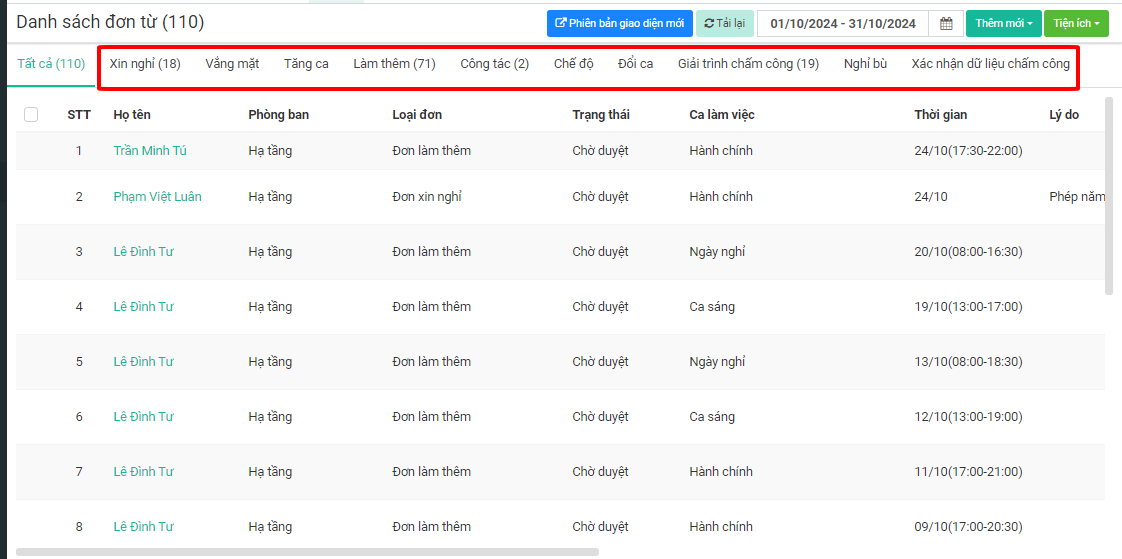
**Bước 2:** Để xem từng loại đơn cụ thể trong tháng, ta chọn từng Tab đơn từ tương ứng với các loại đơn từ

<figure><img src="https://1934075284-files.gitbook.io/~/files/v0/b/gitbook-x-prod.appspot.com/o/spaces%2FSgjp5pKuJrPSuYtLZvBs%2Fuploads%2FQOeBEKtC6yrM8qidaNxw%2Fimage.png?alt=media&#x26;token=37928e5f-134f-418d-aca3-43eb394a0ca7" alt=""><figcaption></figcaption></figure>

**Bước 3:** Để xem các đơn của tôi gửi lên, chọn bộ lọc **Đơn của tôi**

<figure><img src="https://1934075284-files.gitbook.io/~/files/v0/b/gitbook-x-prod.appspot.com/o/spaces%2FSgjp5pKuJrPSuYtLZvBs%2Fuploads%2FnliBBAWUzsOu4Ved909z%2Fimage.png?alt=media&#x26;token=9824b95c-91d7-4080-a04e-a44215de2caf" alt=""><figcaption></figcaption></figure>

**Bước 4:** Để xem các đơn tôi duyệt, chọn bộ lọc **Đơn tôi duyệt**

<figure><img src="https://1934075284-files.gitbook.io/~/files/v0/b/gitbook-x-prod.appspot.com/o/spaces%2FSgjp5pKuJrPSuYtLZvBs%2Fuploads%2FfWIZ0I6u660In7ZMdhpc%2Fimage.png?alt=media&#x26;token=32e1949b-941a-4f03-9563-f94dcd82a53f" alt=""><figcaption></figcaption></figure>

**Bước 5:** Để xem theo trạng thái đơn từ, ta chọn bộ lọc trạng thái **Chờ duyệt, đã duyệt, không duyệt**

<figure><img src="https://1934075284-files.gitbook.io/~/files/v0/b/gitbook-x-prod.appspot.com/o/spaces%2FSgjp5pKuJrPSuYtLZvBs%2Fuploads%2FC9cMoMoxj1b5V0S2wJwp%2Fimage.png?alt=media&#x26;token=90ddbd3b-2a75-43d5-a24e-cac50a3a24b3" alt=""><figcaption></figcaption></figure>

**Bước 6:** Để lọc theo lý do cụ thể cho từng loại đơn, chọn bộ lọc **Lý do**

<figure><img src="https://1934075284-files.gitbook.io/~/files/v0/b/gitbook-x-prod.appspot.com/o/spaces%2FSgjp5pKuJrPSuYtLZvBs%2Fuploads%2F3INSOPeRv6bTJNfG4vu0%2Fimage.png?alt=media&#x26;token=daff0daf-f792-4452-8638-42dba6408dea" alt=""><figcaption></figcaption></figure>

**Bước 7:** Để lọc theo người nộp nào đó cụ thể, ta chọn bộ lọc **Người nộp**

<figure><img src="https://1934075284-files.gitbook.io/~/files/v0/b/gitbook-x-prod.appspot.com/o/spaces%2FSgjp5pKuJrPSuYtLZvBs%2Fuploads%2F8CXfKmpuN6Fc2aKjBjgV%2Fimage.png?alt=media&#x26;token=0231892e-8f77-43b4-b287-fd5b094a5324" alt=""><figcaption></figcaption></figure>

**Bước 8:** Muốn lọc theo một khoảng thời gian cụ thể, ta chọn bộ lọc **Thời gian**

<figure><img src="https://1934075284-files.gitbook.io/~/files/v0/b/gitbook-x-prod.appspot.com/o/spaces%2FSgjp5pKuJrPSuYtLZvBs%2Fuploads%2Fdw68tIb6yJdHUYpqtIdA%2Fimage.png?alt=media&#x26;token=0a82d4dc-dd91-487e-ab6a-a217fd89ac47" alt=""><figcaption></figcaption></figure>