> For the complete documentation index, see [llms.txt](https://help.fastwork.vn/fastwork-help-center/llms.txt). Markdown versions of documentation pages are available by appending `.md` to page URLs; this page is available as [Markdown](https://help.fastwork.vn/fastwork-help-center/huong-dan-s-dung-chi-tiet/fastwork-hrm/fastwork-staff/thao-tac-nguoi-dung/cach-nguoi-dung-xem-lai-cac-yeu-cau-chinh-sua-ho-so-nhan-su-da-gui-di.md).
# Cách người dùng xem lại các yêu cầu chỉnh sửa hồ sơ nhân sự đã gửi đi
Để xem lại các yêu cầu chỉnh sửa của mình đã gửi và trạng thái phê duyệt ra sao anh/chị thực hiện như sau:
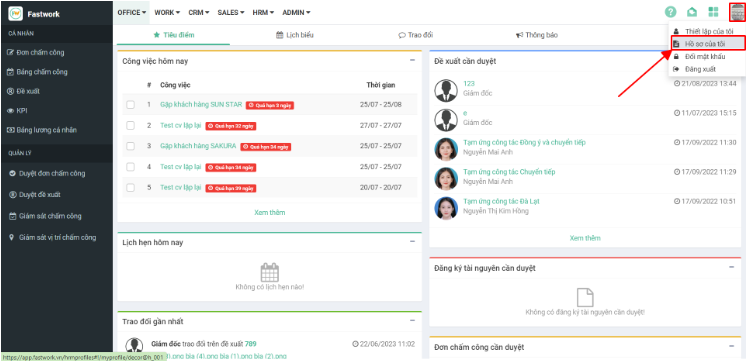
**Bước 1:** Từ phần avatar anh/chị chọn **Hồ sơ của tôi**
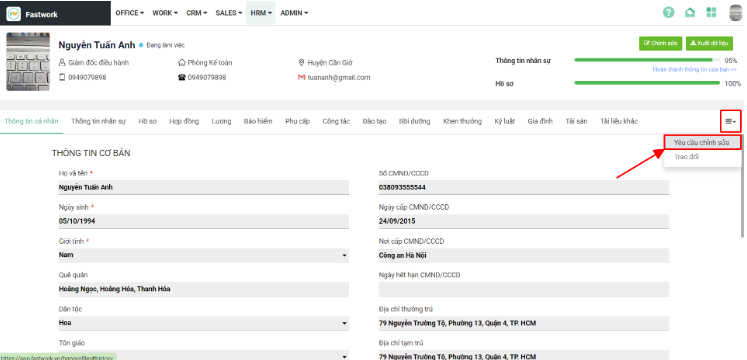
**Bước 2:** Tại đây anh/chị sẽ xem được các thông tin nhân sự của chính mình:
**Bước 3:** Chọn dấu 3 gạch -> chọn **Yêu cầu chỉnh sửa** để xem các yêu cầu đã gửi
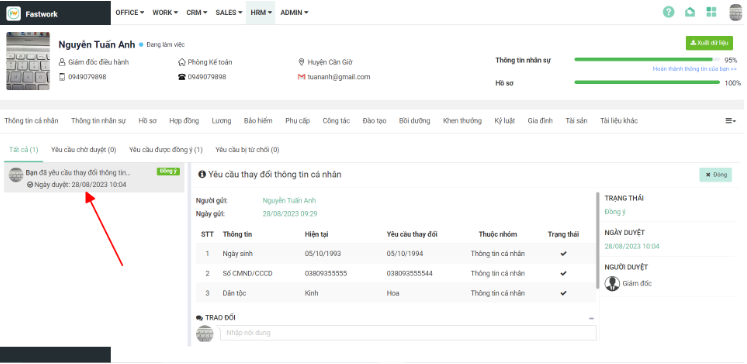
**Bước 4:** Tại đây anh/chị sẽ thấy các yêu cầu đang chờ duyệt, yêu cầu đã duyệt hoặc yêu cầu bị từ chối
* Click vào nội dung chi tiết cần xem thông tin
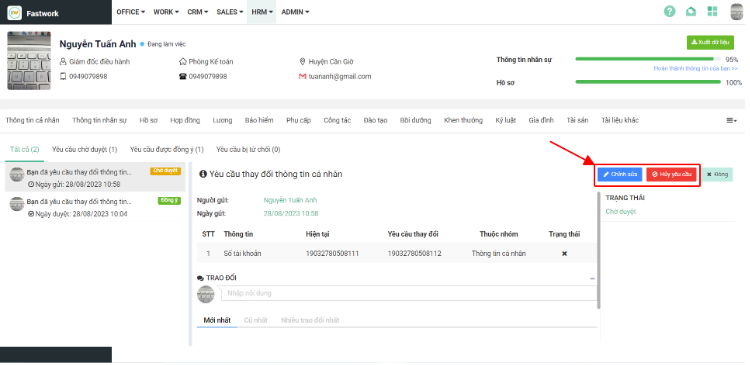
* Với các yêu cầu chờ duyệt anh/chị có thể thực hiện **Chỉnh sửa** lại thông tin (nếu có)
* Nếu anh/chị muốn hủy yêu cầu, không muốn chỉnh sửa thông tin đó nữa thực hiện chọn nút **Hủy yêu cầu**
* Ngoài ra anh/chị cũng có thể thực hiện trao đổi trong yêu cầu chỉnh sửa để bộ phận nhân sự nắm được thông tin (nếu muốn). Thực hiện @ gán tên người cần nhận được thông báo này