# Cách chuyển trạng thái/loại hồ sơ nhân sự

Với các hồ sơ đã nhập lên hệ thống, anh/chị muốn chuyển loại hồ sơ nhân sự thực hiện như sau:

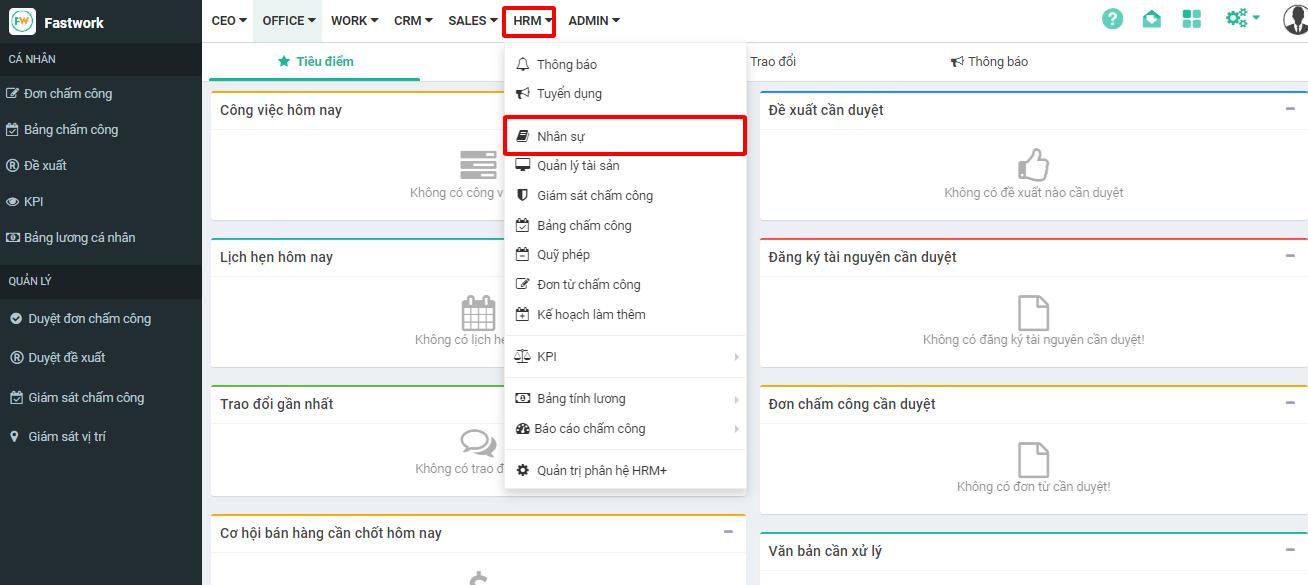
**Bước 1:** Từ menu **HRM** -> chọn **Nhân sự**

<figure><img src="https://1934075284-files.gitbook.io/~/files/v0/b/gitbook-x-prod.appspot.com/o/spaces%2FSgjp5pKuJrPSuYtLZvBs%2Fuploads%2F7wfLnKo2KlgkKyEwCtTe%2Fimage.png?alt=media&#x26;token=0085d77c-7688-4063-9b3e-7197c03f6a03" alt=""><figcaption></figcaption></figure>

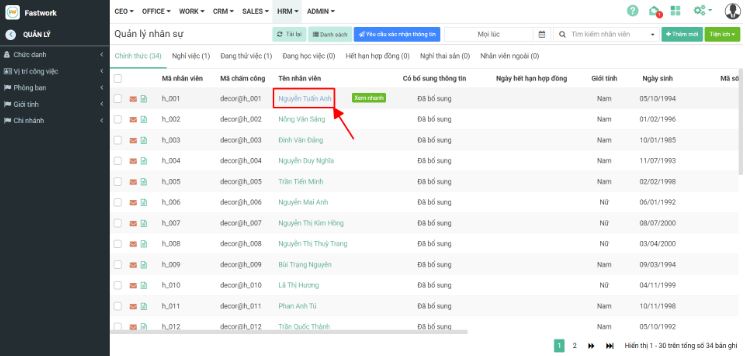
**Bước 2:** Từ giao diện nhân sự chọn **Quản lý**

<figure><img src="https://1934075284-files.gitbook.io/~/files/v0/b/gitbook-x-prod.appspot.com/o/spaces%2FSgjp5pKuJrPSuYtLZvBs%2Fuploads%2FlCqPGn8X7O8kIOXxbaKn%2Fimage.png?alt=media&#x26;token=aef2e496-abcd-4af3-8188-4197ab6b6e3d" alt=""><figcaption></figcaption></figure>

**Bước 3:** Chọn hồ sơ nhân sự cần chuyển

<figure><img src="https://1934075284-files.gitbook.io/~/files/v0/b/gitbook-x-prod.appspot.com/o/spaces%2FSgjp5pKuJrPSuYtLZvBs%2Fuploads%2FV7t8NEJAVyrGfKKoNED0%2Fimage.png?alt=media&#x26;token=36888d99-f67f-4ef1-877d-c13307758dc2" alt=""><figcaption></figcaption></figure>

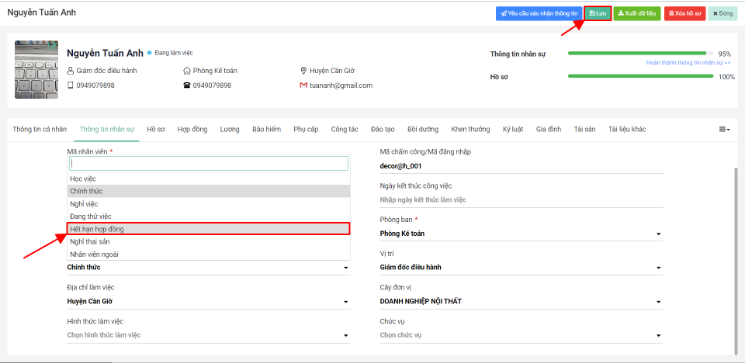
**Bước 4:** Ở tab **Thông tin nhân sự** chọn lại loại hồ sơ nhân viên

<figure><img src="https://1934075284-files.gitbook.io/~/files/v0/b/gitbook-x-prod.appspot.com/o/spaces%2FSgjp5pKuJrPSuYtLZvBs%2Fuploads%2F3KKJ2fEB2u1hbLY0ILUP%2Fimage.png?alt=media&#x26;token=aabe80ef-4fe9-486f-9cc2-3ce002f8a4a6" alt=""><figcaption></figcaption></figure>

**Bước 5:** Chọn loại hồ sơ cần chuyển sang và ấn **Lưu** để lưu lại thông tin
<figure><img src="https://1934075284-files.gitbook.io/~/files/v0/b/gitbook-x-prod.appspot.com/o/spaces%2FSgjp5pKuJrPSuYtLZvBs%2Fuploads%2FqbSF0Ay2J6ePe35QeLBZ%2Fimage.png?alt=media&#x26;token=827b2c22-16a0-4b73-8f4c-ddbf29d3c19c" alt=""><figcaption></figcaption></figure>