# Hướng dẫn tính toán lại dữ liệu trên bảng lương tháng

Để đảm bảo dữ liệu trên bảng lương tháng được chính xác nhất, trước khi thực hiện đối chiếu giá trị hoặc gửi báo cáo bảng lương anh/ chị  nên thực hiện tính toán lại dữ liệu để dữ liệu được cập nhật mới nhất.

**Bước 1:** Chọn **HRM** -> chọn **Bảng tính lương** -> chọn **Bảng lương tháng**

<figure><img src="https://fc-use1-00-pics-bkt-00.s3.amazonaws.com/79620180ce66e27c66759c0d02a48a90ecc67a56e568b1d445f1e7ebd35a3fbc/f_faq-image/u_3e38da1de48fe4f2078620490fbd5d467f75d2fd226e5659079160450f082d15/img_9jt7b5c1lg_fa4e8342fd81111e18ca7b9f820e63719f226fa5d7d4bee5e1f562beab9e8fd2.png" alt=""><figcaption><p>Giao diện chức năng Bảng lương tháng</p></figcaption></figure>

**Hoặc:**&#x20;

<figure><img src="https://fc-use1-00-pics-bkt-00.s3.amazonaws.com/79620180ce66e27c66759c0d02a48a90ecc67a56e568b1d445f1e7ebd35a3fbc/f_faq-image/u_3e38da1de48fe4f2078620490fbd5d467f75d2fd226e5659079160450f082d15/img_uho6a6sg14_dc535aca52b524ff650af942e3e41b414d3ff1c74a7d9c99c558d168de247989.png" alt=""><figcaption></figcaption></figure>

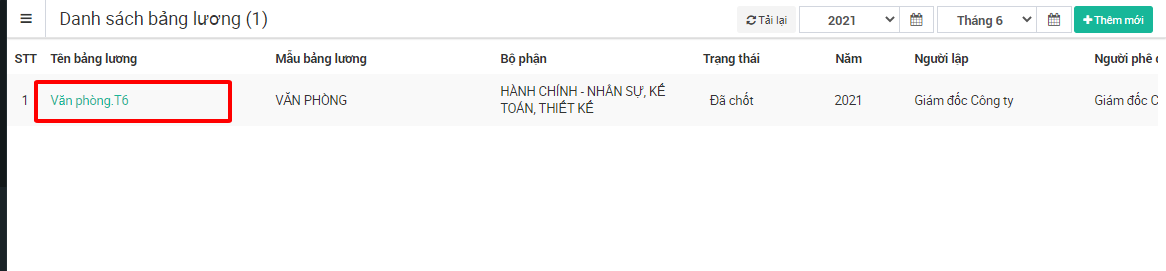
**Bước 2:** Chọn bảng lương tháng cần tính toán lại dữ liệu

<figure><img src="https://fc-use1-00-pics-bkt-00.s3.amazonaws.com/79620180ce66e27c66759c0d02a48a90ecc67a56e568b1d445f1e7ebd35a3fbc/f_faq-image/u_3e38da1de48fe4f2078620490fbd5d467f75d2fd226e5659079160450f082d15/img_1624634915653.png" alt=""><figcaption></figcaption></figure>

**Bước 3:** Chọn **Tiện ích** -> chọn **Tính lại bảng lương**&#x20;

Đợi phần mềm tính toán lại dữ liệu xong anh/ chị có thể xem được dữ liệu bảng lương tháng theo số liệu mới nhất

<figure><img src="https://fc-use1-00-pics-bkt-00.s3.amazonaws.com/79620180ce66e27c66759c0d02a48a90ecc67a56e568b1d445f1e7ebd35a3fbc/f_faq-image/u_3e38da1de48fe4f2078620490fbd5d467f75d2fd226e5659079160450f082d15/img_1624634967405.png" alt=""><figcaption><p>Giao diện bảng lương tháng</p></figcaption></figure>

{% hint style="info" %}
Trong trường hợp tính toán lại bảng lương thấy số liệu vẫn chưa chính xác, anh/ chị thực hiện truy cập **Bảng chấm công**, kiểm tra lại dữ liệu. Sau đó quay lại **Bảng lương tháng** và thực hiện Tính toán lại bảng lương thêm 1 lần nữa. Lúc này dữ liệu sẽ được tính toán lại theo bảng công vừa truy cập
{% endhint %}


---

# Agent Instructions: Querying This Documentation

If you need additional information that is not directly available in this page, you can query the documentation dynamically by asking a question.

Perform an HTTP GET request on the current page URL with the `ask` query parameter:

```
GET https://help.fastwork.vn/fastwork-help-center/huong-dan-s-dung-chi-tiet/fastwork-hrm/fastwork-payroll/huong-dan-thiet-lap/huong-dan-bang-luong-thang/huong-dan-tinh-toan-lai-du-lieu-tren-bang-luong-thang.md?ask=<question>
```

The question should be specific, self-contained, and written in natural language.
The response will contain a direct answer to the question and relevant excerpts and sources from the documentation.

Use this mechanism when the answer is not explicitly present in the current page, you need clarification or additional context, or you want to retrieve related documentation sections.
