# Hướng dẫn thanh toán đơn mua hàng

## Giao diện Web

### Cách 1: Thanh toán trên từng đơn

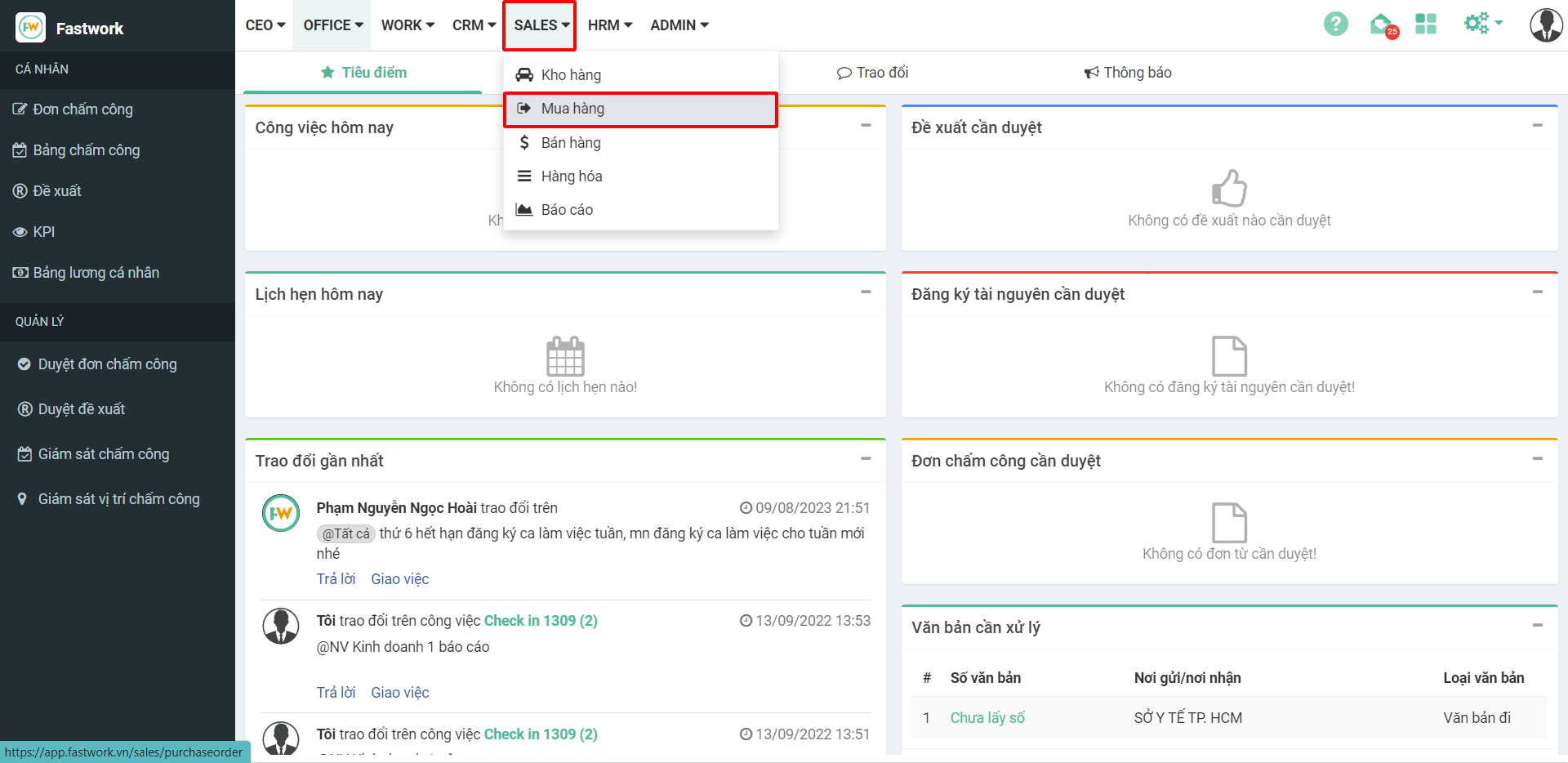
**Bước 1:** Từ menu **SALE** ⇒ chọn **Mua hàng**

<figure><img src="https://1934075284-files.gitbook.io/~/files/v0/b/gitbook-x-prod.appspot.com/o/spaces%2FSgjp5pKuJrPSuYtLZvBs%2Fuploads%2FoApW2wbDB9f3KKPM04nn%2Fimage.png?alt=media&#x26;token=8b845338-1838-4872-beed-0e362d4e319a" alt=""><figcaption></figcaption></figure>

**Bước 2:** Chọn **Mã mua hàng** cần thanh toán

<figure><img src="https://1934075284-files.gitbook.io/~/files/v0/b/gitbook-x-prod.appspot.com/o/spaces%2FSgjp5pKuJrPSuYtLZvBs%2Fuploads%2FgdeM1PF1MhVQR7YcJj4J%2Fimage.png?alt=media&#x26;token=1c691ce7-5daa-4b12-af9e-b1be9feba162" alt=""><figcaption></figcaption></figure>

**Bước 3:** Chọn icon **ATM** để thanh toán

<figure><img src="https://1934075284-files.gitbook.io/~/files/v0/b/gitbook-x-prod.appspot.com/o/spaces%2FSgjp5pKuJrPSuYtLZvBs%2Fuploads%2FVpZnrGUJJ9utl9cTsuJN%2Fimage.png?alt=media&#x26;token=9de337a4-fe86-4471-a8e5-515f3daf9bec" alt=""><figcaption></figcaption></figure>

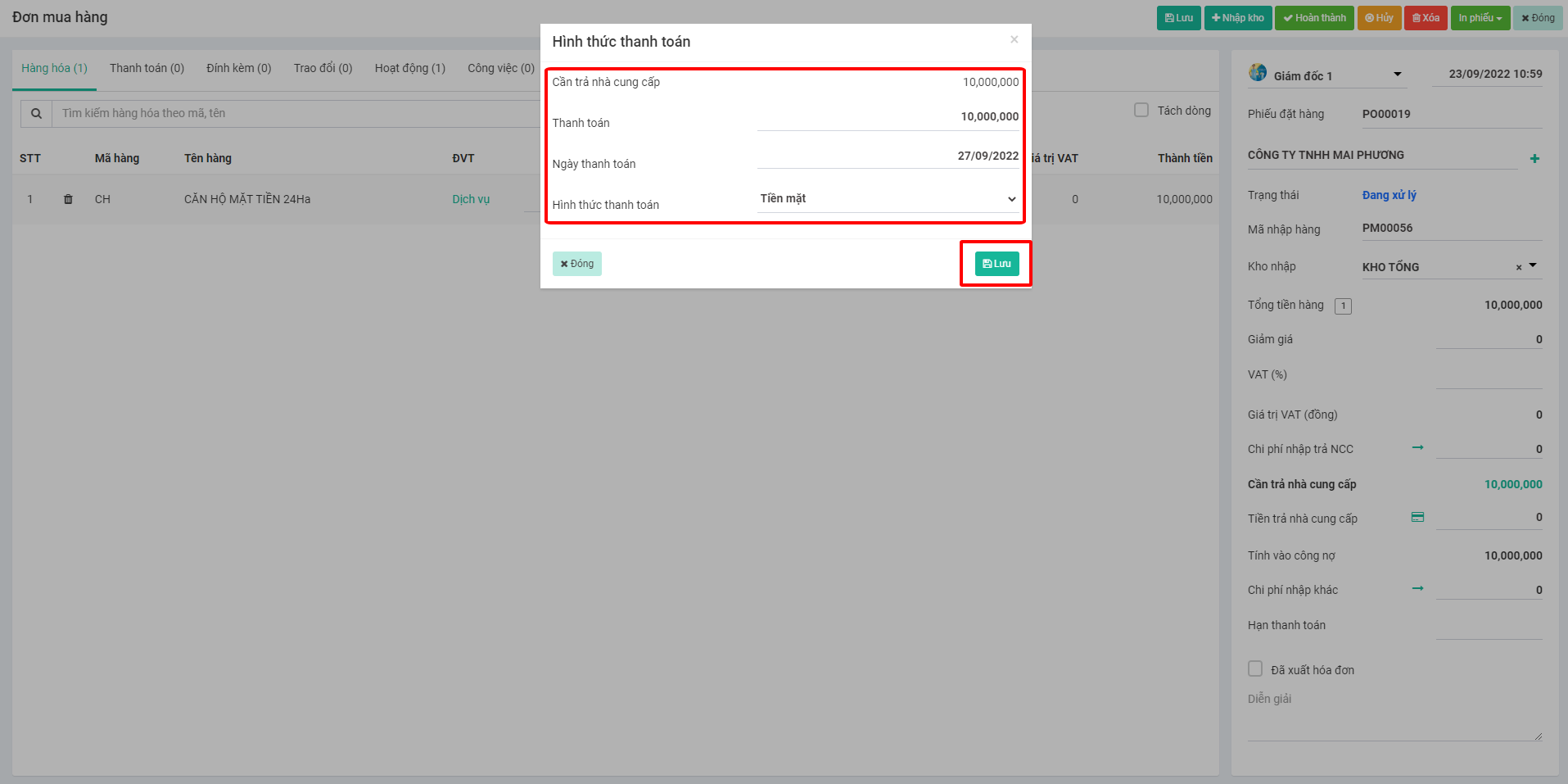
**Bước 4:** Điền thông tin thanh toán, sau đó ấn **Lưu**
<figure><img src="https://1934075284-files.gitbook.io/~/files/v0/b/gitbook-x-prod.appspot.com/o/spaces%2FSgjp5pKuJrPSuYtLZvBs%2Fuploads%2FUzynQLYVfTFB1lzHd43a%2Fimage.png?alt=media&#x26;token=f794c1b6-b63d-4ccf-83d6-0703bf8fa944" alt=""><figcaption></figcaption></figure>

### Cách 2: Thanh toán nhiều đơn

Để thanh toán nhiều đơn thì các đơn mua phải chung NCC

**Bước 1:** Từ menu **SALE** ⇒ chọn **Mua hàng**

<figure><img src="https://1934075284-files.gitbook.io/~/files/v0/b/gitbook-x-prod.appspot.com/o/spaces%2FSgjp5pKuJrPSuYtLZvBs%2Fuploads%2FIx4NCxvo90gJ3xizeLUy%2Fimage.png?alt=media&#x26;token=a6132616-83af-47b2-b966-2a2a3163851d" alt=""><figcaption></figcaption></figure>

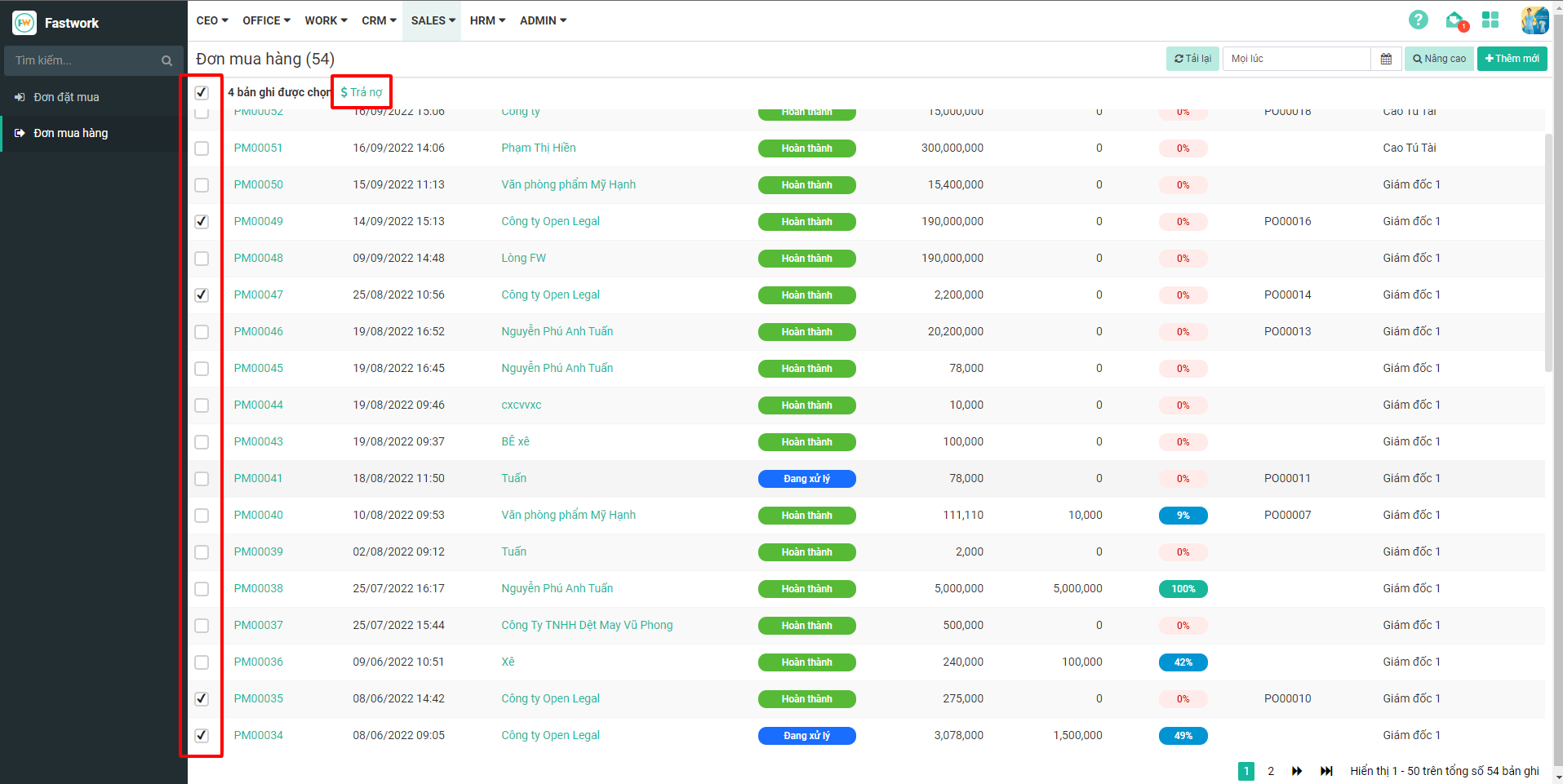
**Bước 2:** Tick chọn vào các đơn mua cần trả ⇒ chọn **Trả nợ**

<figure><img src="https://1934075284-files.gitbook.io/~/files/v0/b/gitbook-x-prod.appspot.com/o/spaces%2FSgjp5pKuJrPSuYtLZvBs%2Fuploads%2F5dN0WGmPXPYnuZS1pCHU%2Fimage.png?alt=media&#x26;token=f3c031f1-ac2f-4b9f-b75a-da1c167689e9" alt=""><figcaption></figcaption></figure>

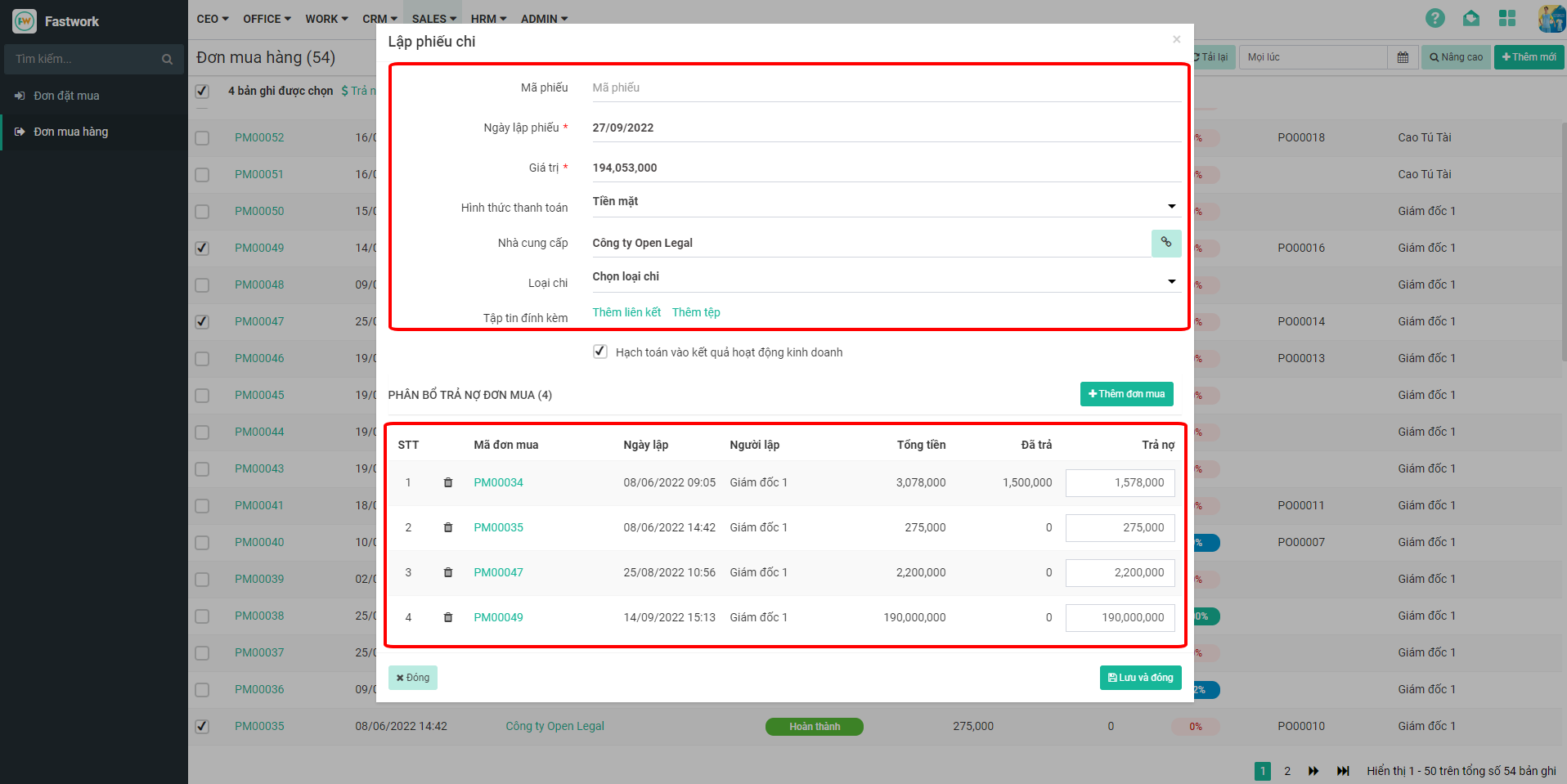
**Bước 3:** Nhập giá trị thanh toán ⇒ sau đó phân bổ cho các đơn mua

<figure><img src="https://1934075284-files.gitbook.io/~/files/v0/b/gitbook-x-prod.appspot.com/o/spaces%2FSgjp5pKuJrPSuYtLZvBs%2Fuploads%2FAgZO3BOj2StlRHD4Kvi4%2Fimage.png?alt=media&#x26;token=7a90fb1f-b65e-47e5-a22d-d8522015aa6b" alt=""><figcaption></figcaption></figure>

## Giao diện Mobile

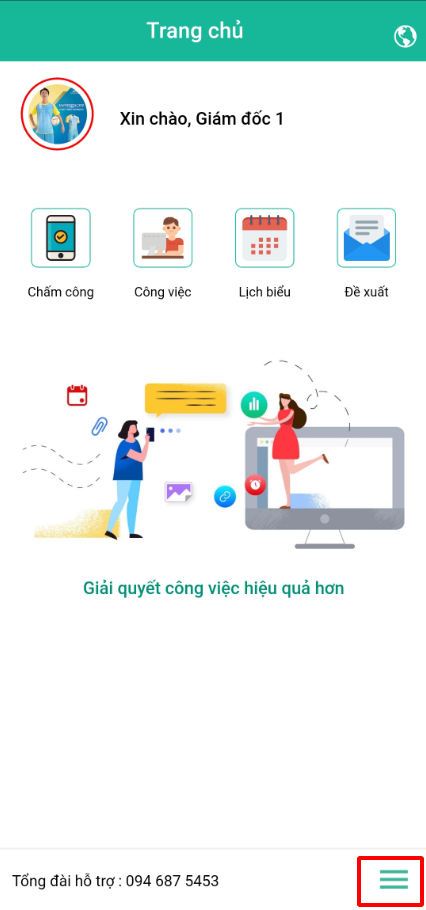
**Bước 1:** Từ giao diện chính chọn **dấu 3 gạch**

<figure><img src="https://1934075284-files.gitbook.io/~/files/v0/b/gitbook-x-prod.appspot.com/o/spaces%2FSgjp5pKuJrPSuYtLZvBs%2Fuploads%2FwwmHgm3yfKBJag2qz4fB%2Fimage.png?alt=media&#x26;token=802a2998-ae9d-41e5-bdf1-e02ef421ac8e" alt=""><figcaption></figcaption></figure>

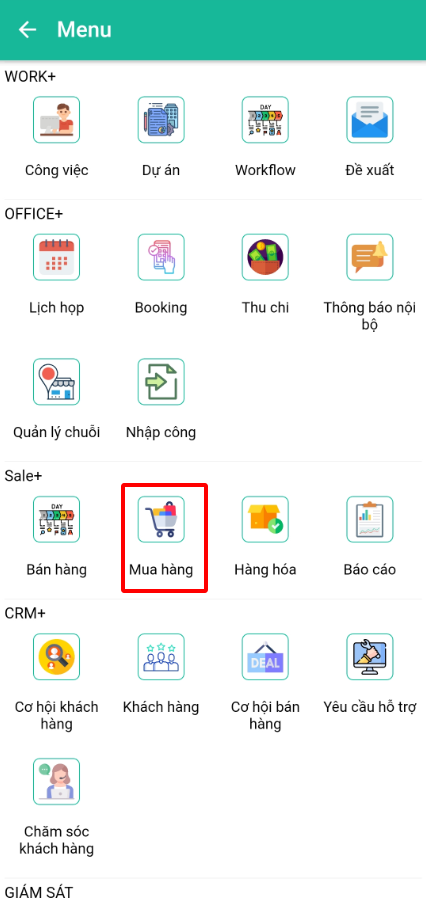
**Bước 2:** Trong mục **Sale+ ⇒** chọn **Mua hàng**

<figure><img src="https://1934075284-files.gitbook.io/~/files/v0/b/gitbook-x-prod.appspot.com/o/spaces%2FSgjp5pKuJrPSuYtLZvBs%2Fuploads%2FvhIsGvFjUgMjwCHkz2TH%2Fimage.png?alt=media&#x26;token=a81a7699-fa10-4972-bcfb-ac5fd2e5b858" alt=""><figcaption></figcaption></figure>

**Bước 3:** Chọn vào **dấu 4 gạch**

<figure><img src="https://1934075284-files.gitbook.io/~/files/v0/b/gitbook-x-prod.appspot.com/o/spaces%2FSgjp5pKuJrPSuYtLZvBs%2Fuploads%2F9N1qY35xYwtYjSvjpqJD%2Fimage.png?alt=media&#x26;token=b0e1b81e-19ad-4f92-8832-19da244096d7" alt=""><figcaption></figcaption></figure>

**Bước 4:** Chọn vào **Đơn mua hàng**

<figure><img src="https://1934075284-files.gitbook.io/~/files/v0/b/gitbook-x-prod.appspot.com/o/spaces%2FSgjp5pKuJrPSuYtLZvBs%2Fuploads%2FjqFOl8ZVBiVectJ94qaa%2Fimage.png?alt=media&#x26;token=49764099-d416-48e1-a7b5-6c342a003d24" alt=""><figcaption></figcaption></figure>

**Bước 5:** Chọn đơn mua hàng cần thanh toán

<figure><img src="https://1934075284-files.gitbook.io/~/files/v0/b/gitbook-x-prod.appspot.com/o/spaces%2FSgjp5pKuJrPSuYtLZvBs%2Fuploads%2F91BIOTmXzrRA93Tsxbak%2Fimage.png?alt=media&#x26;token=963a0802-f579-4752-8160-fb9f80975d4f" alt=""><figcaption></figcaption></figure>

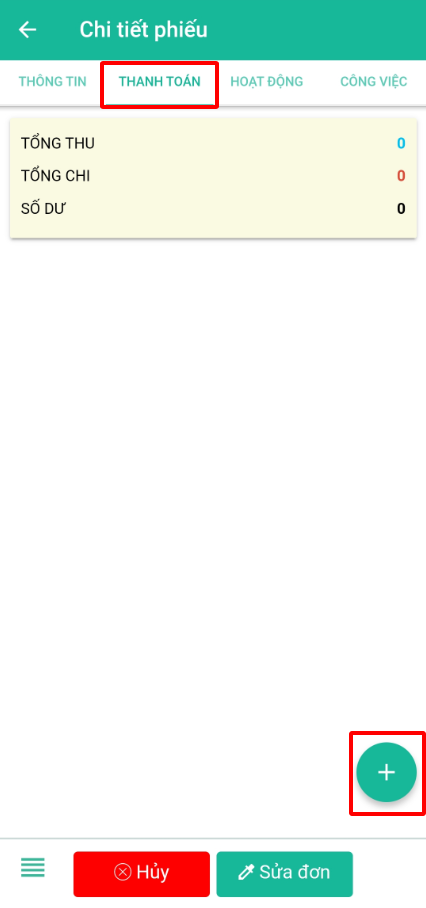
**Bước 6:** Chuyển sang tab **Thanh toán ⇒** bấm nút dấu **+** để tạo mới thanh toán

<figure><img src="https://1934075284-files.gitbook.io/~/files/v0/b/gitbook-x-prod.appspot.com/o/spaces%2FSgjp5pKuJrPSuYtLZvBs%2Fuploads%2FeMIlKjvpohIQXLcQOGkw%2Fimage.png?alt=media&#x26;token=3f4c7efd-5113-4df4-9384-3beae3ab0df5" alt=""><figcaption></figcaption></figure>

**Bước 7:** Nhập thông tin thanh toán, sau đó ấn **Lưu**

<figure><img src="https://1934075284-files.gitbook.io/~/files/v0/b/gitbook-x-prod.appspot.com/o/spaces%2FSgjp5pKuJrPSuYtLZvBs%2Fuploads%2FIk9IW2fyaqrBQ3PhDrxb%2Fimage.png?alt=media&#x26;token=13fd12c6-2b96-4d33-b68b-fae368d97de5" alt=""><figcaption></figcaption></figure>