# Hướng dẫn thêm mới phiếu nhập và xuất kho

## Thêm mới phiếu nhập

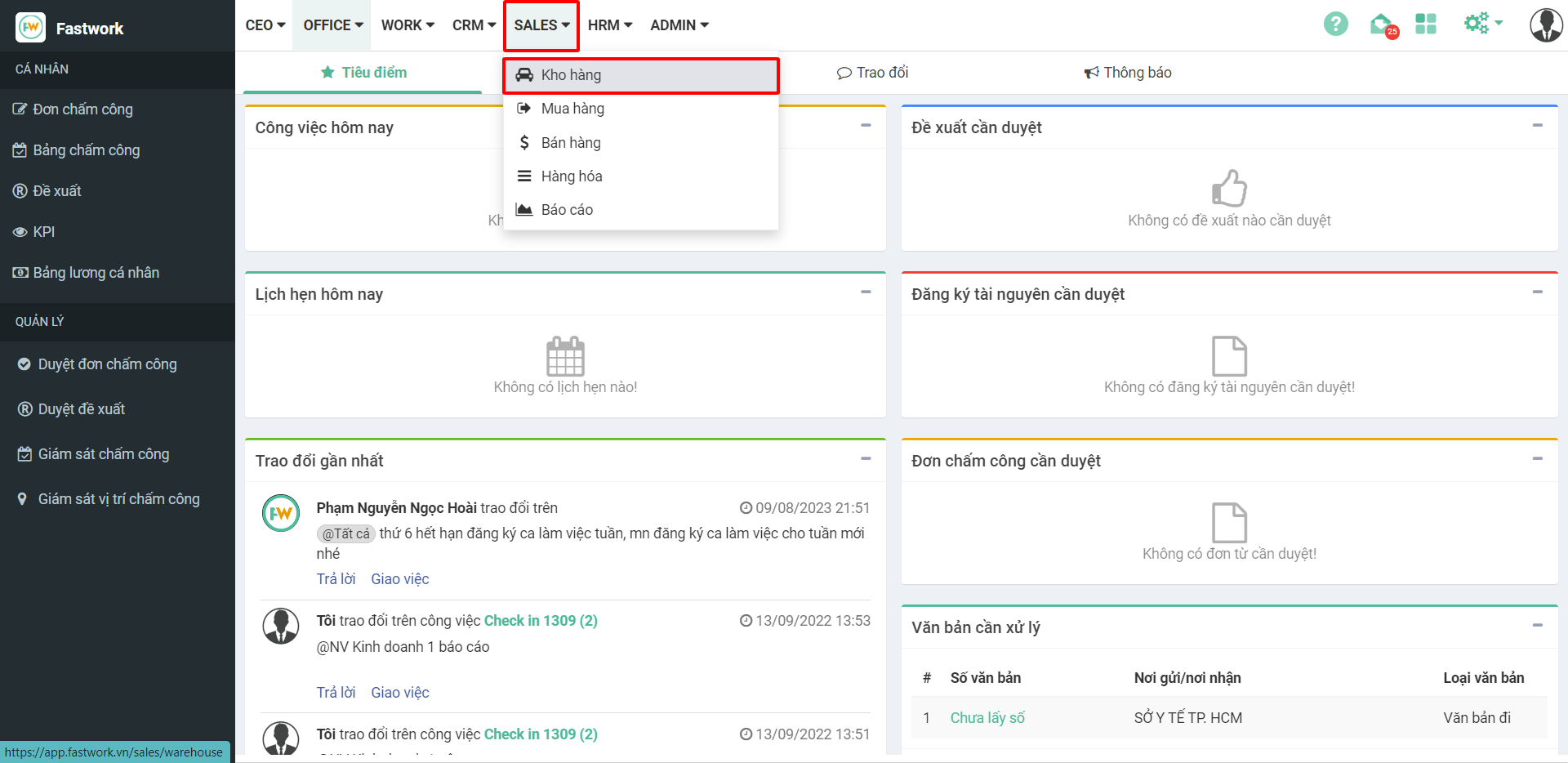
**Bước 1:** Từ menu **SALE** ⇒ chọn **Kho hàng**

<figure><img src="https://1934075284-files.gitbook.io/~/files/v0/b/gitbook-x-prod.appspot.com/o/spaces%2FSgjp5pKuJrPSuYtLZvBs%2Fuploads%2FqMejHGWQdIL1EyHcoRx9%2Fimage.png?alt=media&#x26;token=873b2cfe-f282-49a7-a2cf-f40c4d912d16" alt=""><figcaption></figcaption></figure>

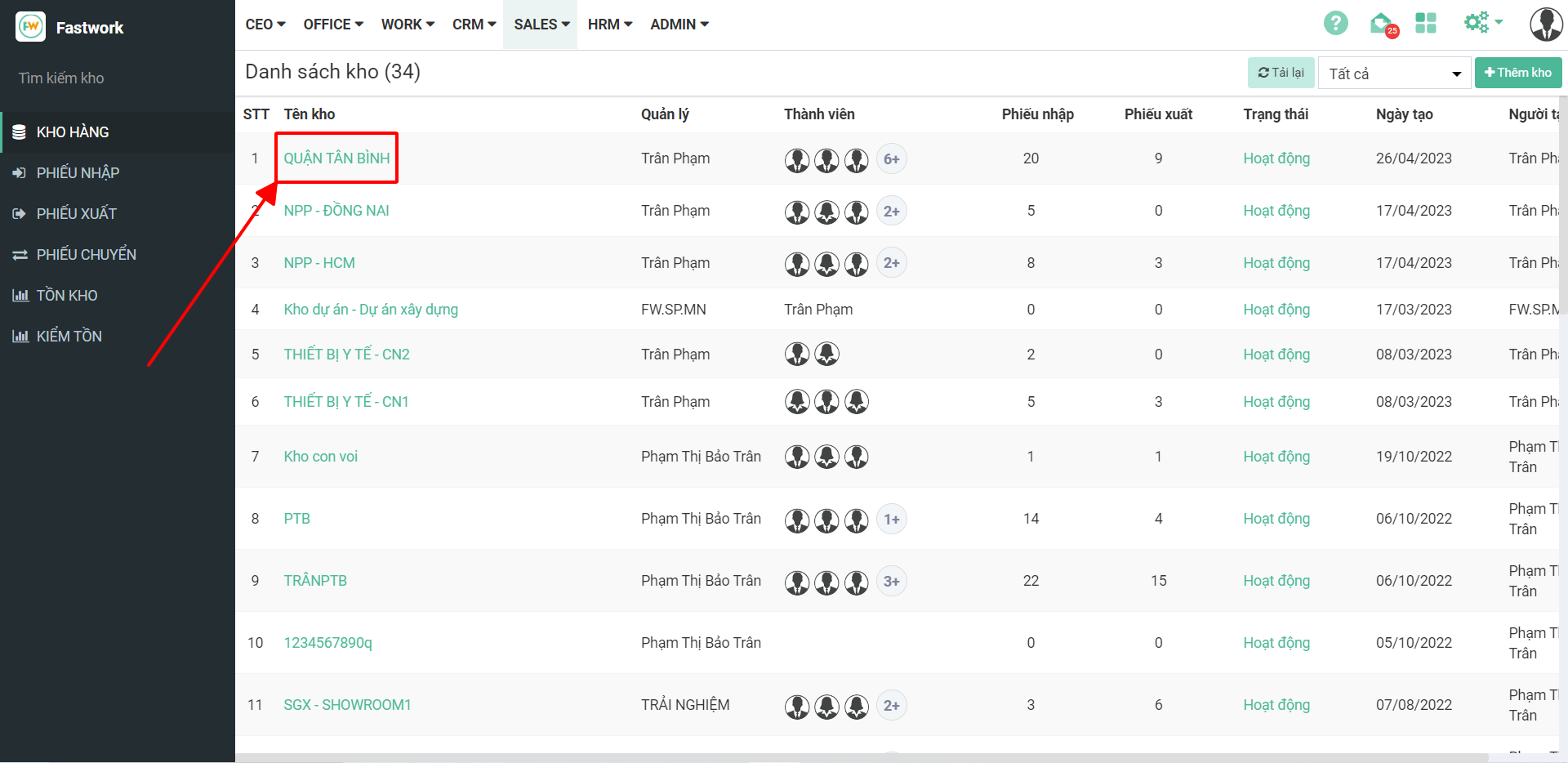
**Bước 2:** Chọn kho cần tạo phiếu nhập

<figure><img src="https://1934075284-files.gitbook.io/~/files/v0/b/gitbook-x-prod.appspot.com/o/spaces%2FSgjp5pKuJrPSuYtLZvBs%2Fuploads%2FBneRuBGCaxpfXNJYCi1C%2Fimage.png?alt=media&#x26;token=93f0e54b-2991-4148-bba4-0510932f123c" alt=""><figcaption></figcaption></figure>

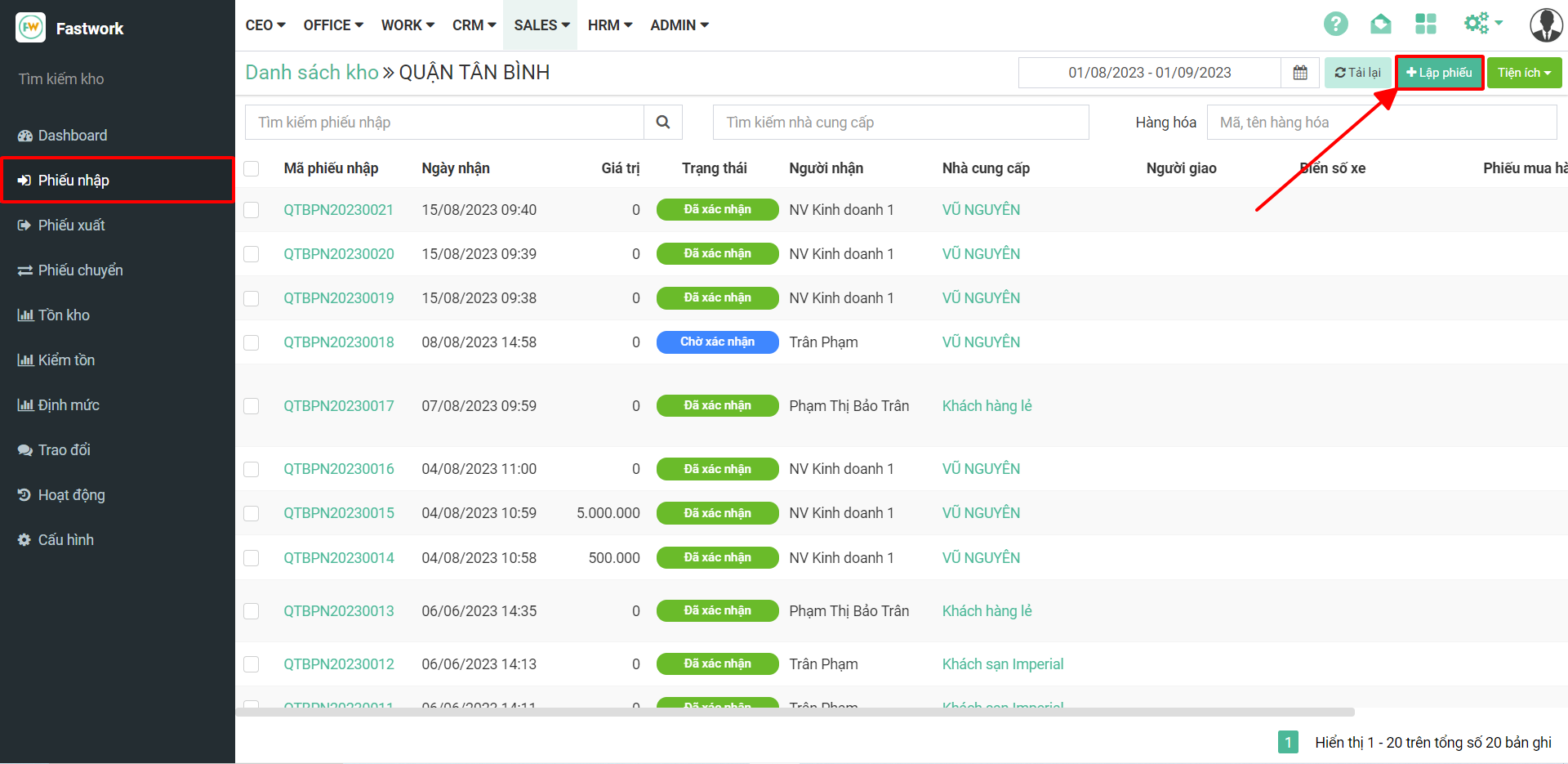
**Bước 3:** Chọn **Phiếu nhập ⇒** chọn **Lập phiếu**

<figure><img src="https://1934075284-files.gitbook.io/~/files/v0/b/gitbook-x-prod.appspot.com/o/spaces%2FSgjp5pKuJrPSuYtLZvBs%2Fuploads%2Fqd7iCn58K3o3Hdk7vfLZ%2Fimage.png?alt=media&#x26;token=dbb08054-ba45-4eb5-8274-10449cb57341" alt=""><figcaption></figcaption></figure>

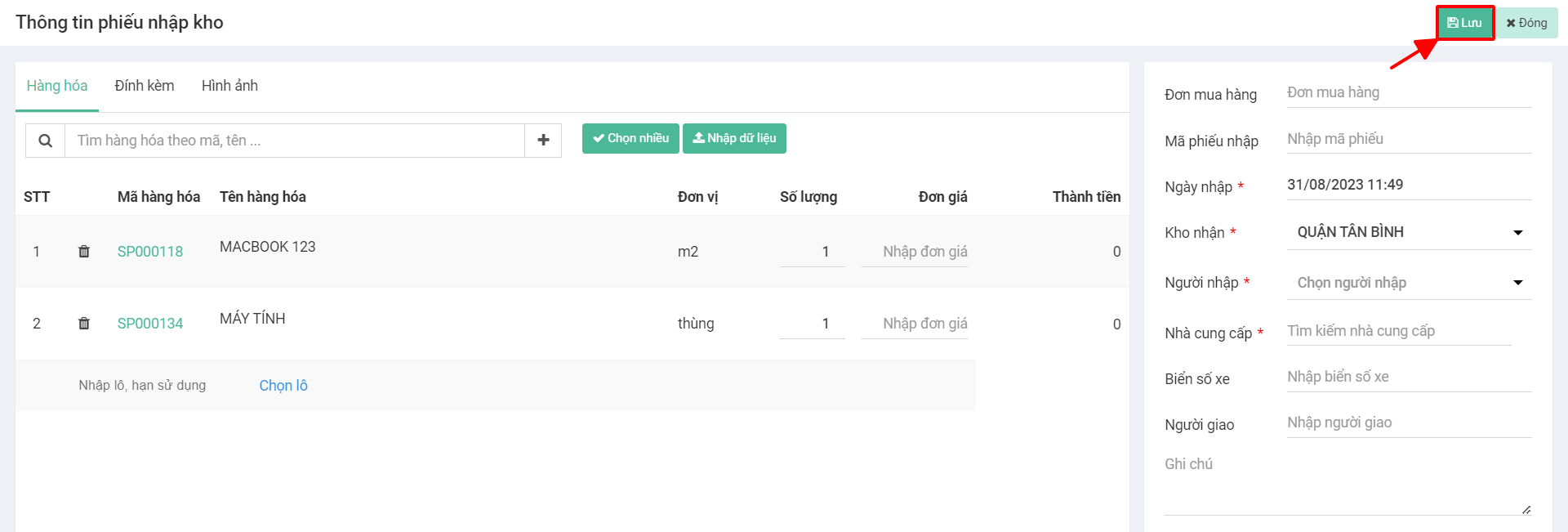
**Bước 4:** Chọn hàng hóa (nhập thông tin hàng hóa), điền thông tin vào ô trái sau đó ấn **Lưu**

<figure><img src="https://1934075284-files.gitbook.io/~/files/v0/b/gitbook-x-prod.appspot.com/o/spaces%2FSgjp5pKuJrPSuYtLZvBs%2Fuploads%2FSjD51tGIN9p0vWUmhLWo%2Fimage.png?alt=media&#x26;token=8530695b-9022-4af7-8838-edf8c748d122" alt=""><figcaption></figcaption></figure>

## Thêm mới phiếu xuất

**Bước 1:** Từ menu **SALE** ⇒ chọn **Kho hàng**

<figure><img src="https://1934075284-files.gitbook.io/~/files/v0/b/gitbook-x-prod.appspot.com/o/spaces%2FSgjp5pKuJrPSuYtLZvBs%2Fuploads%2Fid390Yk2KrEVNYSKtua9%2Fimage.png?alt=media&#x26;token=46e44f72-7d7d-4eba-84f0-385ec7421c8f" alt=""><figcaption></figcaption></figure>

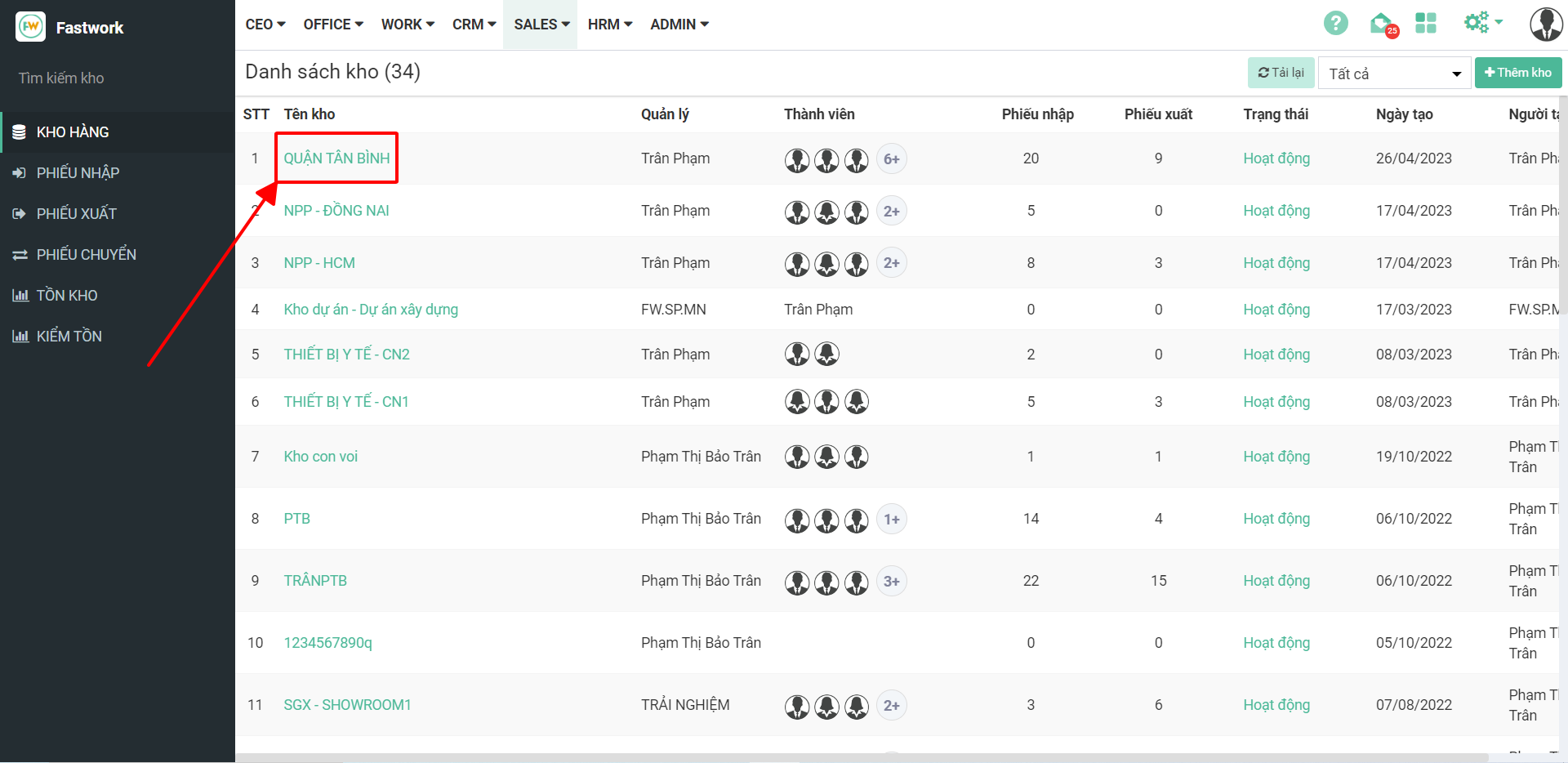
**Bước 2:** Chọn kho cần tạo phiếu xuất

<figure><img src="https://1934075284-files.gitbook.io/~/files/v0/b/gitbook-x-prod.appspot.com/o/spaces%2FSgjp5pKuJrPSuYtLZvBs%2Fuploads%2FFzegRRu9J2ky1zd8bJis%2Fimage.png?alt=media&#x26;token=7d16dbf6-f6ef-466f-b8c6-75fd3c0e7e49" alt=""><figcaption></figcaption></figure>

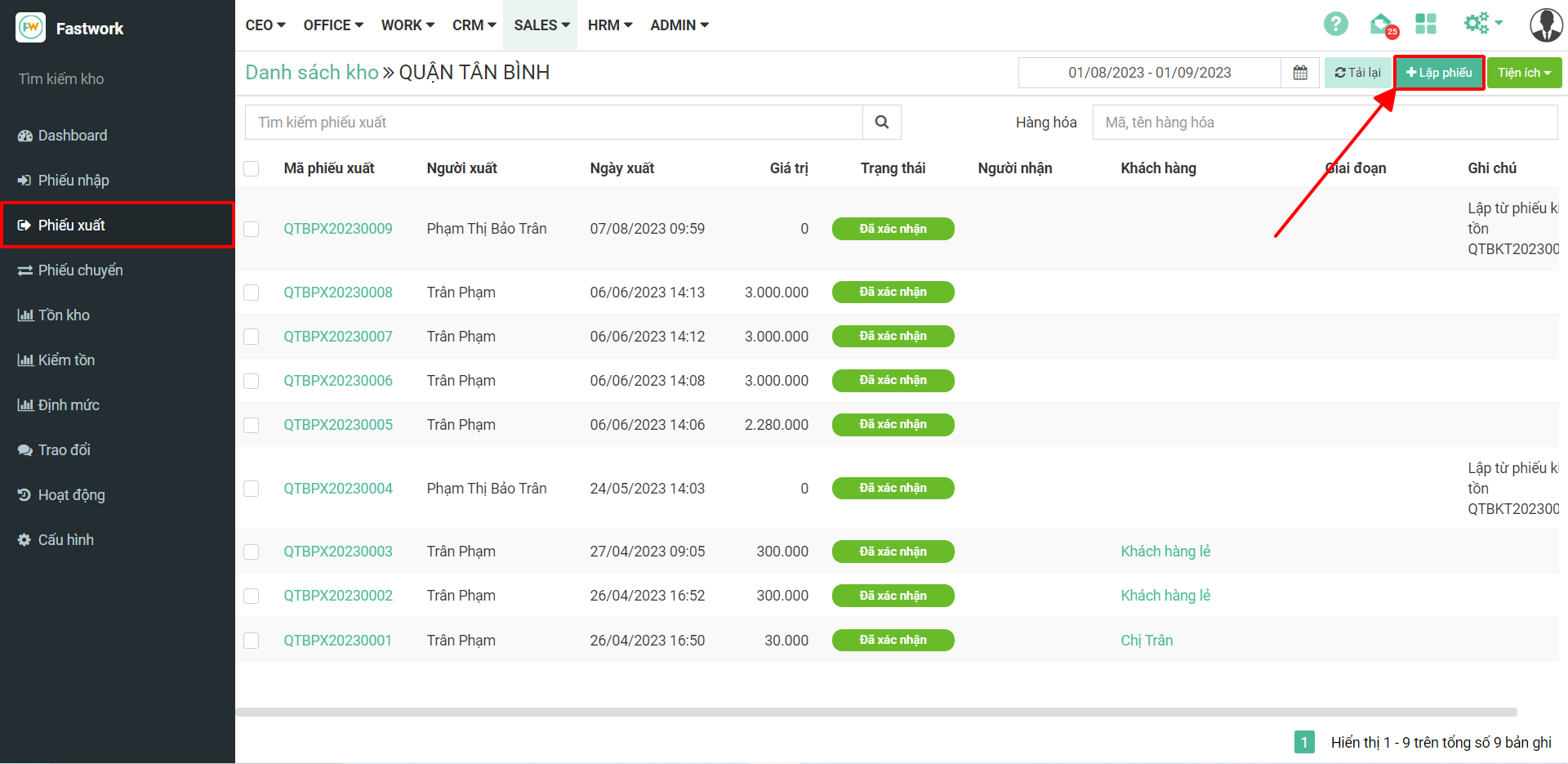
**Bước 3:** Chọn **Phiếu xuất ⇒** chọn **Lập phiếu**

<figure><img src="https://1934075284-files.gitbook.io/~/files/v0/b/gitbook-x-prod.appspot.com/o/spaces%2FSgjp5pKuJrPSuYtLZvBs%2Fuploads%2FYBk5hW3uZifp6PL1dYoQ%2Fimage.png?alt=media&#x26;token=b14ceaea-142c-4760-9bc1-7779cfecbd3b" alt=""><figcaption></figcaption></figure>

**Bước 4:** Chọn hàng hóa (nhập thông tin hàng hóa), điền thông tin vào ô trái sau đó ấn **Lưu**
<figure><img src="https://1934075284-files.gitbook.io/~/files/v0/b/gitbook-x-prod.appspot.com/o/spaces%2FSgjp5pKuJrPSuYtLZvBs%2Fuploads%2FlXCbaPkqx32g9QI7SF5H%2Fimage.png?alt=media&#x26;token=0210b7f5-ddcd-4599-ba2b-121f5ae495ea" alt=""><figcaption></figcaption></figure>