# Hướng dẫn thêm mới kho hàng

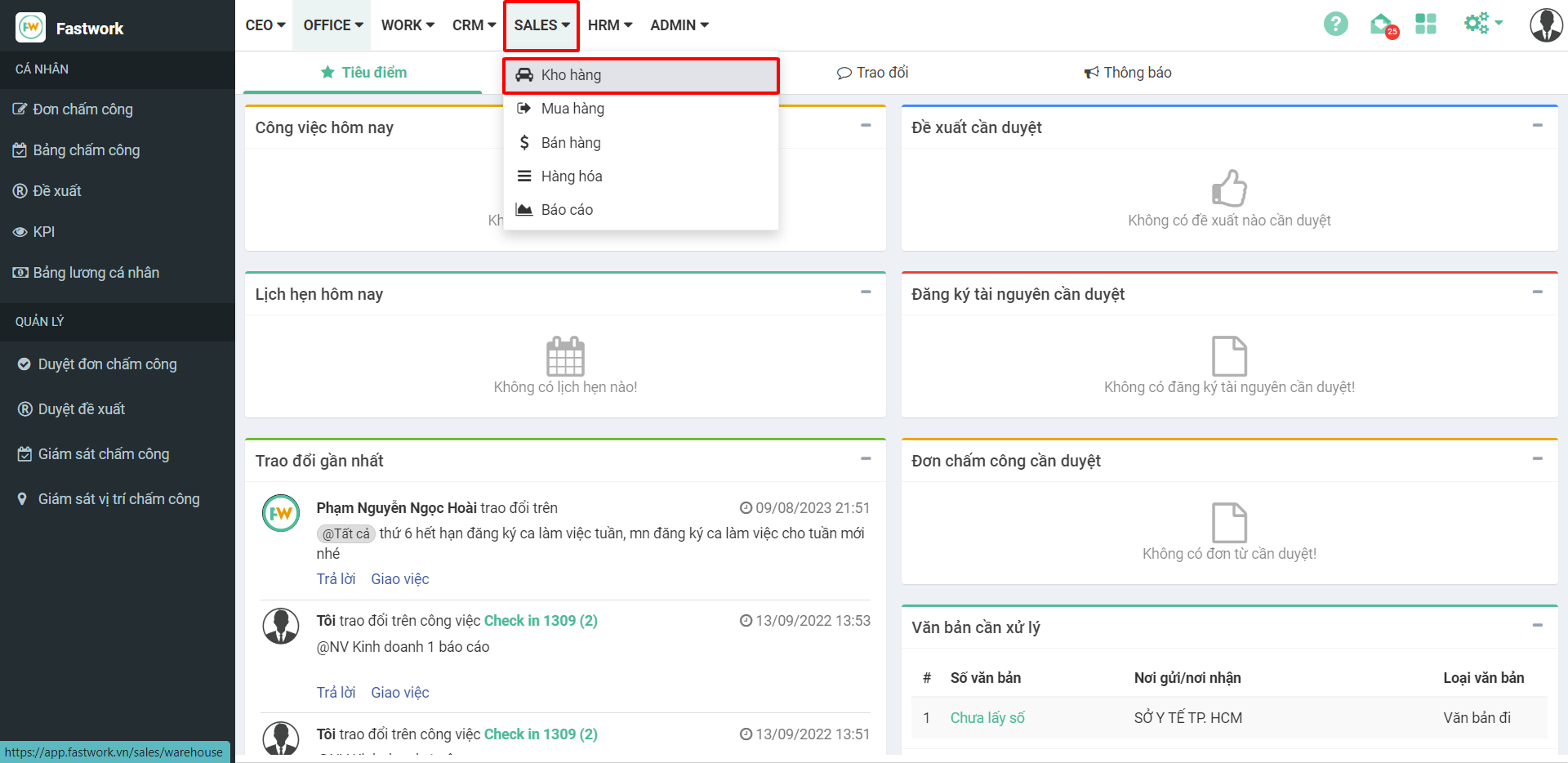
**Bước 1:** Từ menu **SALE** ⇒ chọn **Kho hàng**

<figure><img src="https://1934075284-files.gitbook.io/~/files/v0/b/gitbook-x-prod.appspot.com/o/spaces%2FSgjp5pKuJrPSuYtLZvBs%2Fuploads%2Fo9Pn3KSsINdxuVGiwaDd%2Fimage.png?alt=media&#x26;token=ff83ecd2-8a0e-4024-b672-41bcdfa225d5" alt=""><figcaption></figcaption></figure>

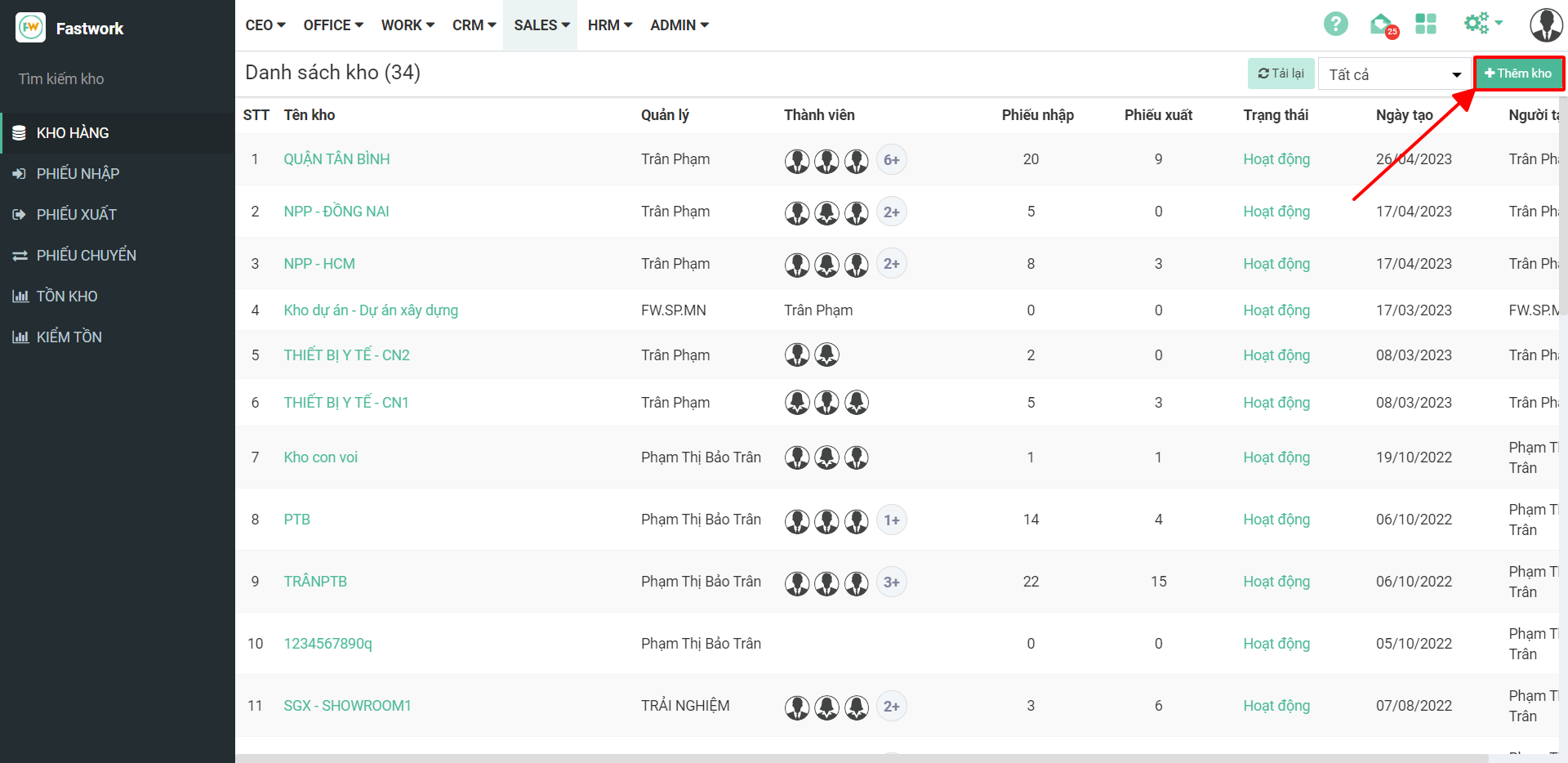
**Bước 2:** Chọn Thêm kho

<figure><img src="https://1934075284-files.gitbook.io/~/files/v0/b/gitbook-x-prod.appspot.com/o/spaces%2FSgjp5pKuJrPSuYtLZvBs%2Fuploads%2F4MddF7SAlBViNpT6dcuI%2Fimage.png?alt=media&#x26;token=cc70de06-05a3-45a3-b8f5-653137bd80c9" alt=""><figcaption></figcaption></figure>

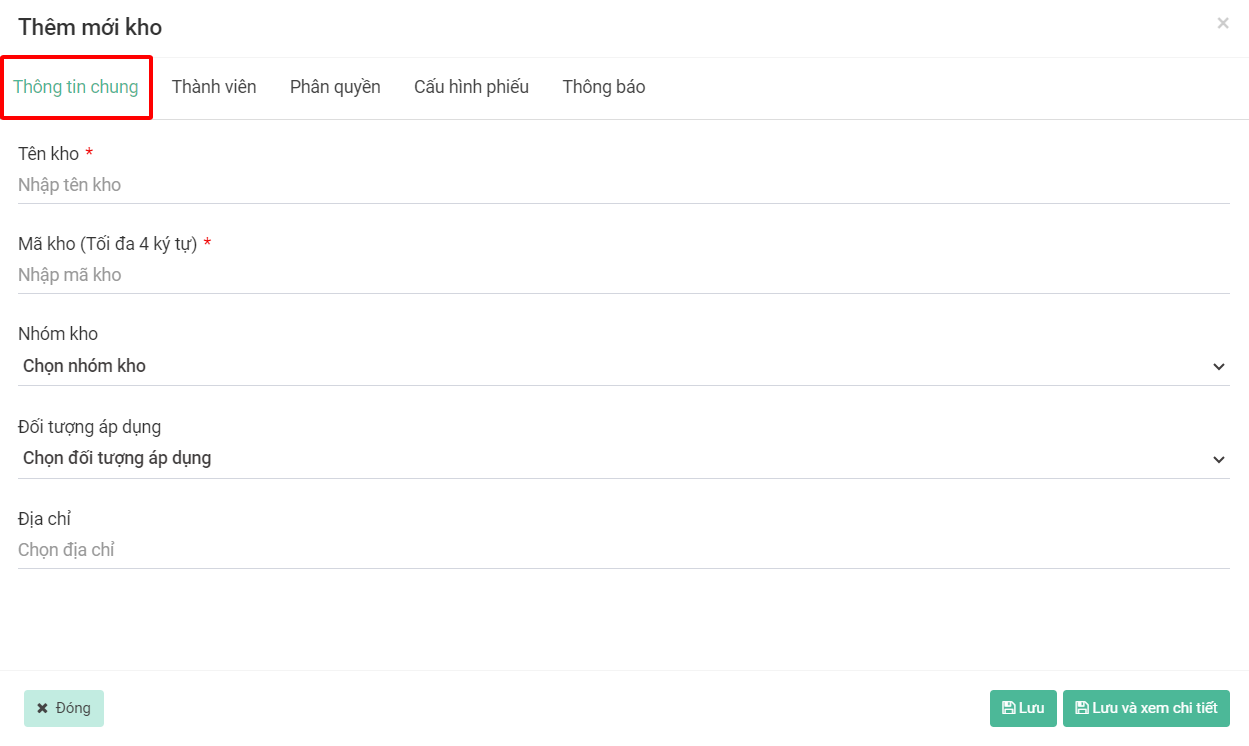
**Bước 3:** Nhập các **Thông tin chung** của kho

<figure><img src="https://1934075284-files.gitbook.io/~/files/v0/b/gitbook-x-prod.appspot.com/o/spaces%2FSgjp5pKuJrPSuYtLZvBs%2Fuploads%2Fw4ZTlpeSEgZa3M54ZMXn%2Fimage.png?alt=media&#x26;token=aafc4220-5ac0-4e1d-98e8-9b890d1573c6" alt=""><figcaption></figcaption></figure>

**Bước 4:** Thêm **Thành viên** của kho

<figure><img src="https://1934075284-files.gitbook.io/~/files/v0/b/gitbook-x-prod.appspot.com/o/spaces%2FSgjp5pKuJrPSuYtLZvBs%2Fuploads%2FiNRdtg6ffZXnFy1pV7Ji%2Fimage.png?alt=media&#x26;token=9f74ed84-154b-43f5-8837-713153631906" alt=""><figcaption></figcaption></figure>

<figure><img src="https://1934075284-files.gitbook.io/~/files/v0/b/gitbook-x-prod.appspot.com/o/spaces%2FSgjp5pKuJrPSuYtLZvBs%2Fuploads%2FBBs6QdZcrkgVJIuDM27J%2Fimage.png?alt=media&#x26;token=6660a1ff-7d23-41da-9637-f61d0d3bb629" alt=""><figcaption></figcaption></figure>

<figure><img src="https://1934075284-files.gitbook.io/~/files/v0/b/gitbook-x-prod.appspot.com/o/spaces%2FSgjp5pKuJrPSuYtLZvBs%2Fuploads%2F45KtDmz3tWicWZnwkfOD%2Fimage.png?alt=media&#x26;token=839e0acf-c552-4797-b66b-78efa52ce177" alt=""><figcaption></figcaption></figure>

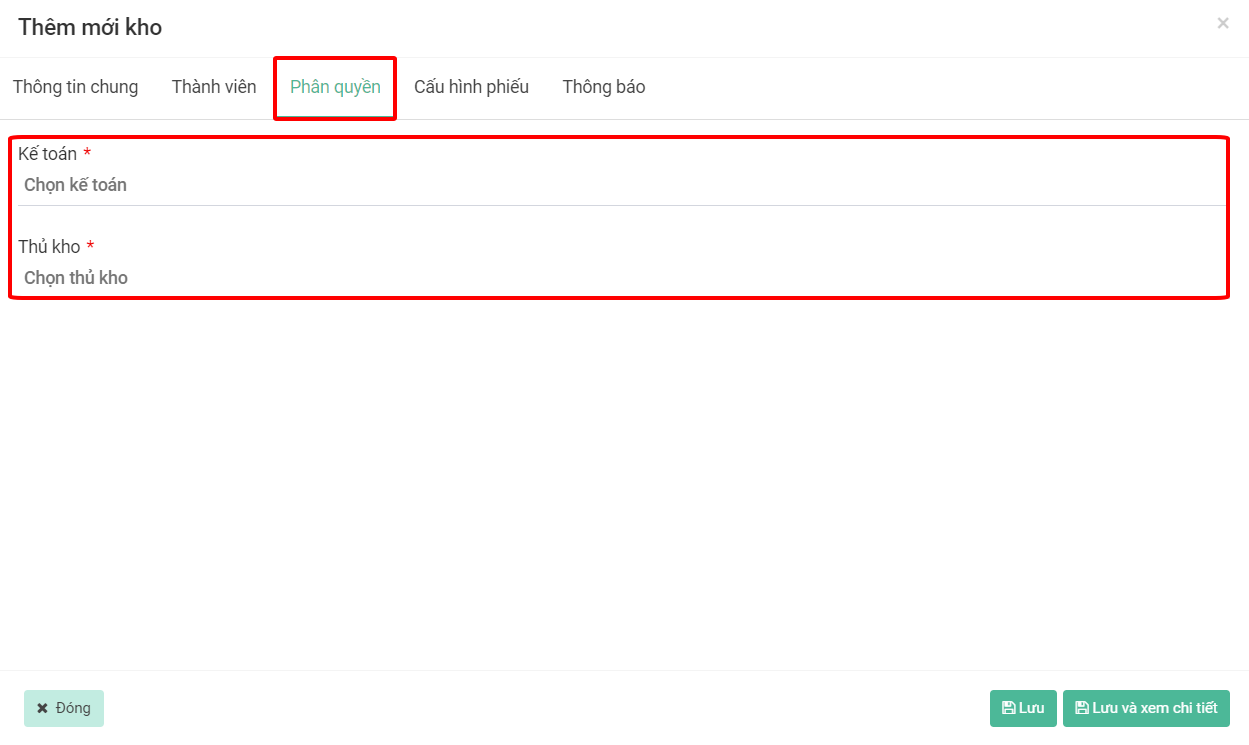
**Bước 5:** **Phân quyền** kho

<figure><img src="https://1934075284-files.gitbook.io/~/files/v0/b/gitbook-x-prod.appspot.com/o/spaces%2FSgjp5pKuJrPSuYtLZvBs%2Fuploads%2FsO9FWfW52uKnZM37oa37%2Fimage.png?alt=media&#x26;token=cb0ea75e-446b-4df1-bd3c-95ed647598e4" alt=""><figcaption></figcaption></figure>

**Bước 6:** **Cấu hình phiếu** (nhập, xuất, chuyển)

* Bắt buộc xác nhận phiếu: Khi thêm mới phiếu sẽ qua tài khoản người xác nhận để xác nhận thì số lượng mới cộng hoặc trừ vào kho
* Bắt buộc chụp ảnh hiện trường: Khi thêm mới phiếu thì sẽ bắt buộc chụp ảnh hiện trưởng
* Cấu hình nhóm ảnh hiện trường: Ảnh hiện trường bao gồm những loại ảnh nào thì cấu hình, nhân viên bắt buộc chụp hình theo cấu hình ảnh này
* Sửa phiếu: Chọn tài khoản được phép sửa phiếu
* Xóa phiếu: Chọn tài khoản được phép xóa phiếu
* Xem phiếu: Chọn tài khoản được phép xem phiếu
* Lập phiếu: Chọn tài khoản được phép lập phiếu

<figure><img src="https://1934075284-files.gitbook.io/~/files/v0/b/gitbook-x-prod.appspot.com/o/spaces%2FSgjp5pKuJrPSuYtLZvBs%2Fuploads%2FYQX3lrPlKCpl9jNNHi9M%2Fimage.png?alt=media&#x26;token=fb0a5570-750a-453f-8c3c-c108adc9e24b" alt=""><figcaption></figcaption></figure>

**Bước 7:** Sau khi cấu hình xong ấn **Lưu** hoặc **Lưu và xem chi tiết**
<figure><img src="https://1934075284-files.gitbook.io/~/files/v0/b/gitbook-x-prod.appspot.com/o/spaces%2FSgjp5pKuJrPSuYtLZvBs%2Fuploads%2FaM8BUVN4o3w3K6mcqiu6%2Fimage.png?alt=media&#x26;token=23f70892-fcf3-4439-a888-d9b44b20daa4" alt=""><figcaption></figcaption></figure>