> For the complete documentation index, see [llms.txt](https://help.fastwork.vn/fastwork-help-center/llms.txt). Markdown versions of documentation pages are available by appending `.md` to page URLs; this page is available as [Markdown](https://help.fastwork.vn/fastwork-help-center/huong-dan-s-dung-chi-tiet/fastwork-crm/fastwork-sale/thao-tac-nguoi-dung/quan-ly-hang-hoa/nhap-danh-muc-hang-hoa.md).
# Nhập danh mục hàng hóa
## Cách 1: Thêm trực tiếp trên phần mềm
**Bước 1:** Từ menu **SALE** ⇒ chọn **Hàng hóa**
**Bước 2:** Chọn **Thêm mới**
**Bước 3:** Nhập thông tin hàng hóa sau đó ấn Lưu
## Cách 2: Thêm từ file excel
**Bước 1:** Từ menu **SALE** ⇒ chọn **Hàng hóa**
**Bước 2:** Chọn **Tiện ích ⇒** chọn **Nhập dữ liệu**
**Bước 3:** Chọn **File mẫu**
**Bước 4:** Nhập thông tin vào File mẫu
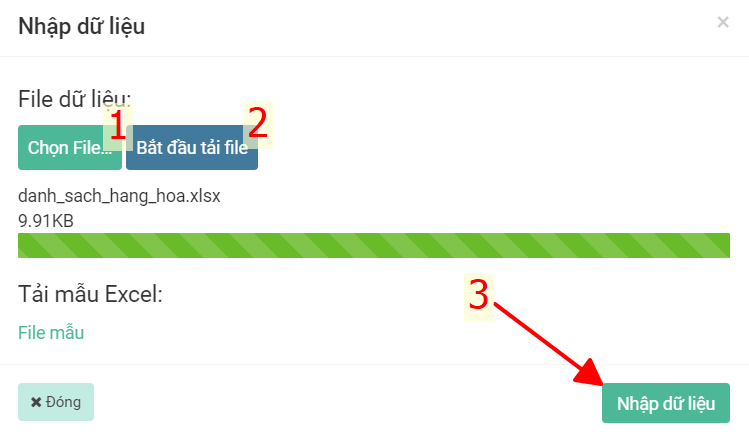
**Bước 5:** **Chọn File** mới điền ⇒ chọn **Bắt đầu tải file ⇒** chọn **Nhập dữ liệu**